
Summary
Editor's rating
Price vs what you actually get (and the subscription question)
Clean look, smart magnet mount, but not very discreet
Battery life: decent, but very dependent on how busy your area is
Weather resistance and long-term feel
Image quality, motion detection and how it actually behaves day to day
What you actually get in the box and how it works
Pros
- Easy installation with a strong magnetic mount and no need for nearby power
- Good integration with Google Home, smart displays, and voice assistants
- Decent 1080p video quality and reliable motion/person/vehicle detection
Cons
- Short free video history (3 hours) pushes you towards a paid Nest Aware subscription
- Battery life drops quickly in high-traffic areas, leading to frequent recharging
- No local storage option like microSD, fully dependent on cloud and app

Specifications
View full product page →| Brand |
Battery camera that actually feels thought-through
I’ve been using this Google Nest Cam (battery, indoor/outdoor, the "Snow" white one) for a few weeks, mainly watching my front door and the driveway. I bought it because I was tired of messing with cables and I already have a couple of Google Nest Minis at home. So this felt like the obvious option if I wanted everything in the same app and to be able to yell "Hey Google, show me the front door" on my TV.
Right away, what stands out is that it’s a pretty straightforward product: a small dome camera, battery-powered, Wi‑Fi only, with motion alerts and some smart detection for people, animals, and vehicles. No weird hub, no DVR, everything goes through the Google Home app. If you’ve used other Nest stuff, the setup feels familiar. If you’re new to it, it’s still pretty simple, but you do need a Google account and you basically live inside that ecosystem.
My use case is pretty basic: I want to know when someone is at the door, check if parcels are left, keep an eye on the car, and occasionally point it inside to watch the living room when we’re away. So I’m not trying to build Fort Knox, just a reliable camera that doesn’t randomly die or spam me with useless alerts every two minutes. I also don’t want to drill half the house just to get power to it.
Overall, it does the job, but it’s not perfect. There are a couple of things that annoyed me, like the battery life being very dependent on how busy your area is, and the fact that the full features really only make sense if you pay for Nest Aware. If you’re expecting endless free cloud recording, that’s not what this is. It’s a solid camera with smart features, but you pay both at checkout and over time if you want the full experience.
Price vs what you actually get (and the subscription question)
In terms of value, this is where opinions will split. The camera itself isn’t the cheapest on the market. You’re paying for the Google brand, the integration with Google Assistant and Nest displays, and the relatively polished app experience. If you’re already deep in the Google ecosystem, that part makes sense and feels convenient. But if you just want a cheap standalone camera, there are less expensive options that will still show you a live feed and record motion.
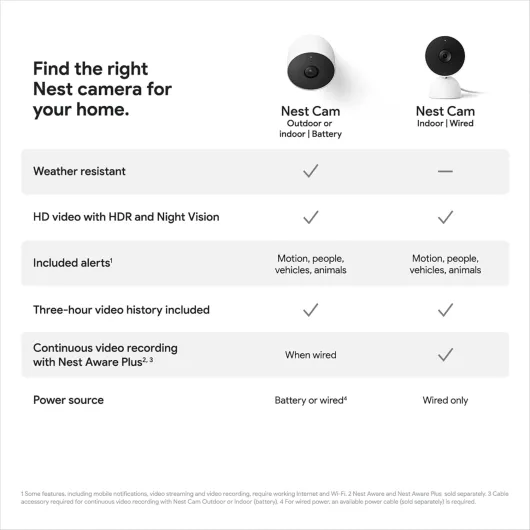
The big thing is the Nest Aware subscription. Out of the box, you only get 3 hours of event history, which is pretty limited. If something happens overnight and you check in the morning, it might already be gone. To make the most of the camera (longer history, better detection, familiar faces, etc.), you basically have to subscribe. The subscription isn’t outrageously expensive, but it’s an ongoing cost that stacks up over the years. So the real price of this camera is the upfront cost plus however many months or years of Nest Aware you end up paying for.
Compared to cheaper brands that offer free longer event storage or local SD card recording, this looks less generous. On the other hand, the Google Home app is more polished than a lot of budget camera apps I’ve tried, and the integration with smart displays and TVs is genuinely handy. Being able to shout at a Nest Hub or Chromecast device and have the camera feed pop up is something I actually use, not just a gimmick on the box. So you’re kind of paying for that smoother experience.
So, value-wise, I’d rate it as "pretty solid if you’re already using Google stuff, average if you’re not". If you want a camera that plays nicely with your existing Nest speakers, displays, and Google Home routines, it’s a sensible pick even if it’s not the cheapest. If you hate subscriptions or don’t care about smart home integration, you can definitely find more budget-friendly options that will cover the basics just as well.
Clean look, smart magnet mount, but not very discreet
The design is very typical Google: rounded, simple, and quite minimal. The "Snow" colour is basically matte white, with a darker front where the lens and sensors are. It looks more like a smart gadget than a hardcore security device, which I like on the front of a house because it doesn’t make the place look like a warehouse. That said, the white stands out quite a bit on darker brick or wood, so if you want something very discreet, this isn’t the most low-profile option.
The main thing I liked is the magnetic mount. You screw the metal plate to the wall, then the camera just snaps onto it with a strong magnet. Adjusting angle is stupidly easy: you just grab the camera and twist it up, down, or sideways. Compared to older bullet cameras where you’re fiddling with tiny screws and ball joints, this is way more user-friendly. I’ve bumped it a couple of times while bringing in shopping bags, and it didn’t fall off, so the magnet is strong enough for normal use.
Inside, on a shelf with the optional stand (I borrowed one from a friend to test), it basically looks like a small speaker or a little desk gadget. It doesn’t scream "camera", which is good if you don’t want guests to feel watched all the time. Outdoors on a wall, it’s clearly a camera, but in a fairly neutral way. There’s no big glowing LED ring, just a small status light that you can control in the app.
Overall, from a design angle, it’s pretty solid: compact, neutral, and practical to mount. My only real complaint is colour choice – just having this white version feels limiting. A darker option would blend better on many exteriors. Also, since it’s round and smooth, if you mount it low enough, a determined person could probably twist it away from the area you’re trying to film, though that’s a risk with most non-caged cameras anyway.
Battery life: decent, but very dependent on how busy your area is
The big selling point here is that it’s battery-powered, so you don’t need a plug right next to where you mount it. In practice, the battery life was okay, but not mind-blowing. In my case, front-of-house with a moderate amount of traffic (a few people walking past, Amazon drivers, neighbours), I got roughly 4–6 weeks between charges with standard settings: motion alerts on, people/vehicle detection on, and recording events as usual. When I first installed it without tweaking the activity zones, it was triggering more often and the battery dropped faster, closer to the lower end of that range.
If you mount it in a very busy area – like facing a main road or a shared corridor – you can expect the battery to drain a lot quicker. Every detection and recording uses power, so the more stuff happening, the shorter the life. On the flip side, if it’s in a quiet backyard where not much moves, you could stretch it longer. Google doesn’t really promise a fixed number, and now I see why – it’s very usage-dependent. Also, cold weather always hits batteries, so if you’re somewhere with harsh winters, you’ll probably see shorter runtimes outdoors.
Charging is done via the included USB cable and adaptor. You have to take the camera down from the mount, bring it inside, and plug it in. It charges reasonably quickly (think a few hours from low to full), but it’s still a bit of a hassle if you’ve mounted it high up. That’s why a lot of people end up buying the optional weatherproof power cable to just leave it plugged in, especially if it’s in a spot that’s annoying to reach with a ladder. The camera can run fully wired too, so you can basically treat it as a wired camera if you want.
So, battery-wise, I’d say it’s fine but not magic. It does what a battery camera should, but you still have to think about where you place it and how often you’re okay with charging it. If you want to truly forget about it for months, you’ll either need a very quiet placement, or just bite the bullet and go for the wired accessory. For a normal suburban front door, expect to be recharging it every month or so, maybe a bit more or less depending on traffic.
Weather resistance and long-term feel
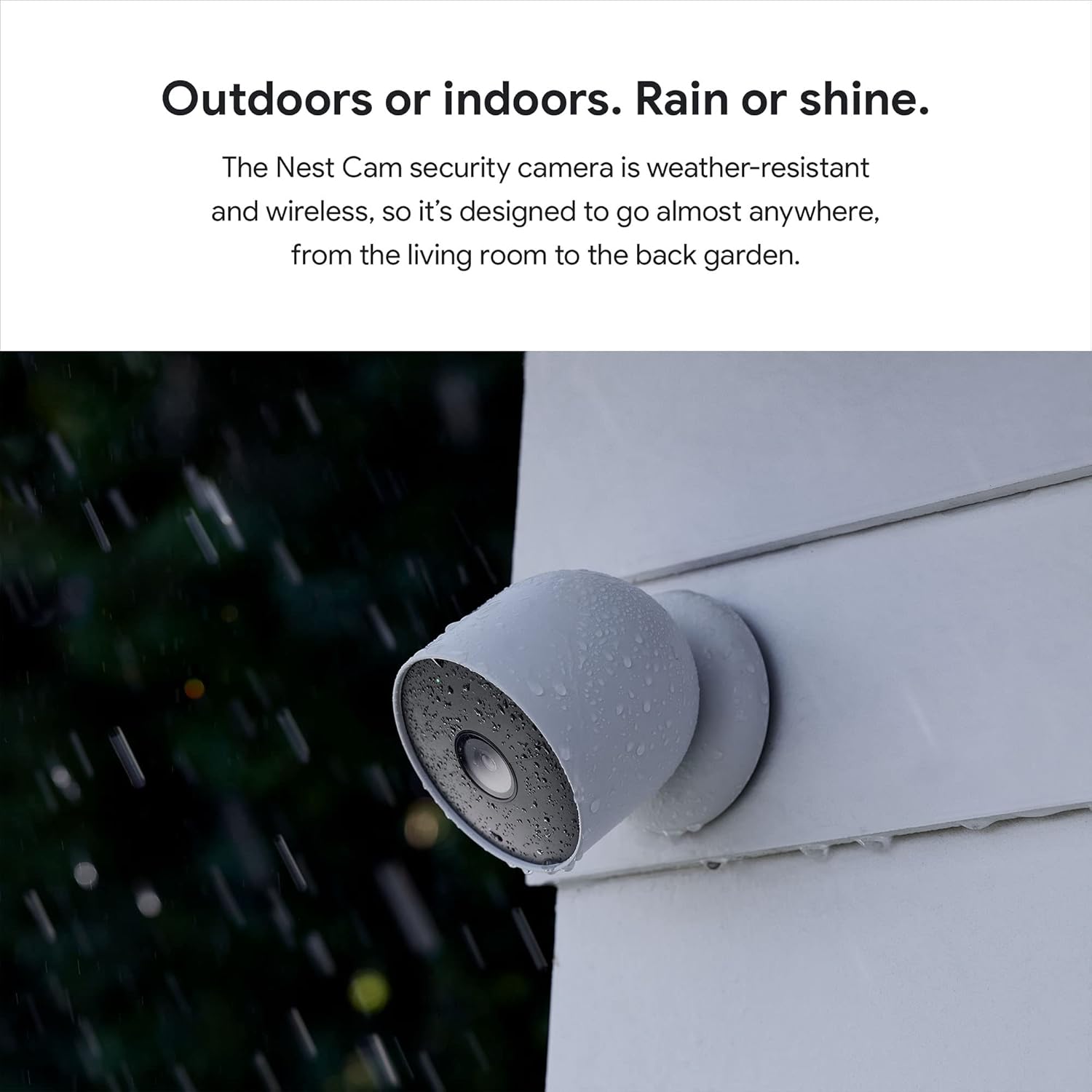
The camera is rated IP54, which in plain terms means it can handle dust and splashes but it’s not meant for full-on hose pressure or being mounted where water can pool inside it. I’ve had it outside through several heavy rains and a couple of windy days, and it’s still working fine. No fogging inside the lens, no weird condensation, and the plastic housing still looks the same. It doesn’t feel flimsy in the hand either – there’s a bit of weight to it, which gives the impression it can handle some knocks.
The magnet mount hasn’t rusted or loosened yet, though to be fair, I’m only a few weeks in. The screws and wall plugs supplied are okay for basic brick or masonry. If you’re mounting on something tricky like old crumbly render or very soft wood, I’d probably use my own fixings just to be safe. The camera hasn’t fallen or slipped out of angle on its own, even with some gusty wind, so the magnetic connection seems solid for normal household use.
One thing to keep in mind is that because it’s battery-powered, the long-term "durability" also depends on how the internal battery ages. I obviously can’t judge that from just a short testing period, but based on other rechargeable gadgets, I’d expect some drop in battery life after a couple of years. The good thing is there’s a 2-year limited warranty from Google, which at least covers early defects. Still, if you’re planning to keep this camera for 5+ years, just mentally factor in that the battery performance may slowly degrade.
Overall, for a normal home setup – outside under partial cover or on a wall that gets some rain and sun – it feels solid enough. I wouldn’t mount it somewhere exposed to constant direct jets of water or super harsh industrial conditions. This is clearly built for residential use, not a warehouse yard. But for a typical front door, garden, or balcony, it seems to handle the elements and daily life without drama.
Image quality, motion detection and how it actually behaves day to day
On the performance side, I’d sum it up as: good enough for home use, not mind-blowing. The 1080p video is clear enough to see faces and read number plates at short distance (within a few metres), but don’t expect crystal‑clear zoom 20 metres away. The 130° field of view covers my front porch and driveway nicely, but if you have a wide garden, you might need more than one camera or a different placement. The frame rate at 30 fps keeps movement looking smooth, so you don’t get that choppy CCTV vibe.
Night vision is infrared-based and rated for about 20 feet (roughly 6 metres). In reality, that’s about right. People are clearly visible around the porch and part of the driveway, but the further end of the driveway is more of a silhouette. For a typical UK/EU-style front garden or small driveway, it’s fine. If you have a huge front yard, you’ll hit the limit pretty quickly. There’s no fancy colour night vision in total darkness; it’s the usual black-and-white IR look, but it’s usable and you can actually make out what’s happening.
The motion detection is where it feels more "smart". It can tell the difference between people, vehicles, and animals, and you can choose what you want alerts for in the Google Home app. Once I dialled in the zones and turned off generic "all motion" alerts, it stopped spamming me every time a car just drove past on the street. I set a zone around the front door and the car, and that cut down false alerts a lot. It still occasionally flags shadows or heavy rain as motion, but it’s not constant.
Streaming is generally smooth on my Wi‑Fi (decent fibre connection, router about 8–10 metres away through one wall). When the Wi‑Fi hiccups, the app sometimes takes a few extra seconds to load the live view, which is annoying if you’re trying to talk to a delivery driver in real time. But the fact that it buffers about an hour of events locally does help – once the network is back, you can still see what happened. Overall, in daily use, it’s reliable enough that I actually trust it to tell me when someone’s at the door, which is the whole point. It’s not perfect, but for a home camera, it gets the job done.
What you actually get in the box and how it works
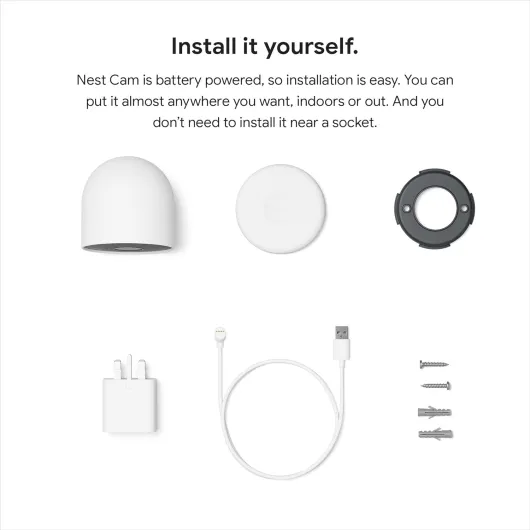
In the box you get the camera itself, a magnetic mounting plate, a wall plate, screws and wall plugs, and a short USB charging cable with power adaptor. No huge surprises there. The camera is a compact dome shape, about 8.3 cm each side, and weighs just under 400 grams, so it feels more like a small gadget than a piece of industrial security gear. It’s rated IP54, so it can handle rain and dust, but it’s not something I’d dunk in water or mount directly where sprinklers hit it all day.
The camera records in 1080p at 30 fps with a 130° field of view. In practice, that’s wide enough to cover my whole front porch and a decent chunk of the driveway, but not the entire street. If you’re expecting super-wide fisheye coverage, this isn’t that. The video format is MP4, and you access everything through the Google Home app on your phone or tablet. There’s no local NVR, and no SD card slot, so everything is cloud and event-based. If the Wi‑Fi goes down, it keeps roughly an hour of event clips locally and uploads them once it’s back online, which actually saved me once during a short power cut.
Out of the box, you get about 3 hours of event history for free, which is okay if you just want to check what happened in the last few hours. If you want more than that, you basically have to subscribe to Nest Aware. That’s where it starts to feel like a service more than a one-off product. It’s not hidden, but if you don’t read the fine print you might think you’re getting full history for free. You’re not. You also get motion/person/animal/vehicle alerts, and you can talk through the camera using the built‑in speaker and mic, which is handy for scaring off delivery drivers about to shove a parcel behind the bin.
In day-to-day use, the overall concept is clear: this is a Wi‑Fi battery camera for people already in the Google ecosystem who want something they can mount quickly without pulling cables. No local storage, no standalone monitor, everything goes through the app or smart displays like Nest Hub or compatible Alexa/Google Assistant screens. If that fits how you use tech at home, it makes sense. If you hate subscriptions and cloud stuff, you’ll probably get frustrated pretty fast.
Pros
- Easy installation with a strong magnetic mount and no need for nearby power
- Good integration with Google Home, smart displays, and voice assistants
- Decent 1080p video quality and reliable motion/person/vehicle detection
Cons
- Short free video history (3 hours) pushes you towards a paid Nest Aware subscription
- Battery life drops quickly in high-traffic areas, leading to frequent recharging
- No local storage option like microSD, fully dependent on cloud and app
Conclusion
Editor's rating
Overall, the Google Nest Cam (battery, indoor/outdoor) is a solid, no-nonsense home security camera that fits especially well if you’re already using Google Home and Nest gear. The setup is straightforward, the magnetic mount is genuinely practical, and the video quality is good enough for normal home use, both day and night. Motion detection with person/vehicle/animal tagging works well once you spend a bit of time tweaking the zones, and the backup recording during Wi‑Fi or power cuts is a nice safety net.
On the downside, the whole thing really only makes full sense if you’re okay with paying for Nest Aware to get proper video history. The free 3-hour history is pretty barebones. Battery life is decent but very dependent on how busy your area is, and if you have a high-traffic view, you’ll probably be taking it down to recharge more often than you’d like. Also, it’s not the cheapest option out there, especially once you factor in the subscription and maybe the optional power cable if you get tired of charging.
I’d say this camera is for people who want a clean, integrated solution with Google Assistant and don’t mind paying a bit extra for that convenience. If you’re already using Nest speakers, displays, or other Google devices, it fits in nicely and feels like part of the same system. If you’re more price-sensitive, don’t care about smart home integration, or want free long-term storage or local recording, there are better-value alternatives from other brands that will cover the basics just as well. It’s a good product, but not the cheapest way to get a camera on your wall.