
Summary
Editor's rating
Is the Swann Master-Series worth the money?
Chunky, practical design – more “security gear” than home decor
Build quality, weather resistance, and long-term feel
Image quality, night vision, and motion detection in real life
What you actually get in the box and how it all fits together
Does it actually make you feel more secure day to day?
Remote viewing and app experience: handy but not flawless
Pros
- Wired NVR system with local storage and no subscription fees
- Good daytime image quality and useful colour night vision with sensor spotlights
- Stable Ethernet connection and 120° wide viewing angles for covering large areas
Cons
- NVR interface and mobile app feel dated and require some learning
- Setup is cable-heavy and time-consuming compared to wireless cameras

Specifications
View full product page →| Brand | Swann |
A wired 4K kit for people who are done with subscription fees
I’ve been running the Swann Master-Series NVR kit around my house and driveway for a few weeks now. Before this, I had a mix of cheap Wi‑Fi cameras and a Ring doorbell, so I’m used to cloud subscriptions, random app glitches, and dead batteries at the worst time. I picked this up mainly because it’s a wired NVR system with no monthly fees and promises 4K and colour night vision. On paper, it ticks most of the boxes for a home setup or a small shop.
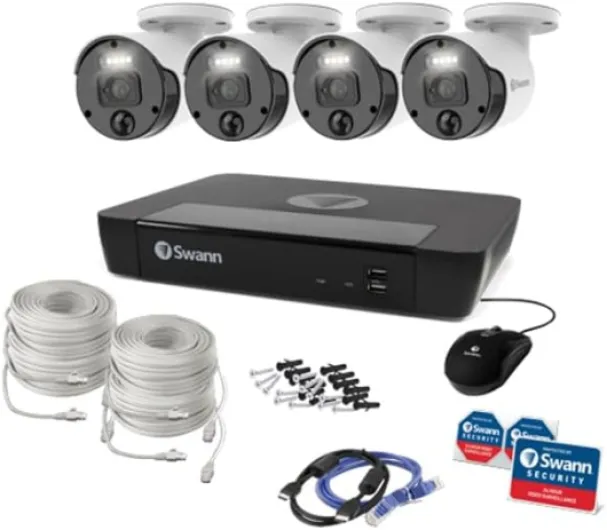
First impression: this is not a cute little plug‑and‑play camera you hang in five minutes. It’s a proper kit that expects you to run cables and spend a bit of time in the menus. The box has the NVR, cameras, power bits and some basic mounting hardware. No screen in the box, so you need your own monitor or TV with HDMI. That’s fine, but worth knowing if you’re expecting something “all-in-one”.
After a weekend of drilling, routing Ethernet, and swearing in the attic, I had four cameras up: two on the front of the house, one watching the driveway, and one covering the back yard. Once it was wired, the system basically just powered on and started recording. The cameras come up automatically on the NVR, and from there you tweak motion detection and recording settings.
Overall, my first takeaway is: it does the core job well (recording and letting me see what’s going on), but it’s not effortless. If you’re expecting something you set up in 20 minutes from your phone, this isn’t it. If you don’t mind some manual work and a slightly old‑school interface, it’s a pretty solid, no‑subscription option.
Is the Swann Master-Series worth the money?
From a value for money point of view, this system sits in that middle zone: not bargain-basement, not high-end pro. You’re paying for a wired NVR setup with 4K display resolution, colour night vision, sensor spotlights, and no subscription fees. Compared to buying several individual Wi‑Fi cameras plus cloud plans, the cost starts to make sense pretty quickly, especially if you have a larger area like a driveway, yard, or small car park to cover.
What I like is that once you’ve paid for the kit, that’s basically it. Recording is local, no monthly charges, and you’re not forced into some “basic vs premium” tier to access your own footage. If you keep the system for a few years, that alone can balance out the initial price. Also, the 4-channel NVR gives you some flexibility: you can start with the included cameras and add or reposition later, instead of juggling multiple brands and apps.
On the downside, for a similar price there are other brands that offer slightly more polished apps or smarter motion detection (people/vehicle detection, better AI filtering). Also, the interface on the NVR feels a bit out of date, and you need to invest time in setup. If you put any value on your own time or you hate drilling and cable routing, that’s part of the real “cost” here. Wireless, battery-based systems are easier to deploy, even if they’re less reliable.
For me, I’d say this kit is good value if you specifically want: wired reliability, local storage, and visible deterrent-style cameras. If you just want one or two simple indoor cams and don’t mind paying a cloud fee, this is overkill. But if you’re covering a home with multiple angles, a driveway, or a small business, the cost per camera plus the no-subscription model is pretty fair.
Chunky, practical design – more “security gear” than home decor
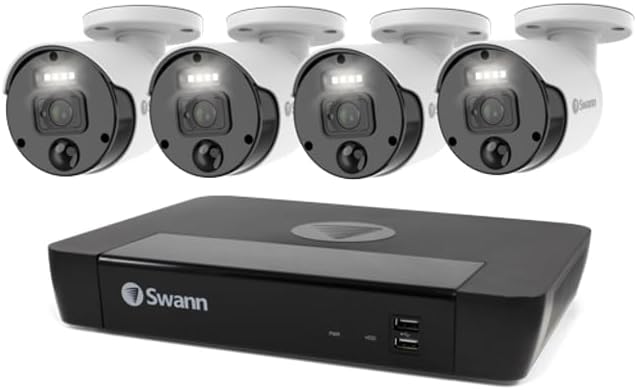
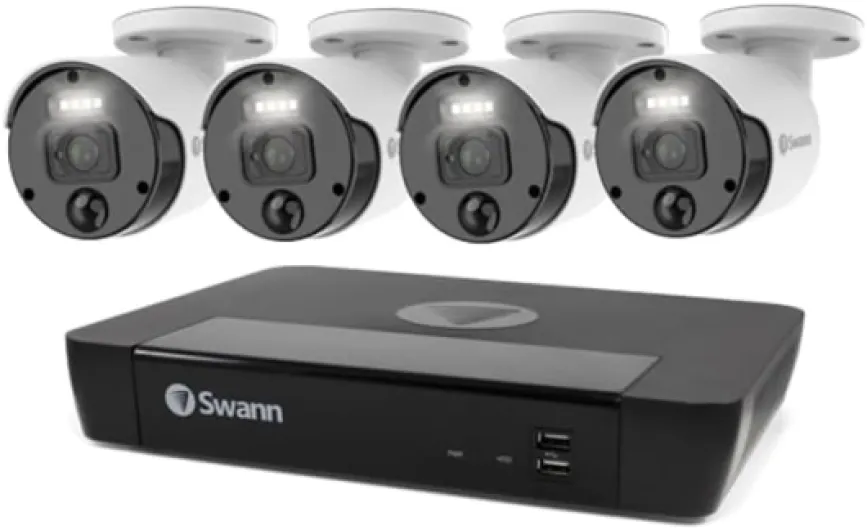
Design-wise, this kit is very much function over style. The cameras are classic bullet-style units in black, with visible lenses and sensor windows on the front and the spotlights around the lens. They look like proper security cameras, not disguised gadgets. If you want a deterrent, that’s a plus: anyone walking up to the house or shop clearly sees they’re being recorded. If you’re trying to keep things low-key, these are not exactly subtle.
The NVR itself is a flat black box with vent holes and ports on the back. Front panel is minimal: power light, maybe a few status LEDs, and that’s it. No fancy display, no touch controls. You control everything with the included USB mouse and the on-screen menu. It feels a bit old-school, but honestly, once the NVR is tucked under a TV or in a cabinet, you don’t really care what it looks like. It doesn’t run hot or loud in my case; just a faint HDD noise if you’re right next to it.
One thing I liked is the 120-degree viewing angle on the cameras. In practice, that let me cover my whole driveway from a single corner mount and still catch part of the street. On the downside, because the cameras are quite visible and have the spotlights, you need to think a bit about placement so they don’t shine straight into windows or blind you when you walk out the door at night. The housings swivel and tilt, so you can aim them fairly precisely, but you’ll probably adjust them a couple of times after checking the footage.
Overall, the design is solid and gives a “serious security” vibe, but it’s not pretty or discreet. For a shop, warehouse, or anyone who wants a clear visual deterrent, that’s good. For a carefully curated modern living room, it’s a bit of an eyesore, but you can usually mount them high enough outside that you stop noticing them after a few days.
Build quality, weather resistance, and long-term feel
Obviously I haven’t used this for years yet, but after installing the cameras outdoors and leaving them through some rain, wind, and a couple of cold nights, they seem solid enough. The housings feel like typical metal/plastic mixes you get on mid-range CCTV gear. Nothing fancy, but they don’t feel flimsy. The mounts hold position well so far; I’ve not had any of them sag or drift out of alignment, even with some gusty weather.
The system is designed for entrances, driveways, yards, shop floors, and storerooms, so it’s clearly meant to handle outdoor use. The cables and connectors are the weak point as usual: you want to protect those with junction boxes or at least tape and conduit if they’re exposed. Out of the box, you just get raw Ethernet ends, so if you leave them dangling in the rain, you’re asking for trouble. I spent some extra time tucking cables under eaves and using proper cable clips, and I’d recommend doing the same if you want this to last.
Inside, the NVR has been running 24/7 without any obvious issues. No random reboots, no overheating, just a quiet hum. It’s a Linux-based box, which is usually a good sign for stability. The internal hard drive is the one component I expect might fail first over the years, but that’s standard for any recorder. At least it’s user-serviceable: you can open the case and swap the drive if needed, which is better than some sealed gadgets.
Overall, the durability feels decent for the price range. It’s not industrial-grade kit for harsh environments, but for a normal home or small shop, I don’t see any immediate red flags. Just be ready to do a proper job with mounting and weatherproofing your cable runs. If you just slap the cameras up with minimal thought, the system itself will probably outlast your install quality.
Image quality, night vision, and motion detection in real life
This is sold as a 4K system with colour night vision, and in general, the image quality is pretty solid. The cameras technically upscale to 4K display resolution, so it’s not the same as a native high-end 4K sensor, but on my 4K TV the feeds look sharp enough to clearly see faces, license plates at short range, and small details like packages on the porch. During the day, colours are decent and the wide angle doesn’t distort too much. You can use the digital zoom to punch in on a recorded clip; it’s not magic, but for things like reading a plate in the driveway, it works.
At night, the colour night vision with sensor spotlights is the main perk. If the spotlight is set to trigger on motion, you get a colour image as soon as something moves, as long as it’s within a reasonable distance (say, typical driveway/yard range). Without the light, it switches to the usual black-and-white IR mode, which is still clear enough to recognise people and shapes. In my tests, the spotlight is bright enough to light my whole driveway and part of the street, so you do get a clear view, but it can be a bit harsh. I ended up tweaking the sensitivity so it doesn’t trigger with every passing car.
Motion detection recording works, but you have to spend time dialling in the zones and sensitivity. Out of the box, it was picking up every tree movement and bug flying close to the lens, which flooded the timeline with clips. After drawing detection zones and lowering sensitivity on the cameras facing the street, it became a lot more usable. The NVR supports 30 fps and 60 fps modes depending on settings; I kept it at 30 fps to save storage, and the footage was still smooth enough for normal use.
In terms of reliability, the system has been stable: no random disconnects, no missing recordings so far. Compared to my old Wi‑Fi cameras that dropped out every time the router hiccuped, the wired Ethernet connection is a clear improvement. It’s not perfect—digital zoom will always have limits, and the upscaled 4K isn’t on par with high-end pro gear—but for home/small business use, it gets the job done and gives you usable evidence if something happens.
What you actually get in the box and how it all fits together
The Swann Master-Series is a 4-channel NVR system, which means you can hook up to four cameras to the recorder. Mine came with the NVR unit, cameras, Ethernet cables, power adapter, mouse for navigating the menus, and some basic screws and plugs for mounting. No PoE switch fuss: the NVR powers the cameras directly over Ethernet, so each camera just needs one cable. Physically, the NVR is a slim black box, about the size of a small DVD player (for those who still remember those), so it fits under a TV or on a shelf without being too obvious.
Setup is pretty straightforward in theory: plug the NVR into your router with Ethernet, connect the cameras to the NVR ports, then hook the NVR to a monitor or TV. The first boot wizard walks you through basic stuff like date/time, password, and network. It’s not flashy, but it’s clear enough. If you’ve ever set up a basic router or older DVR, you’ll manage. If you’re used only to slick phone apps, the interface feels a bit dated and menu-heavy, but it works.
The system is clearly built more for “set it once and leave it” than for constant tweaking. The NVR runs a Linux-based OS and just records to its internal drive (pre-installed in my case). You choose continuous or motion-based recording per channel, and you can schedule times. There’s also support for sensor spotlights and colour night vision, which you can turn on/off per camera. That’s handy if you don’t want something blasting light into a neighbour’s window all night.
My impression after getting through the initial menu marathon is that Swann aims this at people who want something closer to a small business CCTV system than a toy consumer cam. It’s not fancy, but it’s complete: recording, playback, export, alerts, remote viewing. Once you understand where things are in the menus, it’s fine, but the learning curve is steeper than with the usual app-only smart cams.
Does it actually make you feel more secure day to day?
In daily use, the big question for me was: does this system actually help, or is it just tech clutter? After a couple of weeks, I’d say it genuinely improved how aware I am of what’s going on outside, but it took some tuning. The first few days, I was getting too many alerts on my phone because motion was set too sensitive. Squirrels, headlights, branches, you name it. Once I adjusted the motion zones and disabled notifications on the less important camera views, the alerts became more meaningful.
The NVR’s timeline and playback system are pretty practical. If a package goes missing or you hear a noise in the night, you can sit down at the TV, pick a camera, and scrub through the day easily. The digital zoom helps you focus on small areas like the front gate or a parking spot. Exporting clips to a USB drive is a bit clunky (file naming is not the friendliest), but it works. I did a test run pretending I had to send a clip to the police: it took me about 5–10 minutes from sitting down to having the file on a USB stick. Not lightning fast, but acceptable.
The sensor spotlights are actually a decent deterrent. I watched one clip where someone walked up my driveway at night, the light kicked on, and you could see them slow down and look up at the camera. They still came to the door (delivery), but you can tell it changes behaviour. If you’re monitoring a shop entrance or car park, that visible light plus the camera body should make people think twice about messing around.
Overall, the system does what I wanted: it records reliably, lets me check live feeds quickly, and gives me enough detail to identify people. It’s not perfect—still some false alerts, and the interface feels a bit dated—but for a wired, fee-free setup, it’s effective. If you expect ultra-smart AI detection like “person vs vehicle vs package” out of the box, you’ll be a bit underwhelmed. If you just want clear footage and consistent recording, it’s solid.
Remote viewing and app experience: handy but not flawless
One of the selling points is smartphone integration, and that was a key factor for me. I don’t sit in front of the NVR all day, so I rely on my phone to check in when I’m away. Once you’ve connected the NVR to your network and gone through the QR code pairing, the app (Swann’s own) lets you see live views, review recordings, and get motion notifications. It’s not the slickest app I’ve used, but it does cover the basics.
In practice, live view from my phone loads in a few seconds on Wi‑Fi and maybe a bit longer on 4G. You can switch between single camera and grid view, and tap to zoom. The digital zoom on the phone is obviously limited by the original resolution and your connection, but you can still zoom enough to check if a package is on the step or see which car just pulled up. Rewinding recordings from the app is a bit slower and less smooth than on the NVR itself, especially if your upload speed at home is not great. It works, but you need a bit of patience.
Notifications are where things can get annoying. At first, I got spammed with alerts until I refined motion settings on the NVR and also tweaked notification settings in the app (per camera). Once tuned, I mainly get alerts when someone actually walks up to the door or pulls into the drive, which is what I wanted. I did notice a small delay sometimes—maybe 5–15 seconds between motion and the app pinging me—but nothing dramatic for normal home use. If you need instant, mission-critical alerts, this is something to keep in mind.
Compared to cloud-only systems like Ring or Arlo, the app feels a bit more basic and occasionally clunky, but you don’t pay a subscription, and all footage stays on your NVR. For me, that trade-off is acceptable. If you’re used to very polished smart home apps, you might find Swann’s software a bit behind, but once you get used to where everything is, it’s fine for checking in and grabbing clips on the go.
Pros
- Wired NVR system with local storage and no subscription fees
- Good daytime image quality and useful colour night vision with sensor spotlights
- Stable Ethernet connection and 120° wide viewing angles for covering large areas
Cons
- NVR interface and mobile app feel dated and require some learning
- Setup is cable-heavy and time-consuming compared to wireless cameras
Conclusion
Editor's rating
After living with the Swann Master-Series NVR system for a bit, my overall feeling is that it’s a solid, no-nonsense security setup for people who are okay with a bit of DIY and don’t want to pay monthly fees. The 4K display resolution (even if upscaled) gives you enough detail to recognise faces and plates at typical home or small business distances, and the colour night vision with sensor spotlights is genuinely useful for seeing what’s going on after dark. Once you’ve tuned the motion zones, the system records reliably and the wired connection avoids the usual Wi‑Fi drama.
It’s not perfect. The NVR interface feels dated, the mobile app is serviceable but not polished, and the first days are full of tweaking and false alerts unless you take time to set it up properly. The cameras are also quite visible, which is good as a deterrent but not great if you want something discreet. If you prefer ultra-simple, wireless, app-only gadgets, this will feel a bit heavy and old-school.
I’d recommend this to homeowners and small business owners who want reliable, local recording with no subscription, don’t mind running cables, and prefer a more traditional CCTV-style system. If you just need one or two indoor cams, or you care more about a sleek app and AI features than about wired stability, you’ll probably be happier with a different ecosystem. For my use—covering entrances, driveway, and yard—it’s a pretty solid compromise between cost, performance, and control.