
Summary
Editor's rating
Is it worth the money, especially with Nest Aware on top?
Clean look, big unit, and very obviously a camera
No battery here: fully wired, for better or worse
Outdoor use, weather resistance, and how sturdy it feels
Video quality, detection, and how it behaves in real life
What this thing actually does day-to-day
Pros
- Good 1080p video with bright LED floodlight and clear night view when the light is on
- Accurate smart detection for people, animals, and vehicles with useful notifications
- Strong integration with Google Home and Assistant, plus wired power so no battery hassle
Cons
- Only 3 hours of free event history; Nest Aware subscription is basically needed for real security use
- Requires wired electrical installation, which can be tricky or require an electrician

Specifications
View full product page →| Brand |
A smart floodlight cam that fits nicely in the Google world
I’ve been using the Google Nest Cam with Floodlight (the GM493 / G3AL9 model, the white “Snow” version) for a while now on my driveway. I replaced a basic motion floodlight that had no camera, so I really wanted to see if paying the Google tax was worth it. Short version: it does the job, but it’s clearly designed for people already in the Google ecosystem and okay with subscriptions.
Installation was my first test. My house already had a hardwired outdoor light, so I just swapped that fixture out for this one. If you’re comfortable turning off the breaker and matching wires, it’s manageable. Took me about an hour with a ladder and a bit of swearing at the mounting plate. If you’ve never touched electricity before, I’d honestly call an electrician, because this is not a simple plug-and-play gadget.
Once it was on the wall and powered, setup in the Google Home app was straightforward. It found my Wi‑Fi quickly, updated its firmware, and I was getting live video within about 10–15 minutes. The camera shows a clear 1080p image, and the floodlight is properly bright, enough to light my whole two-car driveway and some of the street. So from a pure "does it work" angle, yes, it works.
Where it gets more nuanced is the long-term use: the smart alerts are pretty solid, but the free video history is short (3 hours of events), and to get anything more serious you need Nest Aware. If you hate subscriptions, this will annoy you. If you’re already paying for other Nest stuff, it blends in well. Overall, it feels like a good, but not perfect, solution for someone who already likes Google Home and wants camera + lights in one unit.
Is it worth the money, especially with Nest Aware on top?
Price-wise, the Nest Cam with Floodlight sits in the higher segment compared to generic floodlight cams from no-name brands. It’s roughly in the same ballpark as similar models from Ring or Arlo, sometimes a bit more depending on deals. For that money, you get decent 1080p video, strong floodlights, smart detection (people/animals/vehicles), and tight integration with Google Home and Google Assistant. If you already run Nest thermostats, Nest doorbells, or Google speakers, that integration is the main reason to pick this over cheaper options.
The hidden part of the value equation is the subscription. Out of the box, you only get 3 hours of event video history. That’s basically just enough to see what happened recently, but not enough if you want to check something from earlier in the day or the night before. To get serious history (up to 60 days), you need Nest Aware, which is a monthly or yearly fee. If you only have this one camera, the cost per year starts to add up quickly over a few years.
On the other hand, if you already pay for Nest Aware because you have other Nest cameras or a Nest doorbell, then adding this floodlight cam doesn’t change your subscription cost much. In that case, the value looks better: you’re just adding another device to a system you already use. Personally, I think the hardware itself is priced a bit high for what it is, but you are paying for the software, the app polish, and the Google ecosystem, not just the plastic and LEDs.
So in terms of value for money, I’d call it pretty solid if you’re deep into Google’s ecosystem and plan to use Nest Aware anyway. If you hate subscriptions or just want a simple camera with free long-term recording, then this will feel expensive and somewhat limiting. There are cheaper floodlight cams that store footage locally or give more free cloud storage. This one is basically: pay more, get better integration and a smoother app, but accept the long-term subscription model.
Clean look, big unit, and very obviously a camera
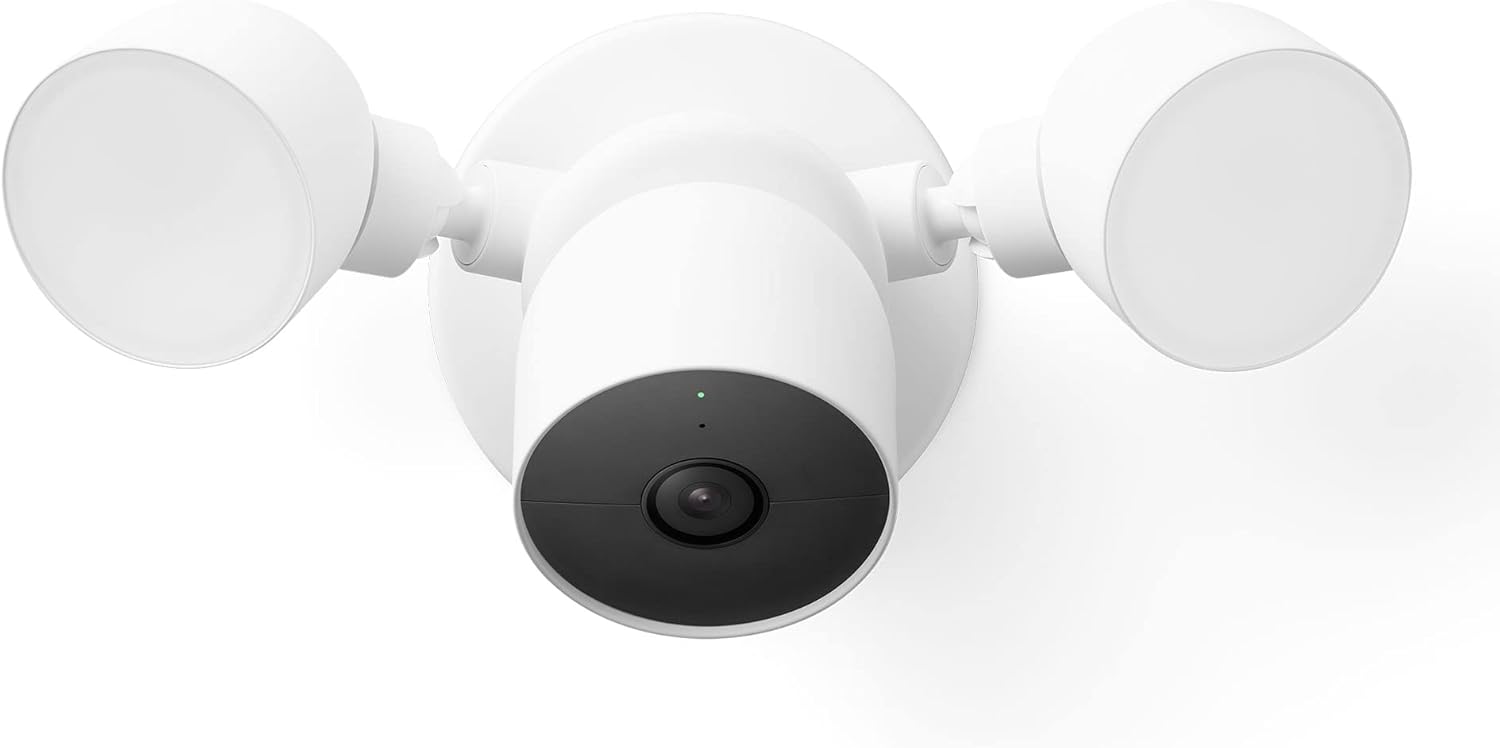
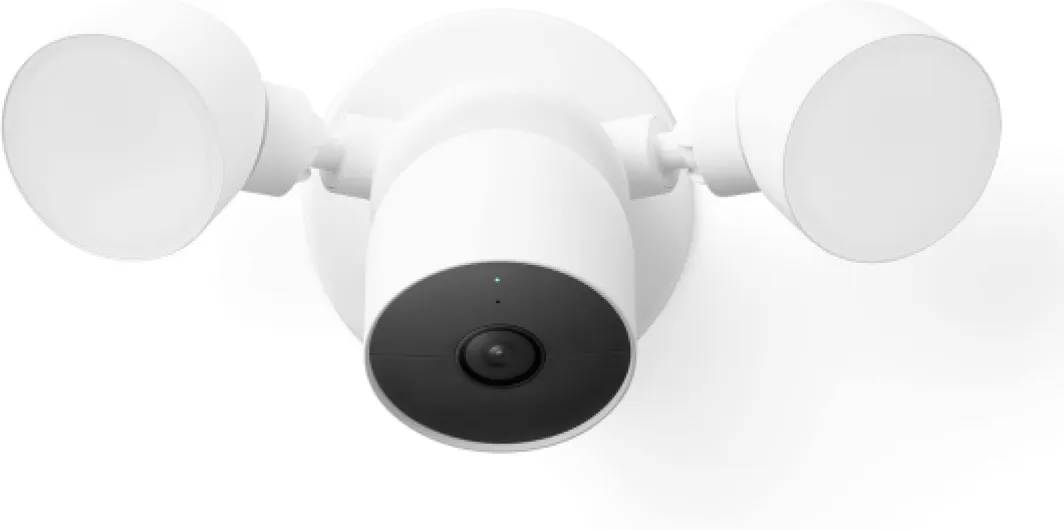
Design-wise, it’s exactly what you’d expect from Google hardware: white (Snow), rounded shapes, and a simple, almost boring look. That’s not a criticism; on an outside wall, I’d rather have something that blends in than something flashy. The unit is fairly big though. When I first held it, I thought, “Okay, this is chunky.” It’s about 31.5 cm wide and 17.6 cm tall, so once it’s on the wall, you definitely see it. On the positive side, that also means people walking up your driveway clearly know they’re being recorded, which can be a deterrent.
The two floodlight heads are like round discs on flexible arms, and the camera sits in the middle like a small dome. You can aim the lights and the camera independently, which is handy. I had to play with the angles for a bit so the camera saw the main part of the driveway while the lights covered both the driveway and the path to the door. There’s enough range of motion to get a decent setup, but don’t expect surgical precision like on a proper PTZ camera.
One thing I noticed is that the design is clearly made for mounting on a flat vertical wall. That sounds obvious, but if your old light was on a weird angled soffit or under an eave, you might have to get creative. On my brick wall, the mounting plate sat flush and looked clean. The included anti-theft screws are a nice touch: once you put those in, it’s not the kind of thing someone can yank off in two seconds. It still could be stolen with tools and time, but not easily.
In terms of aesthetics, if you like the look of other Nest products, you’ll be fine with this. It matches the typical Google style and doesn’t scream “industrial security system.” Personally, I like that it doesn’t look cheap, and it doesn’t clash with the rest of the house. But if you want something super low-profile or black to disappear into dark cladding, this white dome with big light discs will stand out quite a bit.
No battery here: fully wired, for better or worse
Just to be clear: this model is wired only. There is no battery in the floodlight version, and it needs to be connected to your home’s electrical wiring. The specs mention batteries required in some places, but in real use, you don’t swap or charge anything. The power source is straight from your house, and the wattage is around 5W for the camera, plus whatever the LEDs need when the light is on. So if you’re looking for a camera you can just stick up with no wiring, this is not it.
In practice, being wired is both a plus and a minus. On the plus side, you never have to think about charging it or climbing up a ladder every few months to swap batteries. The camera can record and stream 24/7, it can keep the motion detection active all the time, and the floodlight can blast at full brightness without worrying about draining a battery. For a fixed spot like a driveway or garage area that already has a light, that’s very convenient.
On the downside, you are tied to where your existing electrical box is. In my case, that was fine: I replaced an old dumb floodlight on the driveway. If you don’t already have a junction box in the right spot, you either have to pay an electrician to run new wiring or pick a different camera solution. Also, installation is more serious than sticking up a battery cam with screws. You’re flipping breakers, dealing with wire connectors, and making sure everything is properly grounded.
So from a “battery” perspective, the story is simple: there is none, and that’s intentional. If you want the flexibility to place a camera anywhere without touching the wiring, look at the battery Nest Cam or other brands. If you prefer something you install once and forget about charging forever, the wired setup is actually a positive point, as long as you’re okay with the initial install effort.
Outdoor use, weather resistance, and how sturdy it feels
The Nest Cam with Floodlight is rated IP54, which basically means it’s protected against dust and splashes of water, but it’s not meant to be pressure-washed or submerged. In normal words: fine for rain, wind, and general outdoor life, as long as you don’t aim a high-pressure hose at it. I’ve had it on an exterior wall that gets a fair amount of wind and rain, and so far it’s holding up without any weird condensation or flickering lights.
The whole unit feels solid in the hand. It’s not light or flimsy; it weighs over a kilo (around 1165 grams). Once it’s screwed into the mounting plate with the included hardware, it feels properly anchored. I gave it a few firm pushes after installation to see if it would wobble or feel loose. It barely moved. The anti-theft screws are a bit of a pain to install, but they do their job: you can’t just unscrew the thing with a random screwdriver.
Heat and cold are always a question for outdoor gear. I haven’t run it through extreme temperatures like -20°C or 40°C, but in typical seasonal changes—cold nights, some frost, rain followed by sun—it behaves normally. No reboot loops, no random disconnects that I could link to weather. Google claims it’s designed for outdoor use, and from what I’ve seen, that seems accurate. The plastic housing hasn’t discolored or cracked, and the LED floodlight brightness hasn’t dimmed.
If you live somewhere with very harsh weather (heavy snowstorms, direct sea spray, or brutal sun all day), I’d still mount it somewhere semi-sheltered if possible, like under an overhang. IP54 is good for normal weather, not for abuse. But for a standard home in a regular climate, the build and materials feel up to the task. I don’t get the impression it will fall apart after one winter, and the 2-year limited warranty adds a bit of peace of mind, even if you hope you never have to use it.
Video quality, detection, and how it behaves in real life
Let’s talk about how it actually performs, because that’s what matters. The video is 1080p, not 4K, and honestly, that’s fine for this use. During the day, faces, license plates at short range, and details like packages on the ground are clear enough. It’s not cinema quality, but for checking who’s at the door or what just pulled into your driveway, it’s more than okay. At night, with just the infrared night vision, the image is decent but a bit grainy, like most consumer cameras. When the floodlight kicks in, though, it’s a different story: the scene looks almost like daytime on the feed.
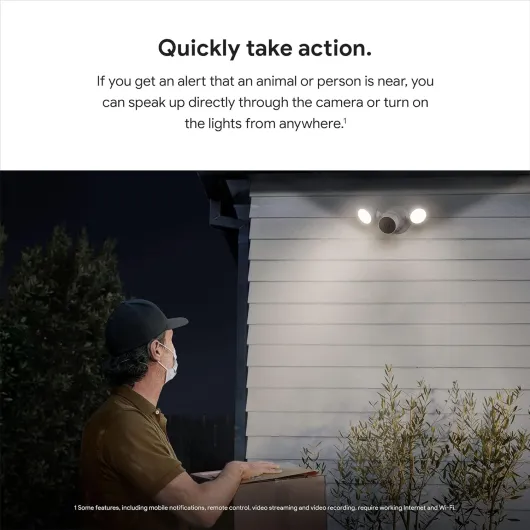
The motion detection is where it did better than I expected. It actually does a decent job of separating people, animals, and vehicles. For example, my neighbor’s cat triggers an “animal” alert, and cars passing on the street don’t always trigger anything if they’re outside my activity zone. When a person walks straight up the driveway, I get a “person detected” notification with a short clip, usually within a few seconds. That’s fast enough that I can still open the app and talk to them while they’re there.
One thing to note: performance heavily depends on your Wi‑Fi. The camera runs over Wi‑Fi and needs a stable signal. When I first installed it, my router was on the opposite side of the house, and I had some lag and occasional buffering. After I added a mesh node closer to the camera, the feed became much smoother. So if your Wi‑Fi is weak outside, expect some frustration. The camera itself is not the problem in that case; it’s the network.
In terms of reliability, it’s been mostly stable. Over a few weeks, I had one instance where the camera went offline for a few minutes and then came back on its own. The app showed an error during that time. Not a disaster, but if you’re paranoid about constant uptime, that’s something to keep in mind. Overall, though, the combination of 1080p video, fast alerts, and bright floodlight makes it a pretty solid performer for everyday home security, as long as your Wi‑Fi holds up.

What this thing actually does day-to-day
On paper, the Nest Cam with Floodlight is simple: it’s a wired outdoor camera with a built-in LED floodlight, controlled through the Google Home app. In practice, it’s your driveway or garden “watchdog” that records 1080p video, sees at night, and can blast the area with light when it detects movement. The camera has a 130° field of view, 1080p resolution at 30 fps, and night vision out to about 6 meters or so (the spec says 20 feet). It connects over Wi‑Fi and can talk to you through your phone thanks to the built-in mic and speaker.
The smart part is the detection. The camera can tell the difference between people, animals, and vehicles. In my use, it’s been pretty accurate. It mostly stopped spamming me every time a tree branch moved, which is what my older cheap camera did all day. I get alerts when someone walks up the driveway or a car pulls in, and rarely for random shadows. You can tweak how sensitive it is and set activity zones, which helps if your camera points partly at a busy street.
The floodlight is tied into all this. You can set it to come on with motion, or at certain times, or both. For example, I have it set to turn on with any motion after 10 pm, but only if it detects a person or vehicle earlier in the evening. That way it’s not turning on all the time when the neighbor’s cat strolls by at 7 pm. You can also manually turn it on from the app if you hear something outside and want to light it up.
Day-to-day, I mostly use it as a quick check camera: I pull up the live view when I hear a noise, or when a package is due, or if I want to see whether my driveway is icy. I also like being able to talk through it—yelling “leave it at the door please” to delivery people works fine. The downside is the free event history is only 3 hours, which is pretty weak if you want to review what happened earlier in the day without paying extra. So functionally, it’s solid, but clearly nudges you toward a subscription.
Pros
- Good 1080p video with bright LED floodlight and clear night view when the light is on
- Accurate smart detection for people, animals, and vehicles with useful notifications
- Strong integration with Google Home and Assistant, plus wired power so no battery hassle
Cons
- Only 3 hours of free event history; Nest Aware subscription is basically needed for real security use
- Requires wired electrical installation, which can be tricky or require an electrician
Conclusion
Editor's rating
Overall, the Google Nest Cam with Floodlight is a solid outdoor security option if you want camera and lighting in one tidy package and you’re already using Google Home. The video quality is good enough, the floodlight is bright, and the smart detection for people, animals, and vehicles actually works in real life. Installation is a bit of a project if you’re not used to electrical work, but once it’s up, it mostly just runs without much attention. The build feels sturdy, and it looks clean on the wall rather than cheap or overly aggressive.
Where it’s less appealing is the price and the subscription side. The free 3 hours of event history is very limited, and to really get value from the camera as a security device, Nest Aware is basically required. If you’re okay paying ongoing fees and you like having everything in the Google ecosystem, that’s acceptable. If you want a one-off purchase with decent free recording, there are better options. I’d recommend this mainly to people who already have Google/Nest gear, have a decent Wi‑Fi setup, and want a wired, low-maintenance solution for a driveway, garage, or garden area. If you’re starting from scratch or hate subscriptions, I’d look at other floodlight cameras before committing.