
Summary
Editor's rating
Is it worth the money or just expensive convenience?
Square body, big station, and some quirks
Battery life and how it handles larger spaces
Build, reliability, and how it holds up (plus support)
Vacuum and mop performance in real life
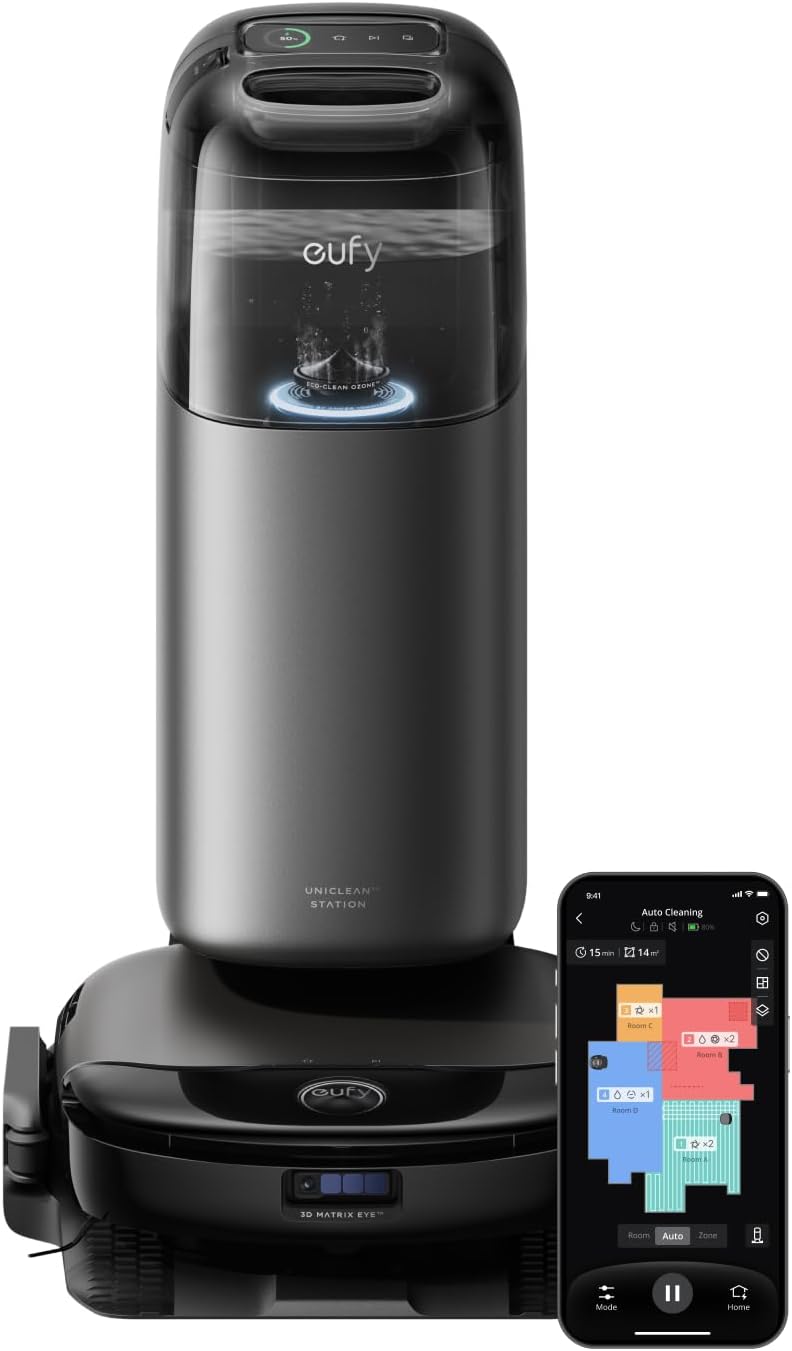
What you actually get with the S1 Pro
Pros
- Strong daily cleaning on hard floors with both vacuum and mop
- Base station handles auto emptying, mop washing, drying, and water management
- Good navigation and obstacle avoidance that rarely gets stuck or eats cables
Cons
- High purchase price compared to simpler robot vacuums
- Bulky base station that needs a good amount of space and looks like an appliance, not furniture
- Ongoing costs for proprietary mop solution and dust bags, plus some reports of early unit failures

Specifications
View full product page →| Brand | eufy |
A pricey robot that actually made me clean less
I’ve been using the eufy Robot Vacuum Omni S1 Pro for a few weeks in a pretty normal household: kids, some mess, mixed floors, and not nearly enough time to clean. I didn’t get it to admire the tech, I got it because I’m tired of sweeping and mopping after work. So I’ll keep this simple: it does reduce how often I need to clean manually, but it’s not magic and it’s definitely not cheap.
In my case, it runs in an area of about 90–110 m² with a mix of vinyl, tile, and some medium-pile rugs. I set it to run almost daily on the main floor. The first couple of days were mostly tweaking the map, setting no-mop zones on carpets, and picking up small stuff like cables and toys. Once that was done, it became closer to a “press start and forget” thing, at least most days.
What stood out early is the combination of vacuum + real mop system with the station that washes and dries the roller. Compared to the older basic robots I’ve tried that just drag a damp cloth, this is way more effective on everyday dirt and light spills. But you still need to understand its limits: dried food, sticky stains, or large liquid messes still need you and a real mop or cloth.
If you’re expecting a robot that fully replaces manual cleaning, you’ll be disappointed. If you want something that keeps floors in a decent state between real deep-clean sessions, and you’re okay with the price and a bit of setup hassle, the S1 Pro is pretty solid. I’ll go through design, performance, battery, maintenance, and whether I think it’s worth the money.
Is it worth the money or just expensive convenience?
This thing is not cheap, and that’s the main sticking point. You’re paying for the combo of strong suction, a real mop system, and a very capable base station that handles emptying, washing, drying, and water management. If you just want a basic robot that vacuums once a day and you don’t mind emptying a small bin, there are much cheaper options that will get the job done reasonably well on hard floors.
Where the S1 Pro starts to make sense is if you value time and low-contact maintenance. If you hate handling dusty bins and dirty mop pads, the station really does cut down on the gross part. I can go several runs without touching dust or dirty water, and when I do, it’s just emptying a tank into the toilet and swapping a bag every few weeks. For people with allergies or simply low tolerance for dealing with dirt, that’s a real benefit.
On the downside, you’re somewhat locked into their ecosystem for mop solution and consumables like dust bags and filters. The proprietary cleaning solution requirement is a bit annoying. It works fine and the smell is mild and fades quickly, but it’s another recurring cost. If you were hoping to just dump any floor cleaner in there, that’s not recommended and could cause issues with the system or warranty.
So in terms of value, I’d put it like this: if you have a medium to large home with mixed floors, pets, kids, and you’re already spending a lot of time cleaning, the S1 Pro can realistically save you several hours a week. In that case, the price can be justified as a time-saver. If you live in a small place, don’t mind manual mopping, or are on a tight budget, this is probably overkill and you’d be better off with a simpler robot plus a cheap stick vacuum or a manual mop.
Square body, big station, and some quirks
The first thing you notice is that the robot itself isn’t the usual round puck. It has a more square-ish shape, and that’s not just for looks. That shape actually helps it reach corners and edges better. In my home, baseboards and corners usually keep a line of dust with round robots. With the S1 Pro, that line is smaller and sometimes gone entirely, especially on hard floors. It’s not perfect, but edge cleaning is clearly better than the older round robot I had before.
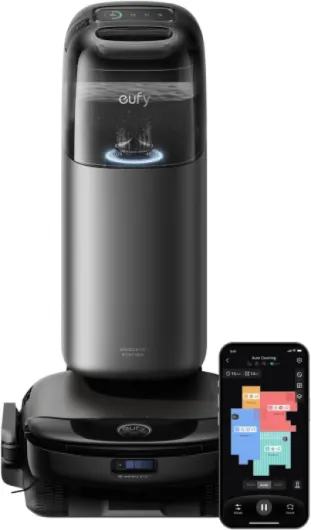
The second thing you notice is the size of the base station. It’s big. You need to plan a proper spot for it, ideally against a wall with some space on both sides like the manual suggests. If you live in a small apartment or hate big appliances in view, this might bother you. In my case, it sits in a hallway and it basically looks like a narrow black tower. Not pretty, not ugly, just a big black box that you forget about after a few days.
Build quality feels solid. Nothing rattles, the lids on the clean and dirty water tanks open and close with a firm click, and the robot doesn’t feel cheap when you flip it over to clean the brushes. I’ve owned cheaper brands where the plastic felt hollow and the wheels squeaked after a month. So far, the S1 Pro feels more robust. The sports car marketing talk is just that, but at least it doesn’t feel flimsy.
On the downside, the size and complexity also mean more parts to maintain: side brushes, the roller, the mop roller, filters, tanks, hoses in the base, etc. It’s not hard work, but you do need to be okay with occasionally taking a few minutes to clean hair out of the brush or wiping the base tray. If you want something tiny and unobtrusive, this isn’t it. If you accept that a more capable system will be bulkier, the design is fine and mostly practical.
Battery life and how it handles larger spaces
The spec sheet says up to 216 minutes of battery life, and that’s not totally unrealistic if you use lower suction and mild mopping. In my actual use, on mixed floors with some turbo zones (kitchen, entry), a full run of around 100 m² doesn’t drain it completely. It usually finishes with some battery left, or it goes back once to recharge if I push higher suction everywhere. The nice part is that it manages its own charging and resuming pretty well, so you don’t need to babysit it.
One thing I noticed is that the cleaning time is more about how many obstacles and small rooms you have rather than just square meters. In a more open area, it moves quickly and covers ground fast. In a cluttered space with many chairs, small rugs, and corners, it takes longer and uses more battery. That’s normal for any robot, but worth mentioning if your layout is complex. The good news is that it doesn’t seem to run out of juice mid-job very often, and when it does, it returns to the dock, charges to around two-thirds, and then finishes the job.
The 20% faster charging claim versus the previous generation is hard to verify without that older model, but charging speed is decent. From low battery to full takes a few hours, so if you’re trying to clean a huge house multiple times a day, you’ll run into some downtime. For a regular once-a-day or once-every-two-days schedule, it’s fine. I haven’t seen any weird behavior like the battery dropping suddenly or the robot dying far from the base.
Overall, I’d say battery life is good enough for most medium to large homes as long as you’re okay with it sometimes pausing to recharge on big or high-power runs. If you have a small apartment, you’ll never really worry about battery. It’s not some miracle battery, but it doesn’t feel like a weak point either.

Build, reliability, and how it holds up (plus support)
I obviously haven’t used it for years yet, but based on a few weeks and cross-checking with Amazon reviews, I can say this: build quality feels solid, but there are occasional unit failures. Several reviewers mentioned error codes (like E20 or E76) on early runs, which is annoying given the price. The positive side is that eufy support seems to be fairly responsive. People reported getting full replacements with prepaid labels and minimal hassle, which is not always the case with smart home brands.
In my own use, I haven’t hit any serious errors so far. No pump failures, no mapping crashes, no random reboots. The moving parts—side brushes, main brush, mop roller—still look fine after frequent use. Hair wraps around the main brush like on any vacuum, but it’s easy enough to cut away every week or two. The wheels haven’t jammed yet, and the lid hinges on the station still feel firm.
The weak spot for long-term durability in systems like this is always the water path: pumps, hoses, dirty water tank, and anything that can get clogged. You do need to be disciplined about not sending it through big puddles or thick mud, and you should empty and rinse the dirty water tank regularly. If you let dirty water sit for weeks, you’ll probably get smells and maybe buildup. That’s not a fault of this robot specifically; it’s just how wet systems work.
Given the price, I’d have liked to see fewer negative reviews about early failures, but at least they’re balanced by many positive ones and good experiences with support. I wouldn’t call it bulletproof, but it doesn’t feel fragile either. If you accept that you might need to contact support if you’re unlucky with your unit, the overall durability outlook seems okay, especially with regular light maintenance.
Vacuum and mop performance in real life
In terms of raw cleaning, the S1 Pro is strong. The 8,000 Pa suction spec is marketing, but in practice, on my floors it picks up dust, crumbs, and pet hair reliably. I run it on a mix of standard and higher suction in the dirtier areas, and I don’t see much left behind on hard floors. On carpets, it does a good job with surface dirt and hair, but like every robot I’ve tried, it’s not a full replacement for an occasional pass with a powerful upright or canister vacuum, especially if your carpets are thick.
The mopping system is the more interesting part. It uses a spinning roller mop with water that gets refreshed at the base and during the run. At moderate settings, it keeps my vinyl and tile looking clean day to day. Light stains and footprints disappear, and the floor feels better under bare feet compared to vacuum-only. Where it struggles is dried, sticky food or old stains that have been there for days. It can lighten them, but you’ll still need to pass a real mop or scrub by hand if you want them gone completely. So think of it as a maintenance mop, not a deep cleaner.
Navigation and obstacle avoidance are honestly one of its strong points. It rarely bumps into furniture hard. It slows down near chair legs and table legs, and it has been pretty good at avoiding cables and small toys if they’re not completely tangled. Compared to my previous robot, which loved to eat phone chargers, this is a big relief. It also handles transitions between hard floor and rugs without drama, as long as the rug isn’t too thick.
Noise is acceptable. On standard suction, you can easily have a conversation in the same room. On max suction, especially on carpets, it’s louder but still less annoying than a traditional vacuum. The loudest part is when it empties the dust bin or washes and dries the mop in the base; that’s a short burst of noise. I wouldn’t run that right next to a bedroom at night, but for a living area it’s fine. Overall, the performance is strong for daily upkeep, with the usual robot limits on heavy messes and deep carpet cleaning.
What you actually get with the S1 Pro
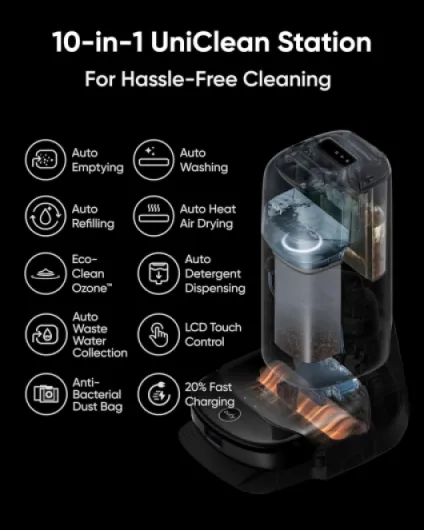
The S1 Pro is basically two things: the robot itself and a big “UniClean” base station. The robot vacuums and mops, the base handles the dirty work: it empties the dust bin, washes the mop roller, dries it with warm air, refills the clean water tank, and stores the dirty water. On paper it’s a 10-in-1 station, in practice it means you don’t have to touch dust and dirty mop water very often, which is the main appeal.
In the box I got the robot, the station, a dust bag already installed, extra side brushes, the roller mop, and a few bits of documentation. Setup is straightforward if you’ve ever used any smart device: plug the station, drop the robot on it, install the app, connect to 2.4 GHz Wi‑Fi (important, it really doesn’t like 5 GHz only routers), and let it build a map on the first run. That first mapping run took around 40–50 minutes for my floor and it did a decent job of recognizing rooms and obstacles.
The app is where you actually control everything: suction level, mop intensity, room schedules, no-go and no-mop zones, and how often the mop should go back to the base for washing. The Amazon reviews are not lying: the app is pretty easy to understand, even for someone who doesn’t like fiddling with settings. I set up a nightly run on the ground floor and a more intense kitchen cleaning after dinner. After the first two days, I mostly just tweak small things like increasing suction on rugs or changing the order of rooms.
Overall, as a package, it feels like a high-end robot meant for people who want as little hands-on maintenance as possible. You still have to empty the dirty water tank, refill clean water, and change the dust bag occasionally, but compared to older robots where you had to empty the tiny bin after every run, this is a big step up in convenience. Whether that justifies the price depends on how much you hate floor cleaning and what your budget looks like.
Pros
- Strong daily cleaning on hard floors with both vacuum and mop
- Base station handles auto emptying, mop washing, drying, and water management
- Good navigation and obstacle avoidance that rarely gets stuck or eats cables
Cons
- High purchase price compared to simpler robot vacuums
- Bulky base station that needs a good amount of space and looks like an appliance, not furniture
- Ongoing costs for proprietary mop solution and dust bags, plus some reports of early unit failures
Conclusion
Editor's rating
After living with the eufy Robot Vacuum Omni S1 Pro, my opinion is pretty straightforward: it’s a strong, convenient robot for people who really want to offload daily floor cleaning, but it comes at a high price and isn’t flawless. The vacuuming is solid, the mopping is genuinely useful for day-to-day grime, and the big base station does cut down how often you have to touch dust and dirty water. Navigation and obstacle avoidance are also clearly above average; it doesn’t slam into furniture or eat cables all the time like cheaper models.
On the flip side, it’s bulky, not cheap, and there are some reports of early unit failures, even though customer support seems to handle replacements fairly well. The mopping system is good for maintenance but still won’t replace a proper deep clean when you’ve got dried food or serious spills. You also need to accept ongoing costs for dust bags and the recommended cleaning solution.
If you have a busy household with kids or pets, a decent amount of floor space, and you’re willing to pay extra to save time and deal less with dirty bins and mop pads, the S1 Pro is a pretty solid choice. If your place is small, your budget is tight, or you don’t mind doing some regular manual cleaning, you can get by with something cheaper and simpler. It’s a strong tool for the right person, but not a universal no-brainer.