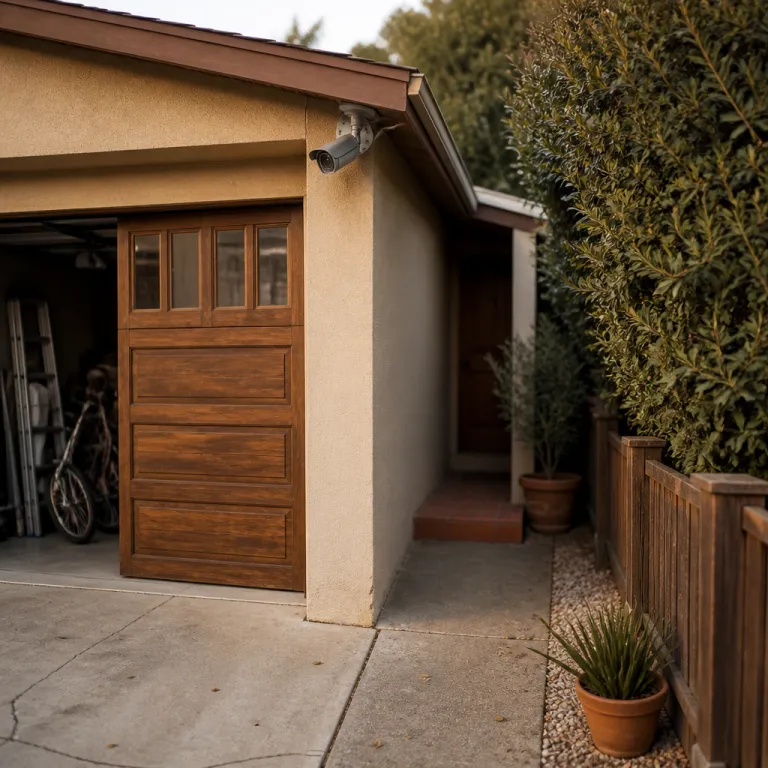
Why garage security camera placement is your first real test
Most homeowners obsess over the front door and forget the garage. Yet from a security perspective, the garage combines valuable tools, stored packages, and often a quiet interior door that leads straight into your living areas. Treating garage security camera placement as an afterthought leaves one of your easiest entry points almost unmonitored.
Security experts consistently rank every ground floor door, including the garage side door and interior access door, as first priority coverage for any camera system. When you only protect the front door with a single door camera, you create a predictable pattern that experienced intruders recognize and route around through darker side areas and side yard paths. A balanced camera placement plan treats the garage as a separate zone, with its own access points, lighting quirks, and false alert risks.
Think about how your property actually works during a normal week. Delivery drivers often leave parcels near garage doors, kids dump bikes near side doors, and you probably open and close the main garage door more often than the front door. All those movements shape where cameras should go, how you angle cameras, and which security cameras can handle constant motion without drowning you in useless notifications.
For most households, the best security layout around the garage uses at least two cameras. One outdoor camera sits above the main garage door, watching the driveway, side yard approach, and any ground floor windows nearby. A second indoor security camera covers the interior entry door to the house and the vehicle bays, giving you clear footage of anyone who actually crosses into protected areas.
That two layer camera placement also helps you reconstruct events when something goes wrong. The exterior security camera shows how a person approached, which access points they tested, and whether a vehicle was involved. The interior camera then confirms whether they breached the door, how long they stayed, and what they touched, which matters for both police reports and insurance claims.
Exterior coverage: getting the angles, height, and access points right
Outside the garage, placement tips matter more than brand names. A camera mounted too low becomes a vandalism magnet, while a camera mounted too high gives you a perfect view of hoodies and baseball caps but no faces. Aim for a mounting height around 2,5 to 3 meters, then angle cameras downward about 15 to 30 degrees so they capture faces at the typical approach distance.
Start with the main garage door as a primary access point, then map every other entry point nearby, including side doors, ground floor windows, and any gate that feeds the driveway or side yard. Your exterior security camera should see the full width of the garage door, the path from the street or alley, and any side yard route that bypasses the front door entirely. When you install cameras, avoid pointing cameras straight at the street for long distances, because that wastes resolution on passing cars instead of your own property.
Wireless outdoor cameras such as the Arlo Pro 5S, Nest Cam Battery, or Blink Outdoor 4 work well above garage doors when Wi Fi is solid. These cameras give you flexible placement without running power cables, but they still need reliable power either from long life batteries or a nearby outlet. If your property has a detached garage or thick masonry walls, a wired Power over Ethernet camera system from Reolink or similar brands often delivers clearer footage and fewer connection drops than purely wireless cameras.
Think about lighting before you drill any holes. At night, the best security comes from a mix of modest ambient light and the camera’s own infrared LEDs, not a single blinding floodlight that causes IR washout and ruins clear footage. If you already have a bright motion light above the garage, test your security camera at night and adjust the angle so the beam does not hit the lens directly.
Finally, consider how your exterior camera integrates with the rest of your security systems. A well placed outdoor camera over the garage should trigger the same alerts and recording rules as your front door camera, but with different sensitivity to avoid constant pings when neighbors drive past. For more detail on where to mount outdoor cameras for maximum coverage and fewer false alerts, you can consult this practical guide to outdoor coverage and false alert reduction and then adapt the principles to your own garage layout.
Inside the garage: heat, headlights, and the overlooked interior door
Once you step inside the garage, the rules for security camera placement change. You are no longer fighting rain and direct sun, but you are dealing with temperature swings, car headlights, and a surprisingly vulnerable interior door that often has weaker locks than the front door. A camera that works flawlessly in a shaded porch can fail quickly in an uninsulated garage that bakes in summer and freezes in winter.
Most consumer security cameras are rated for roughly minus 20 to plus 50 degrees Celsius, yet detached or poorly insulated garages in parts of the United States can exceed that range. If your climate regularly pushes those limits, look for indoor outdoor cameras or compact CCTV style units specifically rated for harsher environments. When you install cameras inside, avoid placing them directly above vehicles where rising heat and exhaust can shorten the life of the camera and its power supply.
The interior door between the garage and the house deserves the same attention as the front door. Mount a security camera on the wall or ceiling opposite that door, high enough that it cannot be grabbed, but low enough that the lens can still capture faces and hands at the handle. Angle cameras slightly across the room rather than straight at the door, so you also see anyone moving between storage areas, tool benches, and any ground floor windows that open into the garage.
Headlights create another challenge for camera placement. When a car pulls in, its beams can blind a camera that is mounted at bumper height or pointed directly toward the garage door, causing exposure swings and lost details just when you need clear footage. To reduce this, mount the camera higher on a side wall, use wide dynamic range settings where available, and test recordings while a car actually enters and exits.
False alerts inside garages can be relentless if you rely only on basic motion detection. Pets, hanging tools, and even shifting light through small windows can trigger constant pings that train you to ignore your own security system. Smarter motion zones, person detection on models like Nest Cam Battery or Arlo Pro 5S, and careful camera placement away from swinging objects will help you keep alerts focused on real entry points instead of harmless background movement.
For broader strategy on where to mount outdoor cameras so that indoor views complement them instead of duplicating them, you can study this detailed analysis of outdoor camera mounting and false alert control and then mirror the logic inside your garage space.
Connectivity, storage, and the real cost of watching your garage
Even perfect garage security camera placement fails if the cameras cannot stay online. Detached garages, thick walls, and metal doors all weaken Wi Fi, which is why so many wireless cameras in garages show choppy video or miss events entirely. Before you buy another camera, map your signal strength in the garage with a phone and decide whether you need a mesh node, a wired access point, or a full Power over Ethernet run.
For many security conscious upgraders, a PoE camera system in the garage is a turning point. One Ethernet cable delivers both data and power, so you avoid flaky wireless links and do not rely on batteries that die in extreme temperatures. Reolink and similar brands offer PoE security cameras that record to local network video recorders, giving you clear footage without mandatory monthly fees for cloud storage.
If running cable is impossible, a strong mesh Wi Fi node placed near the interior garage wall can stabilize wireless outdoor cameras and indoor units alike. Pair that with models like Arlo Pro 5S or Eufy SoloCam S340, which support higher bitrates and better night vision than older cameras, and you will see a visible jump in detail around your garage doors and side yard. Just remember that every extra camera you add to a cloud based camera system can increase monthly fees, especially if you want longer video history or advanced detection features.
Storage choices also shape how you use your garage footage. Cloud first security systems such as Ring or Blink make it easy to review events from your phone, but they often lock useful features like rich notifications and extended history behind subscriptions. Local storage on microSD cards or NVRs avoids those ongoing costs, yet it demands that you manage backups and protect the recorder as carefully as any other valuable property.
Think about how you will actually search footage when something happens. A camera review interface that lets you filter by motion zones, people, or specific cameras around the garage saves hours compared with scrubbing through continuous video. Newer tools that turn footage into searchable text summaries, such as the techniques explained in this article on making camera recordings searchable with modern language models, can make a multi camera garage setup far more usable after an incident.
Whatever mix of cloud and local storage you choose, test your system under stress. Trigger the garage door, walk through every access point, and confirm that your security cameras capture clear footage without gaps or corrupted clips. The real measure of best security is not the advertised resolution, but what your camera system actually records when someone slips through a side door at three in the morning.
Practical layouts: from single camera upgrades to full garage coverage
Upgrading garage security rarely means starting from zero. Most readers already have at least one door camera at the front door and maybe a couple of outdoor cameras watching the backyard, yet the garage remains a blind spot. The goal is to extend that existing system so the garage becomes a monitored zone, not a dark gap between better protected areas.
If you can only add one camera today, place it outside above the main garage door. This single security camera should cover the driveway, the approach from the street, and any side yard path that bypasses the front door, while still giving you a usable view of faces near the door. Choose a model with strong night vision and good camera reviews for motion detection, because this camera will handle frequent events like cars arriving and kids playing.
When budget allows two cameras, add an indoor unit facing the interior door from the garage into the house. That second camera turns the garage into a buffer zone, where you can see whether someone who approached the garage door actually crossed into your living areas. With careful camera placement and tuned motion zones, you can reduce false alerts from vehicles while still getting immediate notifications if anyone lingers near tools, storage shelves, or ground floor windows.
Larger properties with multiple garage bays, side doors, and rear access points benefit from a more structured layout. One outdoor camera covers the main garage door and driveway, a second outdoor camera watches the side yard and any rear entry points, and one or two indoor cameras monitor the vehicle bays and the interior door. In these setups, angle cameras so their fields of view overlap slightly, which prevents blind wedges where someone could stand unseen between two narrow beams.
As you expand, keep an eye on complexity. Too many cameras, overlapping notifications, and poorly tuned motion zones can turn a strong security system into a noisy mess that you start to ignore. Aim for a layout where each camera has a clear job, each alert corresponds to a meaningful zone, and your recording rules reflect how you actually move through the property during the day and night.
Finally, remember that hardware is only half the story. Regularly review your garage footage, adjust placement tips as your storage patterns change, and update your camera system firmware so detection stays accurate. Protection is not about how many cameras you own, but about whether they quietly catch the one event that really matters while you sleep.
FAQ
Where should I place a camera to watch my garage door?
For most homes, the ideal spot is above the center of the garage door, around 2,5 to 3 meters high. Angle the camera downward about 15 to 30 degrees so it captures faces at the driveway and near the door. Make sure the field of view includes any side paths or ground floor windows close to the garage.
Do I really need a camera inside the garage as well as outside?
An exterior camera shows how someone approached, but an interior camera confirms whether they actually entered the garage or reached the interior door to the house. If your garage connects directly to living areas, an indoor camera facing that door is strongly recommended. It also helps you verify accidental events, like whether a family member left the door open.
How do I handle weak Wi Fi in a detached garage?
Start by testing signal strength in different spots using your phone. If coverage is poor, consider adding a mesh Wi Fi node near the house wall facing the garage or running a Power over Ethernet cable to a PoE camera. In very challenging layouts, a wired access point inside the garage often delivers more reliable performance than any wireless extender.
Which type of camera is best for extreme garage temperatures?
In uninsulated garages with big temperature swings, look for cameras rated for wider operating ranges and designed for indoor outdoor use. Many PoE CCTV style cameras handle heat and cold better than small battery powered units. Always check the manufacturer’s specified temperature limits against your local climate before installing.
How can I reduce false alerts from cars and light changes in the garage?
Use motion zones to ignore areas where headlights sweep or where cars regularly move. Enable person detection if your camera supports it, and avoid pointing the lens directly at bright lights or reflective garage doors. After installation, spend a few days fine tuning sensitivity until alerts match real security events instead of routine activity.