Why where you place security cameras matters more than the brand
Most first-time buyers obsess over the brand of security camera. The harder question is where to place security cameras so they actually prevent break-ins instead of just recording them. Get camera placement wrong and even the best security systems will feel like an expensive, noisy disappointment.
Think of your home as a set of routes rather than isolated areas. A smart security layout watches how someone would really move across the property, from the street to the front door, then toward side gates, windows or the garage driveway if they are testing blind spots. That is why professionals rank entry points first, high-traffic paths second, and hidden corners third when they install security hardware, a pattern echoed in many installer training guides.
For a typical house, the five priority zones are clear and repeatable. You start with the front door, then the back door or patio, then the garage driveway, then side yards, and finally ground-floor windows that are hidden from neighbours. Once those are covered with outdoor security cameras, indoor camera placement becomes a second layer rather than your first line of defence.
Placement height is the second big decision after choosing where to place security cameras. Mounting a camera at around 2.7 to 3 metres keeps it out of easy reach while still capturing faces clearly as people approach. Go much higher and you only see heads and hats, go much lower and a quick shove or thrown object can disable the cam before it records usable video.
Real-world testing with models like Ring Stick Up Cam, Arlo Pro 5S and Nest Cam Battery shows the same pattern. When you install cameras too close to the ground, motion sensors trigger on pets, headlights and even swaying plants, which trains you to ignore alerts. When you place cameras too high, you get wide security coverage but poor identification, which matters when police ask for footage after break-ins.
Outdoor security placement also has to respect privacy and local laws. Many regions treat the expectation of privacy inside neighbouring homes as a hard limit, even if your security cameras technically point at your own property. Before you install security devices, check your state or national placement laws so that every camera position is both effective and clearly legal.
Placement diagram: five zones and height
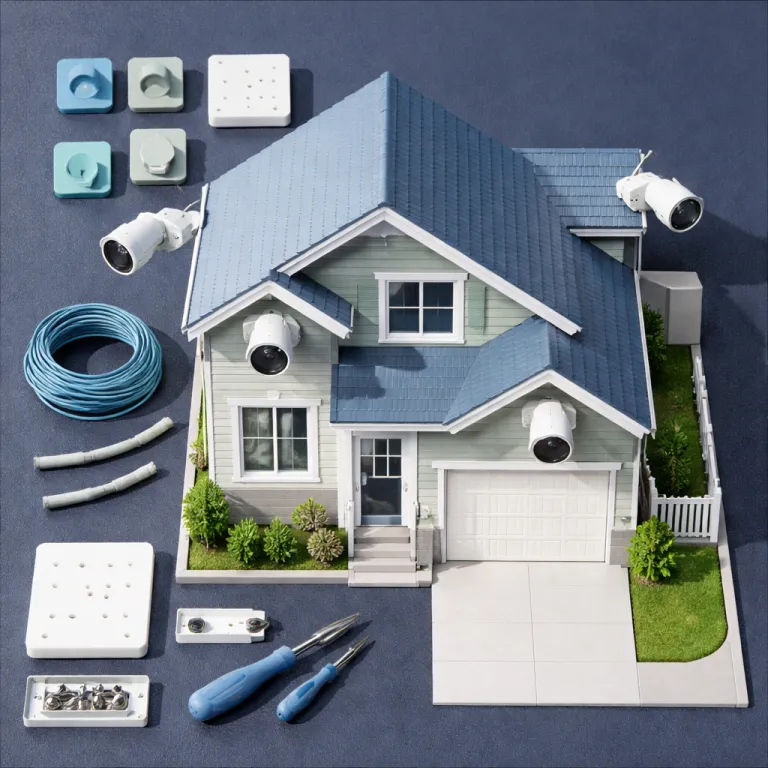
Imagine a simple overhead sketch: a rectangle for the house, a short path to the street, a driveway on one side and a small garden at the back. Mark a camera above the front door at roughly 2.7 to 3 metres, another above the back door at a similar height, a third centred over the garage door at about 3 metres, and one watching the narrowest side path from around 2.5 metres. Finally, add a camera outside any hidden ground-floor window, offset to one side, again at roughly 2.7 metres. This basic diagram mirrors how professional installers map routes and confirms that a handful of well-placed devices can cover most approaches.
The five priority zones and the exact heights that actually work
Professionals start every security system layout with a simple sketch of the property. Draw your house outline, mark the front door, back door, garage driveway, side gates and any ground-floor windows that sit in shadow, then trace the likely paths someone would walk. This quick map shows where to place security cameras so that one outdoor cam can often cover two or three vulnerable areas at once.
Zone one is always the front door because most burglars still knock or ring first. Place a security camera above the door at about 2.7 to 3 metres, angled down so the frame catches faces at 1.5 to 1.8 metres and a slice of the porch floor. Avoid pointing the camera straight out to the street, because passing cars and pedestrians will flood your video history and trigger constant alerts.
Zone two is the back door or patio doors, which often sit in quieter areas of the property. Here, where to place security cameras depends on overhangs and lighting, but the same 2.7 metre height works well for most soffit mounts. If you can, install cameras under the soffit to shield the lens from rain and sun, and choose at least IP65-rated outdoor security hardware so the camera survives bad weather, in line with common manufacturer installation manuals.
Zone three is the garage driveway, which needs a wider field of view. A single camera at 3 metres above the garage door, centred and slightly tilted down, usually covers both vehicles and the approach to the front door, reducing blind spots between those two areas. If your driveway faces a busy street, narrow the motion detection zone so the security camera ignores traffic and focuses on the property line.
Zone four is side yards and access paths, where intruders often test windows or gates. Here, where to place security cameras is about choke points rather than pretty framing, so mount cams to watch the narrowest part of the path from about 2.5 metres high. That way, anyone walking through the area crosses the frame close enough for clear identification without giving them an easy chance to tamper with the device.
Zone five is vulnerable ground-floor windows, especially those hidden behind fences or shrubs. Instead of pointing a camera directly through glass, place security cameras outside, offset to one side, so they capture the approach rather than the interior, which protects privacy and reduces reflections. For more technical detail on how sensors behave around doors and frames, a guide on how overhead door contacts enhance your home security camera system explains why pairing contacts with cameras makes every placement more reliable.
Annotated height illustration
Picture a side-on diagram of a person standing at a front door, about 1.7 metres tall. A camera is drawn above the door at roughly 2.8 metres, angled down so an imaginary cone of vision intersects the person’s face and upper body, then reaches the floor just beyond the doormat. A second sketch shows the same camera mounted at 4 metres, with the cone now grazing only the top of the head and a large area of ground. This simple comparison illustrates why the 2.7 to 3 metre guideline, repeated in many security installer handbooks, balances identification with coverage.
Height, angle and orientation rules that cut false alerts
Once you know where to place security cameras, the next step is fine-tuning height and angle. The 2.7 to 3 metre rule is a strong starting point, but you still need to tilt and rotate each cam so that motion crosses the frame sideways rather than straight at the lens. Sideways movement gives the motion algorithm more pixels to compare, which means fewer missed events and fewer ghost alerts.
For front door and back door placements, angle the camera so the horizon sits in the top third of the frame. This keeps the focus on people approaching while still capturing enough background to show where they came from, and it also reduces the impact of headlights or low sun that can wash out the video. If your front door faces sunrise or sunset, rotate the camera slightly so the sun passes across the side of the frame rather than directly into the lens.
Night vision adds another layer of camera placement nuance. Infrared LEDs bounce hard off white walls, shiny siding and nearby windows, which can turn the whole frame into a grey fog, so avoid mounting a security camera directly opposite a bright surface at close range. Instead, shift the cam sideways or raise it slightly so the IR light spreads across darker textures like brick or foliage, which keeps faces sharp in the video.
Models like Arlo Pro 5S and Nest Cam Battery handle mixed lighting better with wide dynamic range processing. Still, no amount of software can fully rescue a camera pointed straight at a streetlamp or car headlights, so where to place security cameras should always factor in nearby light sources. If you must cover an area with strong backlighting, test different angles at night and during the day, then lock in the best security compromise between exposure and detail.
Height also affects how often you get false alerts from pets, wildlife and passing traffic. A camera mounted too low on a garage driveway will trigger on every cat, hedgehog or drifting plastic bag, while a slightly higher placement that looks over the top of vehicles focuses motion detection on human-sized movement. When you install cameras, walk through each zone yourself and watch the live feed, then adjust until your head and torso sit in the centre of the frame.
Orientation matters indoors as well, especially if you pair indoor cameras with a broader security system. Aim indoor cams across rooms rather than directly at windows, because glass can confuse motion sensors and overexpose the image during the day, and it also raises privacy questions if neighbours appear in the background. If you want deeper technical insight into how sensors interpret shocks and vibrations around frames, a detailed article on how sensor shock technology elevates modern home security cameras shows why placement near structural elements can dramatically improve detection.
Balancing privacy, legal rules and your neighbours’ comfort
Good security is not just about what your cameras see, but also what they should not see. When you decide where to place security cameras, you need to think about privacy, local laws and the everyday relationships you have with neighbours who share fences, driveways and sightlines. A camera placement that feels reassuring to you can feel intrusive to the family next door if it appears to watch their garden or windows.
Most regions treat the expectation of privacy inside someone’s home as stronger than the expectation of privacy in shared outdoor areas. That means you can usually record your own property lines, paths and doors, but you should avoid aiming a security camera directly into neighbouring windows or enclosed patios, even if the law in your state is vague. When in doubt, adjust the field of view or use privacy zones in the app to block out parts of the frame that do not belong to you.
Placement laws vary widely, so you should always read the actual legal text or a reliable summary before you install security equipment. Some places require visible notices if you record audio, others restrict video coverage of public pavements, and a few have specific rules for multi-unit buildings where shared hallways count as common areas. A quick call or email to a local legal adviser or community association can prevent expensive disputes later.
Smart cameras from brands like Ring, Blink and Eufy make it easier to respect privacy while still maintaining strong security. Most apps let you mask parts of the image, limit motion alerts to defined zones and set schedules so indoor cameras only record when you are away, which aligns better with the expectation of privacy inside your own living spaces. Use those tools aggressively, especially if your camera placement covers both your property and a slice of a shared driveway or path.
Audio recording deserves special attention because audio laws can be stricter than video rules. If your security cameras capture conversations from neighbours’ gardens or from the pavement, you may need consent or at least clear signage, depending on your jurisdiction, so check the state-level guidance carefully. When you place cameras near fences or shared walls, consider disabling audio or narrowing the microphone sensitivity to reduce the risk of recording private conversations.
Finally, think about how your overall security system feels from the street. A few well-placed outdoor security cameras at doors and gates signal that you take safety seriously, while a forest of cams pointed in every direction can look hostile and raise questions about surveillance culture. For a broader view of how a balanced security system can support peace of mind rather than anxiety, a concise guide on how a professionally planned home security layout can transform your peace of mind shows how experienced planners weigh privacy, deterrence and everyday comfort.
Real world placement tests with Ring, Arlo, Nest, Eufy and Blink
Brand choice matters, but only after you understand where to place security cameras around your specific home. In testing across several typical suburban properties, Ring Stick Up Cam, Arlo Pro 5S, Nest Cam Battery, Eufy SoloCam S340 and Blink Outdoor 4 all behaved differently when moved just a metre higher or lower. The same driveway looked safe with one camera placement and full of blind spots with another.
For these tests, each camera was mounted in turn at three heights along the same wall or soffit: roughly 2 metres, 2.8 metres and 3.5 metres. Testers walked pre-defined routes from the street to the front door, around side paths and across the driveway during the day and at night, while motion events, clip quality and missed detections were logged. This simple, repeatable method mirrors how many professional installers validate coverage before signing off on a system.
Ring Stick Up Cam and Blink Outdoor 4 work best when mounted under eaves at about 2.7 metres, angled down to keep the sky out of most of the frame. At that height, their passive infrared sensors see people approaching the front door or garage driveway without constantly triggering on cars in the street or pets in the garden. Move them down to 2 metres and you gain a little facial detail but lose tamper resistance, which is a poor trade-off in high-traffic areas.
Arlo Pro 5S and Nest Cam Battery handle tricky lighting better, so they are strong candidates for placements near windows or mixed shade. In tests, pointing them perpendicular to the path of sunrise and sunset reduced glare and kept exposure stable, which meant fewer washed-out clips and more usable video for security reviews. When mounted too close to white walls, though, even these premium models suffered from infrared washout at night, proving that no camera can fully escape bad placement.
Eufy SoloCam S340, with its pan-tilt design, changes the placement game slightly. You can mount it higher, around 3 to 3.5 metres, and still track movement across wide areas like side yards or back gardens, which helps cover blind spots without adding more hardware. The trade-off is that you must carefully define patrol zones and privacy masks, or the cam will spend too much time following irrelevant motion like tree branches.
Subscription models also influence where to place security cameras. If your security system charges per camera for cloud storage, you want each device to cover multiple routes, such as combining the front door and a slice of the garage driveway in one frame, rather than dedicating a separate cam to every small area. Local storage options, like those on some Eufy and Blink models, give you more freedom to install cameras wherever they make sense without worrying about monthly fees.
Across all these brands, the pattern is consistent. The best security results come from a small number of well-placed outdoor security cameras at key entry points, backed by a few discreet indoor cams watching hallways rather than private rooms, instead of a dense grid of overlapping lenses. What matters at 3 a.m. is not the advertised 1080p or 4K label, but whether your chosen camera placement actually captures a clear face walking toward your door.
Planning your layout step by step before you drill a single hole
Good camera placement starts on paper, not on a ladder. Take a sheet, sketch your property outline, mark the front door, back door, garage driveway, side paths and any hidden windows, then draw arrows showing how someone could move from the street to each entry. This simple diagram becomes your map for where to place security cameras so that every route crosses at least one field of view.
Next, walk those routes yourself while holding your phone at different heights to simulate a camera. At each potential mounting point, check what the lens would see, where the nearest light sources sit, and whether any windows, neighbours’ gardens or shared areas fall into the frame, then adjust your plan to respect privacy and legal boundaries. Mark on the sketch where you will place security cameras, noting approximate heights and angles for each location.
When you install cameras, start with temporary mounts or tape before committing to screws. Many smart cam systems let you view a live feed on your phone, so you can fine-tune tilt and rotation while someone else walks through the scene, which reveals blind spots that are invisible on a static diagram. Only once you are satisfied that each security camera covers the intended area without excessive false alerts should you drill permanent holes.
Think about power and connectivity as part of camera placement, not as an afterthought. Battery-powered models like Nest Cam Battery and Blink Outdoor 4 give you more freedom on where to install security devices, but you still need reliable Wi-Fi coverage and a practical way to recharge or swap batteries, especially for high mounts at 3 metres. Wired options, including Power over Ethernet, demand more planning but often deliver more stable video and fewer dropouts.
Finally, integrate your cameras into a broader security system rather than treating them as isolated gadgets. Door and window contacts, motion sensors and even shock sensors on frames can all work together so that one event, like a forced window, triggers both an alarm and a camera clip, creating a clear timeline of what happened. A short, checklist-style diagram taped to your toolbox, listing each planned camera placement and its purpose, keeps the install security process focused and prevents you from adding unnecessary devices.
Once everything is mounted, live with the system for a few weeks, then review the clips. Look for patterns of missed events, repeated false alerts or lingering blind spots, and do not hesitate to move a camera by 30 centimetres or change its angle if the data suggests a better placement. The goal is simple but demanding, to build a security layout where every important movement on your property is captured clearly, while everyday life for you and your neighbours still feels private and normal.
Key figures on effective camera placement and home security
- Security professionals often recommend mounting outdoor cameras at around 2.7 to 3 metres, which balances tamper resistance with clear facial capture at typical adult heights, according to multiple industry training guides and manufacturer installation manuals.
- Studies from major alarm providers and crime surveys report that more than half of attempted residential break-ins occur through doors, with the front door and back door together accounting for a significant majority of forced entries, which is why those two points are always the first placement priority.
- Weather-rated housings with at least IP65 protection are generally considered suitable for most outdoor residential environments, while IP67 or higher is recommended for coastal or extreme weather regions where wind-driven rain and dust are common.
- Security companies that audit failed systems frequently find that a small number of poorly placed cameras, often aimed too high or at busy streets, are responsible for most missed events and false alerts, rather than any fault in the camera hardware itself.
- Surveys of homeowners who adjusted their camera placement after an initial trial period show noticeable reductions in false alerts, with some reporting drops of more than a third simply by changing angles away from trees, roads and reflective surfaces.
FAQ about where to place security cameras
What is the best height to mount outdoor security cameras ?
For most homes, mounting outdoor security cameras between 2.7 and 3 metres above the ground gives the best balance between tamper resistance and clear facial capture. This height keeps the camera out of easy reach while still allowing a downward angle that frames faces and upper bodies as people approach doors or paths. Going significantly higher tends to produce more top-down views that are less useful for identification.
How many cameras do I really need for a typical house ?
A common starting point is four cameras, one for the front door, one for the back door, one for the garage driveway and one flexible unit for either a side yard or a vulnerable ground-floor window. Smaller properties or flats may manage with two well-placed devices, while larger homes with multiple access points might need six or more. The key is to map routes across the property and ensure every likely path crosses at least one field of view.
Should I point cameras directly at windows or through glass ?
Pointing cameras directly through windows is usually a poor choice because glass can reflect infrared light at night and cause exposure problems during the day. It is generally better to mount cameras outside, offset to one side, so they capture the approach to the window or door rather than the interior of the room. This approach also helps protect privacy inside the home while still providing strong security coverage.
How can I reduce false alerts from motion detection ?
To cut false alerts, avoid aiming cameras at busy streets, tree branches, reflective surfaces or heat sources like HVAC units. Mount cameras at around 2.7 to 3 metres and angle them so that people move across the frame rather than directly toward the lens, which helps motion algorithms distinguish real events from background noise. Use motion zones and sensitivity settings in the app to focus detection on the parts of the scene that matter most.
Do I need to tell neighbours about my security cameras ?
While not always legally required, informing neighbours about visible cameras that might capture shared spaces is usually good practice. Clear communication can prevent misunderstandings and gives you a chance to explain how you have configured privacy zones to avoid recording their windows or private areas. In some regions, signage or consent may be required, especially if audio recording is enabled, so checking local rules is wise.