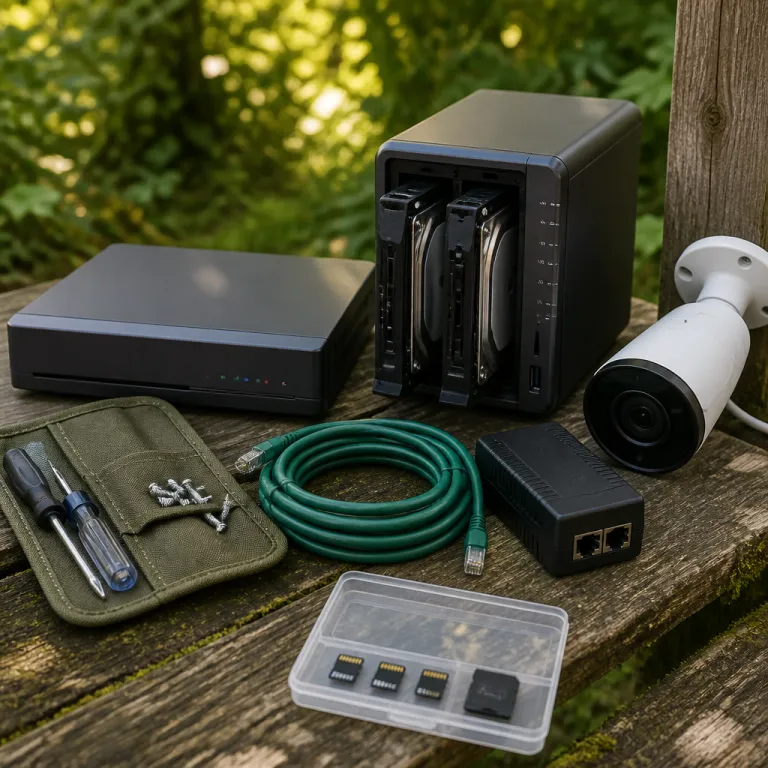
Security camera NAS vs NVR storage: where microSD really fits
For a privacy first buyer, the real fight is not cloud versus local but security camera NAS vs NVR storage versus tiny microSD cards. When you run just one or two security cameras like a Ring Stick Up Cam or Blink Outdoor 4, the cheapest and most tempting storage solution is a microSD card hidden inside the camera. That local card feels private and simple, yet its silent failures and limited video storage can leave you with no usable footage when you actually need evidence.
Think of microSD as per camera attached storage that lives at the edge of your network, recording video data directly from the camera sensor. Each security camera writes its own footage to its own card, so there is no central system to manage retention, no RAID redundancy, and no unified way to store or search clips. When a card dies or fills, the camera usually just overwrites the oldest footage, which means your most critical surveillance window might vanish overnight without any warning.
For fewer than four cameras, microSD can still be a rational storage solution if you understand its limits and build around them. You accept that the drives are disposable consumables, you schedule regular replacement, and you treat the cards as a rolling buffer rather than a long term archive of video surveillance. In that scenario, the main comparison of security camera NAS vs NVR storage becomes less urgent, because the real question is how much risk you tolerate in exchange for low cost and minimal complexity.
In practical terms, a 128 gigabyte card in a single camera can hold several days of continuous video or a couple of weeks of motion detection clips, depending on bitrate and resolution. Multiply that by three or four security cameras and you have a fragmented set of video data scattered across your property, with no central video recorder or network video timeline to scrub through. When something happens, you walk from camera to camera, pulling cards like old film rolls, hoping the relevant footage has not already been overwritten.
That workflow is tolerable for a small flat or a modest house where you just want to store short clips of deliveries or the occasional visitor. It becomes painful the moment you add more cameras, raise your expectations for security, or need to share footage with police or an insurance company. At that point, the trade off between a simple card and a more structured storage nas or nvr storage system becomes impossible to ignore.
There is also the physical risk factor that rarely gets mentioned in glossy marketing for security cameras. If someone steals or smashes the camera, they take the microSD card and every second of footage with it, which means your only copy of the data disappears at the exact moment you need it. That is why many privacy focused homeowners pair microSD with a limited cloud backup, using local cards as primary video storage and a narrow cloud window for only the most critical entrances.
From a cost perspective, microSD looks attractive because a 128 to 512 gigabyte card costs a fraction of a NAS or NVR system and consumes almost no extra electricity. The hidden bill arrives later in the form of card replacements, lost footage, and the time you spend managing scattered drives instead of one coherent network attached storage platform. When you weigh security camera NAS vs NVR storage against microSD, you are really choosing between structured systems and a pile of tiny, failure prone drives.
For a privacy first buyer who distrusts big tech cloud storage, microSD can be a stepping stone rather than a final destination. Start with cards in a couple of PoE cameras from Reolink or Amcrest, then plan a path toward either a dedicated NVR or a more flexible NAS storage setup as your network and expectations mature. The key is to treat microSD as a buffer and not as the backbone of your home security system.
When NVR systems are the right local workhorse
Once you move beyond three or four cameras, the balance in the security camera NAS vs NVR storage debate shifts decisively toward a dedicated NVR. An NVR, or network video recorder, is a single box that sits on your network, connects to your IP cameras, and records all video surveillance to one or more internal hard drives. Brands like Reolink, Lorex, and Hikvision sell NVR systems that bundle PoE cameras, a recorder, and often a preinstalled hard drive, which makes them appealing to homeowners who want a turnkey solution.
In an NVR system, each camera streams network video back to the recorder over Ethernet, often powered by the same cable using PoE, which simplifies installation. The NVR then writes that video data to its internal drives, usually a single large hard drive or a pair of hard drives in a simple RAID configuration for redundancy. Because everything is centralized, you get one interface to scrub through footage, manage motion detection zones, and export clips, which is a huge upgrade from juggling microSD cards in multiple security cameras.
For a household with four to eight cameras of the same brand, an NVR is usually the most efficient local storage solution. You get 24/7 recording, consistent video storage retention, and a predictable power draw from a single box instead of several separate NAS systems or ad hoc attached storage devices. The trade off is that the NVR becomes a single point of failure, so if the recorder or its drives die, you lose the entire window of footage across all cameras.
That risk is not theoretical, especially when NVR storage relies on a single consumer grade hard drive spinning non stop in a warm cupboard. When that drive fails, you do not just lose one camera’s footage nas archive, you lose the entire security system history for that period. This is where the security camera NAS vs NVR storage conversation becomes about redundancy and backup, not just about which box is easier to plug in.
Some NVRs support basic RAID mirroring, which writes the same video data to two hard drives so that one can fail without losing footage. That redundancy helps, but it also doubles your drive cost and does not protect against theft or fire, because the recorder and both drives usually sit in the same physical location. A privacy first homeowner who wants stronger protection often adds a second layer, such as periodic exports to an external attached storage drive or a small NAS nvr bridge that syncs critical footage.
Network design matters here, because a poorly wired system can turn even the best NVR into a bottleneck. If you are running PoE cameras back to a central switch, a clear CAT 5 cable wiring diagram for home security cameras can prevent half the troubleshooting you would otherwise face. Clean cabling, a dedicated VLAN for video surveillance traffic, and a stable router mean your NVR spends its time recording footage instead of dropping frames during peak network usage.
Compared with a NAS, an NVR is less flexible but more appliance like, which suits many homeowners who want to set it and forget it. You usually cannot mix many different camera brands, and advanced features like AI object detection or complex RAID layouts are limited or absent. Yet for a mid sized home with a single brand of PoE security cameras, an NVR remains the most straightforward way to store and manage video without paying ongoing cloud subscription fees.
In the decision tree, if you have four to eight cameras, are comfortable staying within one ecosystem, and want a predictable one time cost, an NVR is the default recommendation. It gives you centralized video storage, simple playback, and a clear upgrade path by swapping in larger hard drives as your retention needs grow. Only when you start mixing brands, integrating with Home Assistant, or demanding more granular control does the NAS side of the security camera NAS vs NVR storage debate start to win.
Why NAS storage is the power user’s local brain
For the privacy first buyer who runs Home Assistant, mixes Reolink with UniFi Protect, and refuses to pay subscription fees, the center of gravity in the security camera NAS vs NVR storage debate usually lands on a NAS. A NAS, or network attached storage device, is essentially a small server with multiple drive bays, a dedicated operating system, and applications like Synology Surveillance Station or QNAP QVR Pro that turn it into a flexible video recorder. Instead of locking you into one brand of cameras, a NAS can ingest RTSP streams from many different security cameras and store that footage on a pool of hard drives with proper RAID redundancy.
In a NAS based system, each camera sends network video streams over Ethernet or Wi Fi to the NAS, which acts as the central video storage and management hub. You can run multiple volumes, schedule different retention policies per camera, and even separate sensitive indoor footage nas archives from less critical outdoor streams. Because NAS systems are designed as general purpose storage servers, they also support snapshots, offsite backup, and integration with other data workflows, which makes them attractive to technically confident homeowners.
The flexibility comes at a cost, both financial and cognitive, that many people underestimate when they compare security camera NAS vs NVR storage. A decent four bay NAS with enough RAM to run video surveillance software comfortably, plus two or more large hard drives in RAID, often pushes the entry price well beyond a simple NVR kit. On top of that, some vendors charge per camera license fees for their surveillance applications, which means your storage nas budget needs to include both hardware and software.
There is also the ongoing electricity bill, because a NAS runs as a full time server, not a low power appliance, and that constant draw adds up over the years. In exchange, you gain the ability to run multiple services, from file sharing to media servers, alongside your video recorder, which can justify the cost if you consolidate other devices. For a household that already relies on a NAS for family data, adding video surveillance becomes an incremental step rather than a separate system.
Reliability is where NAS systems can outshine both microSD and basic NVR storage, provided you configure them correctly. With RAID 1 or RAID 5, a single hard drive can fail without losing video data, and you can replace the failed drive while the system keeps recording. You can also schedule automated backup jobs to another attached storage device or to an encrypted offsite location, creating layers of redundancy that a single box NVR cannot match.
As on device AI improves, more cameras can handle motion detection, person recognition, and even vehicle classification locally, sending only relevant video data to the NAS. That shift reduces bandwidth, shrinks storage requirements, and keeps more intelligence at the edge instead of in a remote cloud. If you want to understand how this trend changes your architecture, a deep dive into how on device AI is replacing the cloud for camera processing can clarify why a flexible NAS brain pairs so well with smarter cameras.
For a mixed brand setup with PoE bullets on the eaves, a dual lens 4K outdoor security camera covering the driveway, and maybe a battery powered Nest Cam watching the garden, a NAS becomes the only realistic way to unify video storage. You can run multiple network video profiles, adjust bitrates per camera, and tune motion detection sensitivity to avoid filling your drives with useless clips of tree branches. In that sense, the NAS is less a simple recorder and more a video data platform for your entire home.
In the decision tree, if you have more than eight cameras, care deeply about long term retention, and are comfortable managing a small server, a NAS is the right answer. It turns the security camera NAS vs NVR storage question into a broader conversation about how you manage all your household data, not just surveillance footage. For this persona, the NAS is not overkill, it is the backbone of a coherent, privacy respecting security system.
A practical decision tree and hybrid strategies that actually work
When you strip away marketing, the security camera NAS vs NVR storage choice is really about matching complexity to your household, not chasing features. Start with the simplest branch of the decision tree, which asks how many cameras you plan to run over the next few years, not just how many you own today. If the honest answer is one to three cameras, microSD with limited cloud backup for only the most critical views is usually enough.
On that branch, you treat each camera as a self contained system with its own attached storage, and you accept the risk of card failure in exchange for low cost and minimal maintenance. You still harden the setup by choosing reputable cards, enabling motion detection to reduce write cycles, and exporting important clips to a separate hard drive or computer when incidents occur. This approach keeps your network simple and your data local, which aligns well with a privacy first mindset that distrusts broad cloud surveillance.
If you expect to stabilize around four to eight cameras of the same brand, the next branch points toward an NVR as your primary storage solution. You gain a unified interface, consistent video storage retention, and a clear upgrade path by swapping in larger hard drives or adding a second recorder if your system grows. To mitigate the single point of failure problem, you can schedule periodic exports of critical footage nas archives to an external drive or even a small nvr nas bridge that mirrors only your most important cameras.
For households that will eventually run more than eight cameras, mix brands, or integrate with Home Assistant and other smart home systems, the NAS branch becomes the most future proof. You invest more upfront in a multi bay NAS, multiple drives in RAID for redundancy, and the time to configure network attached storage correctly, but you gain long term flexibility. As your cameras evolve, from basic Reolink PoE domes to advanced models with AI motion detection and higher bitrate video, your NAS systems can adapt without forcing a full platform reset.
Hybrid strategies often deliver the best balance between resilience, privacy, and cost, especially for this persona. One effective pattern is to use an NVR as the primary video recorder for all cameras, while a NAS captures lower bitrate network video streams from only the most critical entrances as a secondary backup. Another pattern is to rely on NAS storage as the main archive while enabling limited cloud clips for a single front door camera, so that a burglar cannot simply steal your recorder and erase every trace.
Future proofing means thinking about what happens when each layer fails, not just how it works on a good day. When a microSD card dies, you lose only that camera’s footage, but you may not notice for weeks unless you check regularly, so schedule health checks as part of your routine. When an NVR hard drive fails, you lose a whole window of multi camera footage, so RAID mirroring and external backup become non negotiable if you treat your system as real security rather than a gadget.
When a NAS drive fails inside a RAID array, you have a grace period to replace it without losing data, but you must monitor SMART health and alerts or that safety net disappears. You also need to budget for the electricity and replacement hard drives that keep a NAS based video storage platform healthy over the long term. The hidden costs are not just financial, they include the time and attention you are willing to invest in running your own surveillance infrastructure.
For a privacy first homeowner, the most honest next step is to sketch your own decision tree on paper, listing camera count, technical comfort, and tolerance for maintenance. Then choose one primary storage solution — microSD, NVR, or NAS — and one backup layer that protects only your most critical footage without dragging you into full cloud dependence. That way, your home ends up not just watched by security cameras, but genuinely protected by a storage system that still works when something goes wrong at three in the morning.
Key figures that shape local storage decisions
- MicroSD cards for security cameras typically cost between 15 and 40 dollars for 128 to 512 gigabytes, which makes them the cheapest per camera storage option but also the most failure prone over several years of continuous writing.
- A consumer NVR kit with four PoE cameras and a 4 terabyte hard drive usually costs between 260 and 460 dollars as a one time purchase, while equivalent cloud subscriptions for four cameras can add up to roughly 600 to 1 800 dollars over a five year period.
- Entry level four bay NAS units with enough CPU and RAM to run video surveillance software comfortably often start around 500 dollars before adding hard drives, which means the true initial investment can exceed 800 dollars once you include multiple drives in RAID for redundancy.
- Many surveillance focused hard drives are rated for workloads of up to 180 terabytes written per year, which is significantly higher than standard desktop drives and matters when you run 24/7 recording across multiple cameras on an NVR or NAS.
- Using motion detection instead of continuous recording can reduce storage consumption by 50 to 80 percent in typical residential environments, depending on how busy the scene is and how carefully you tune sensitivity and detection zones.
- Running a NAS 24/7 can add roughly 20 to 40 watts of continuous power draw, which translates into noticeable electricity costs over several years and should be included in any long term budget comparison with simpler NVR or microSD based systems.