

Understanding the importance of regular maintenance
Why Regular Care Matters for Your Security System
Keeping your home security camera system in top shape is not just about peace of mind. Regular maintenance is essential for ensuring your security equipment works when you need it most. A well-maintained system helps prevent false alarms, missed alerts, and gaps in coverage. Whether you rely on your security system for home or business security, neglecting maintenance can lead to costly issues and vulnerabilities.
- Reliability: Regular maintenance checks help ensure all components, from cameras to motion sensors and the control panel, are functioning correctly.
- Performance: Dust, weather, and time can affect your devices. Cleaning and caring for your camera lenses and sensors will keep your system’s performance sharp.
- Security: Outdated software or firmware can leave your system open to threats. Keeping up with software updates is a key part of maintaining security.
- Compliance: For those with monitored alarm systems, some insurance policies or central station agreements require proof of regular maintenance and testing.
Regular system maintenance is not just about the cameras. It involves checking all devices, sensors, and the alarm system to ensure everything is working together. Routine testing security features, such as alerts and access control, helps you catch issues before they become real problems. If you’re unsure how to perform these checks or updates, or if you want to learn more about optimizing your alarm system, you might find this guide on how to choose and use an alarm keypad for better home security helpful.
By making regular maintenance a habit, you ensure your system remains ready to protect your home or business. In the next sections, we’ll look at common issues in security systems, how to care for your camera lenses, and when to call a professional for help.
Common issues in home security camera systems
Spotting the Most Frequent Camera System Challenges
Home security camera systems are designed to provide peace of mind, but like any technology, they can develop issues over time. Recognizing these common problems early is key to maintaining security and ensuring your system remains reliable.- Connectivity Problems: Cameras may lose connection to your network, causing gaps in recording or live feeds. Regular maintenance checks help catch these issues before they compromise your security.
- Power Failures: Power interruptions or faulty wiring can cause cameras or the control panel to stop working. This can impact both home and business security systems, so it’s important to check power sources and backup batteries regularly.
- Dirty or Obstructed Lenses: Dust, debris, or weather can cloud camera lenses, reducing image quality. Cleaning and caring for your camera lenses is essential for clear footage and effective monitoring.
- Outdated Software or Firmware: Security equipment relies on software updates to fix vulnerabilities and add features. Failing to update your system’s software or firmware can leave your system open to threats.
- Sensor and Device Malfunctions: Motion sensors, fire sensors, and other security devices may fail or become less sensitive over time. Regular testing security devices ensures they respond correctly to real events and don’t trigger false alarms.
- Recording and Alert Failures: Sometimes, the system may not record footage or send alerts as expected. Testing your system’s recording and alerts helps catch these problems early.
- Access Control Issues: Problems with access control panels or alarm systems can prevent you from arming or disarming your system. Maintenance checks on these components are crucial for smooth operation.
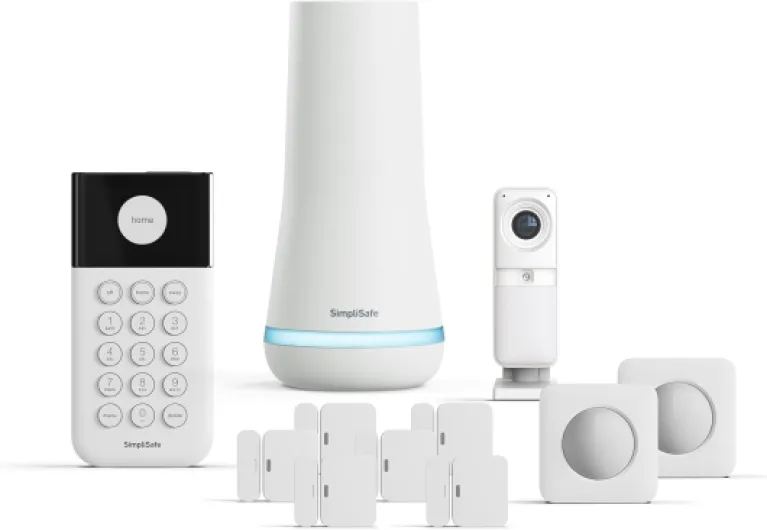
- + Wireless components for easy setup
- + Includes an Indoor HD camera for clear video
- + 11-piece kit covers multiple entry points
- + Optional 24/7 professional monitoring available
- + No Contract required — pay-as-you-go monitoring

Cleaning and caring for your camera lenses
Keeping Camera Lenses Clean for Clearer Footage
A clean camera lens is essential for any security system. Dust, fingerprints, or even spider webs can blur your footage, making it difficult to identify people or incidents. Regular maintenance of your camera lenses is a simple but crucial step in ensuring your system remains effective.- Inspect lenses regularly: Make it a habit to check your camera lenses during your routine maintenance checks. Look for smudges, dirt, or any obstructions that might affect image quality.
- Use the right cleaning materials: Avoid harsh chemicals or rough cloths. Instead, use a microfiber cloth and a gentle lens cleaner. This helps prevent scratches and keeps your security equipment in top condition.
- Check for environmental issues: Outdoor cameras are especially vulnerable to weather, insects, and debris. Ensure that your devices are protected with proper housing and clean them more frequently if they are exposed to the elements.
- Don’t forget the sensors: Some cameras include motion sensors or infrared sensors near the lens. These components also need regular cleaning to ensure accurate detection and reduce false alarms.
Checking and updating your system’s software
Why software updates matter for your security system
Keeping your home security system’s software up to date is a crucial part of regular maintenance. Software and firmware updates often include important security patches, new features, and bug fixes. Ignoring these updates can leave your system vulnerable to cyber threats or cause compatibility issues with other devices.How to check for and apply updates
- Access your system’s control panel or mobile app to check for available software updates. Most modern security systems will notify you when updates are ready to install.
- Schedule regular maintenance checks to ensure all components, including cameras, sensors, and the central station, are running the latest software or firmware.
- Follow the manufacturer’s instructions carefully when updating. Interrupting the process can cause issues or even disable certain security devices.
What to look out for during updates
- After installing updates, test your system’s recording, motion sensors, and alarm functions to ensure everything works as expected.
- Check that all connected devices, such as access control panels and fire sensors, are communicating properly with the main system.
- Be aware that outdated software can lead to false alarms or missed alerts, reducing the effectiveness of your security equipment.
Tips for maintaining security through software
- Enable automatic updates if your system supports it. This helps ensure you never miss critical patches.
- Keep a record of update dates as part of your overall system maintenance routine.
- If you notice persistent issues after an update, contact your security provider or a professional for further assistance.
Testing your system’s recording and alerts
How to verify your system is capturing and alerting properly
Regular testing is a crucial part of maintaining security for your home or business security systems. Even with consistent maintenance checks and software updates, issues can develop that impact the performance of your security equipment. Here’s how to ensure your system remains reliable:- Test all cameras and sensors: Walk through your property and trigger motion sensors, door sensors, and cameras. Confirm that each device records and sends alerts as expected. This helps in identifying any faulty security devices or components.
- Check the control panel and alarm system: Make sure the control panel displays accurate status updates for all connected devices. Test the alarm system by simulating an intrusion to ensure it activates and sends notifications to your central station or mobile device.
- Review recorded footage: Access your system’s storage and review recent recordings. Look for gaps, poor image quality, or missing footage, which could signal issues with the recording function or storage components.
- Test notifications and alerts: Confirm that you receive timely alerts for motion detection, fire, or unauthorized access. If you notice delays or missed notifications, it may be time to check for software firmware updates or adjust your alert settings.
- Simulate power outages: If your system has backup power, disconnect the main supply to ensure the system continues to operate and record during outages. This is especially important for maintaining security during emergencies.
When to call a professional for maintenance
Recognizing When Expert Help Is Needed
Even with regular maintenance and routine system checks, there are times when calling a professional is the best way to ensure your security system remains reliable. While many issues can be handled through basic cleaning, software updates, and regular testing, some situations require specialized knowledge and tools.- Persistent Issues: If your security cameras or other devices repeatedly malfunction, despite regular maintenance, it may indicate a deeper problem with the system components or wiring.
- Software or Firmware Problems: When updates fail or the system software behaves unpredictably, a professional can diagnose compatibility issues and perform necessary updates safely.
- False Alarms: Frequent false alarms from your alarm system, motion sensors, or fire sensors can point to calibration or hardware issues that need expert attention.
- Expansion or Upgrades: Adding new devices, integrating access control, or upgrading your control panel often requires technical expertise to ensure all components work together seamlessly.
- Central Station Connectivity: If your system is monitored by a central station and you notice communication failures, a technician can test and repair the connection to maintain security coverage.
What Professionals Bring to System Maintenance
Security system professionals have the training and equipment to perform advanced maintenance checks, troubleshoot complex issues, and ensure all devices—including cameras, sensors, and alarm systems—are functioning as intended. They can also test your system’s recording and alert features, verify that software updates are correctly applied, and check for vulnerabilities that could compromise your security.Regular Professional Inspections
Scheduling regular inspections with a certified technician is a proactive way to maintain your security equipment. These visits often include:- Comprehensive testing of all security devices
- Review of system logs and software updates
- Inspection of wiring and power supplies
- Calibration of motion sensors and fire sensors
- Ensuring the control panel and access control systems are operating correctly