
Summary
Editor's rating
Price vs what you actually get: fair, with a few trade‑offs
Bulky dome look, but practical for 360° coverage
Solar power and battery: does it really run itself?
Build quality and how it handles weather and daily abuse
Image quality, tracking and app behaviour in real use
What you actually get in the box and how it all fits together
Does it actually make you feel more secure day to day?
Pros
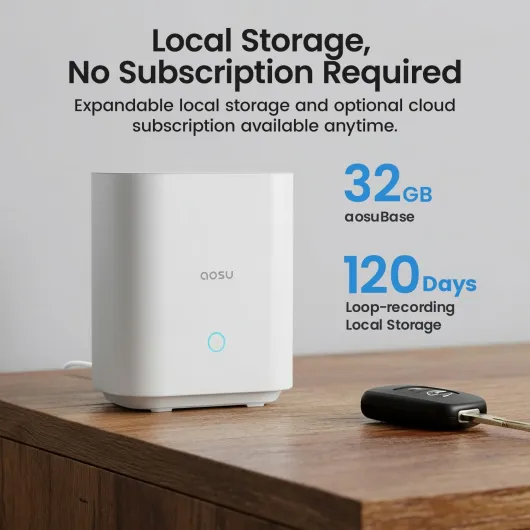
- No subscription needed: 32 GB local storage on the aosuBase included
- Integrated solar panels keep the batteries topped up in normal sunlight, reducing manual charging
- 360° PTZ with colour night vision and auto tracking covers large areas with fewer cameras
Cons
- Bulky dome design is very visible and not ideal if you want something discreet
- Fixed 32 GB storage on the base can feel limited if you add more cameras or want long history
- Auto tracking and app interface could be smoother and need some tweaking to avoid notification spam

Specifications
View full product page →| Brand | aosu |
Wireless cams that don’t nag you for subscriptions
I’ve been running this aosu 2K wireless 2‑camera kit around my house for a couple of weeks. One cam is at the front door, the other covers the driveway and part of the garden. I picked this kit mainly because I was tired of cameras that look cheap at first, then hit you with monthly cloud fees if you actually want to keep footage. Here, everything records on the aosuBase with 32 GB built in, so no immediate upsell.
My setup: average UK semi-detached house, dual‑band Wi‑Fi, router in the living room. I mounted both cameras about 2.5 m high, one on brick, one on wood cladding. Weather’s been mixed: a few sunny days, some rain, a couple of cold nights. Enough to see how the solar and wireless connection behave in normal conditions, not just in a lab scenario.
Overall, the system feels like it targets people who want something wireless, solar, and not too fiddly. Everything talks to the aosuBase, and that base is plugged into Ethernet, which seems to stabilise the connection. You control everything from the app, and it supports both 2.4 GHz and 5 GHz Wi‑Fi, which is handy if your 2.4 GHz band is crowded.
It’s not perfect. The app could be clearer in places, motion detection can be a bit chatty if you don’t tune it, and the cameras are only 3 MP (2K), not the sharpest on the market. But the mix of no subscription, solar power, and 360° pan/tilt is pretty solid for the price. I’ll break down what worked well and what annoyed me so you know what you’re actually getting.
Price vs what you actually get: fair, with a few trade‑offs
From a value point of view, this kit sits in the mid‑range. You’re paying more than for a couple of basic 1080p Wi‑Fi cams, but you’re also getting pan/tilt, solar power, local storage via the aosuBase, and no mandatory subscription. If you compare it to brands that push cloud plans heavily, the maths changes quite a bit. Not having to pay a monthly fee to keep recordings is a big plus over time.
The catch is you’re limited to 32 GB of internal storage on the base. That’s fine for a small setup like this 2‑cam kit, but if you add more cameras or crank up recording quality and length, you’ll hit the loop limit sooner. For most people, having the last few weeks of events is enough, but if you want months of history, you’ll probably find this too tight. Also, there’s no clear path to just pop in a bigger SD card because the storage is built‑in, which feels a bit restrictive.
On the positive side, you’re getting solar panels integrated, 2 cameras with 360° PTZ and colour night vision, and a hub that stabilises the connection. If you tried to build something similar with separate PoE cams, NVR, and cabling, you’d probably spend more money and time, unless you’re already comfortable with that stuff. For someone who just wants a relatively clean, wireless setup with decent features, this aosu kit lands in a pretty good spot.
So in terms of value, I’d call it good but not unbeatable. There are cheaper options if you accept subscriptions or lower image quality, and there are more expensive systems if you want 4K and huge storage. This one sits in the middle: fair price for what it offers, especially if you plan to keep it for several years and don’t want ongoing fees eating into your budget.
Bulky dome look, but practical for 360° coverage
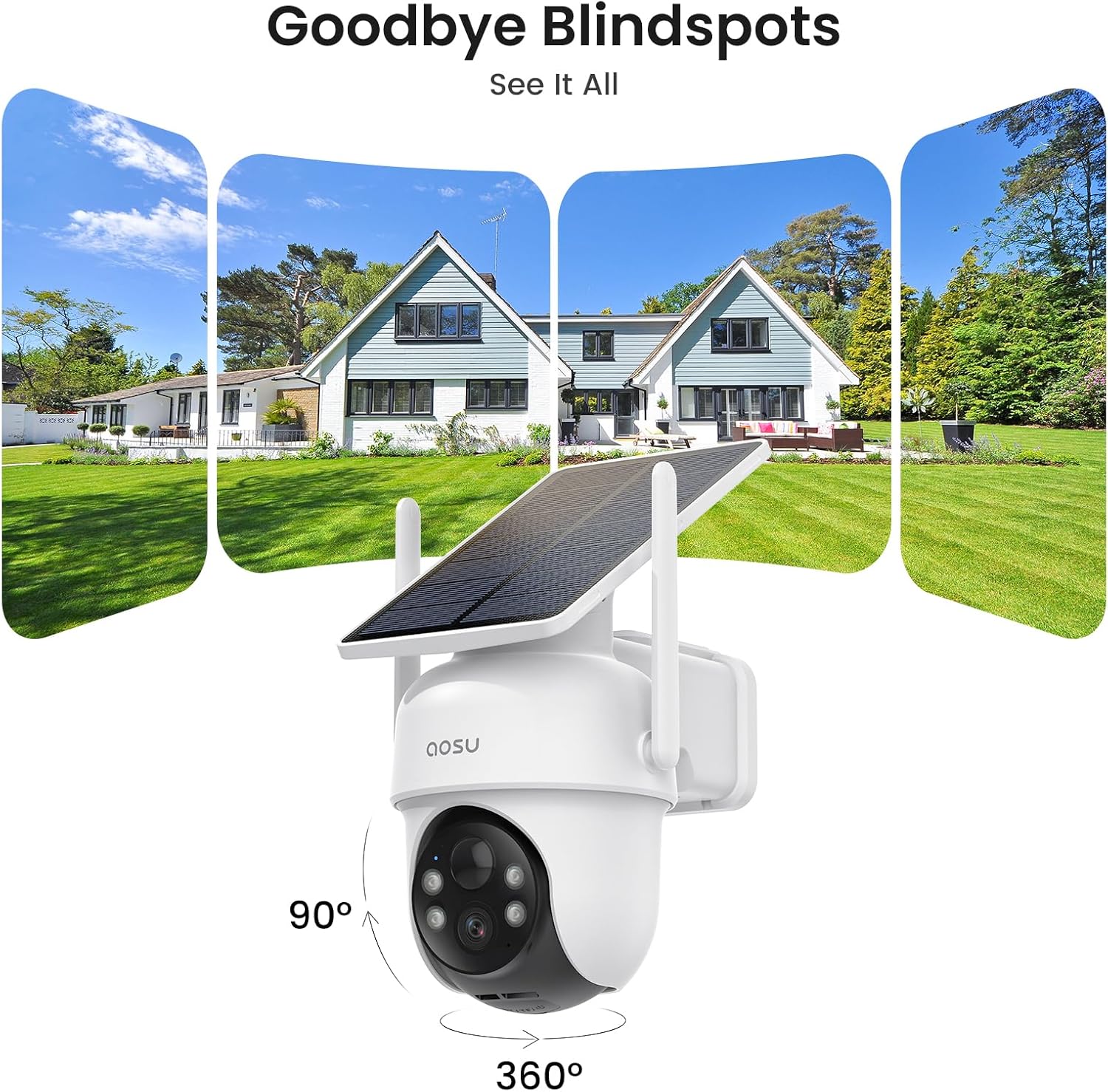
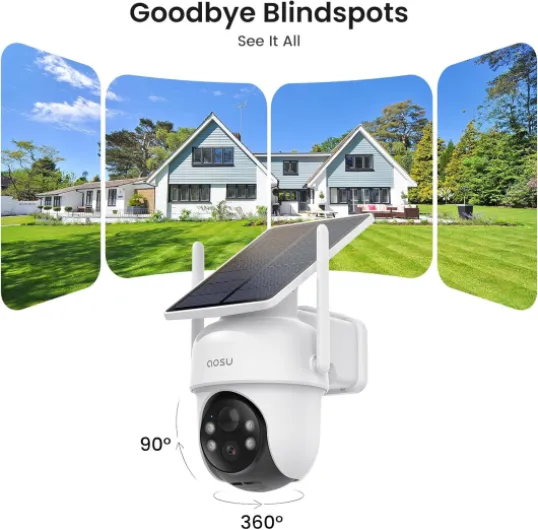
Design‑wise, each camera is a dome‑style PTZ with a built‑in solar panel on top. They’re not tiny; once mounted, you definitely see them. Personally, I don’t mind that. A visible camera is already some level of deterrent. If you want something discreet, this isn’t it. The camera head rotates inside the dome and can pan and tilt quite far, so you can cover a wide area with a single unit instead of mounting three fixed cameras.
The solar panel is integrated, not a separate plate on a cable like some brands. That keeps things cleaner visually and means fewer cables, but it also means you need to think about mounting angle. You want the lens to look at the area you care about and, at the same time, the panel on top needs enough sunlight. On my north‑facing side wall, the front camera only gets a few hours of indirect light and still kept its charge, but I wouldn’t mount it fully under a deep porch roof and expect miracles.
The aosuBase is a small plastic box, plain and functional. It sits next to my router and doesn’t draw attention. There are status LEDs on the front, Ethernet and power at the back, and that’s about it. No screen, no SD card slot, no fancy design. It feels like a network device you forget about, which is fine by me. Once configured, I rarely look at it.
Overall, the design is more about practicality than style. Large housing, clear lens, visible IR and LED lights, and a decent swivel range. The downside is that if you’re in a flat or somewhere with stricter aesthetics, the bulk could be an issue. But if you just want clear coverage around a house, the dome form factor with 360° pan/tilt makes sense and saves you from buying extra fixed cameras.
Solar power and battery: does it really run itself?
This is probably the part most people care about: does the solar panel actually keep the cameras charged, or do you end up getting the ladder out every month anyway? In my case, with mixed UK spring weather (sun, clouds, rain), both cameras stayed between 70% and 100% the whole time. aosu claims 3 hours of sunlight per day is enough to keep them topped up. I didn’t measure exact sunlight hours, but my south‑facing driveway cam definitely charged faster than the more shaded front cam.
Usage matters a lot. I had motion detection active, recording on events only, and not constantly checking live view. If you start using live view all the time, pan/tilt repeatedly, and talk through the speaker often, you’ll drain the battery faster. The solar panel will still refill, but maybe not as fast as you drain it on very active days. For normal use (a few events per hour at most, some live checks), the “install and forget” promise is mostly true so far. I haven’t had to plug in a charging cable once.
The cameras charge via USB‑C if you ever need to top them up manually, which is better than proprietary plugs. The battery percentage is visible in the app, so you can monitor it over weeks. If you live somewhere with very long winters, constant shade, or mount the cam under a big overhang, don’t expect miracles from the small built‑in panel. In those cases, you might need to either reposition the cam or accept the occasional manual charge.
Overall, I’d say battery and solar performance are solid for typical suburban setups, but not magic. If you give the panel half a chance with some decent exposure, you probably won’t worry about charging. If you try to run it in a dark alley with no sun, it will behave like a normal battery cam and eventually run low. At least you have the option to charge via cable without taking the whole system apart.
Build quality and how it handles weather and daily abuse
The cameras are rated IP65, which basically means dust‑tight and protected against water jets. In normal terms: fine for rain, wind, and general outdoor use, just don’t dunk them in a pond. Over the couple of weeks I’ve had them up, they’ve gone through several rainy nights and some strong gusts. No leaks, no condensation inside the dome, and no rattling. The plastic housing feels reasonably thick, not flimsy. You can tell it’s not industrial‑grade metal, but for a home product, it feels sturdy enough.
The mounting brackets are basic but hold the cameras firmly. Once screwed in properly, I didn’t notice any wobble, even when the wind picked up. I did give one of the cams a decent push by hand to see if it would shift out of alignment; the bracket held, and only the PTZ mechanism moved, as expected. If you’re installing on softer material like wood, I’d still recommend using decent screws and not just trusting the cheapest ones in the box.
Long‑term durability is harder to judge after only a few weeks, but a couple of details look reassuring. The seals around the joints and cable ports are snug, and the finish doesn’t scratch too easily. The solar panel on top didn’t show any marks from light debris or the occasional branch brushing against it. The aosuBase sits indoors, so it’s naturally more protected. It’s just a plastic box, but it doesn’t heat up much and hasn’t made any odd noises.
My only real concern would be potential vandalism. Because the cams are quite visible and mounted relatively low (if you follow the manual), someone determined could probably whack them with a stick. That’s true of most consumer cameras though. The upside is that all recordings are stored on the base inside the house, so even if someone rips off the cam, you still keep the footage of them doing it. For normal households and weather conditions, build quality and durability feel more than adequate.
Image quality, tracking and app behaviour in real use
The cameras are 3 MP (2K), so not ultra‑sharp like some 4K models, but good enough to clearly see faces and number plates at short to medium distance. At about 5–8 metres, I can easily recognise people and see what they’re carrying. At 10–12 metres, details start to soften but are still usable. It’s a clear step above old 1080p cams I’ve had, but you’re not getting cinema‑level clarity. For a home setup, it gets the job done.
Daytime image is clean with decent colours. It doesn’t blow out highlights as badly as some cheap cams, though on very bright days, white cars can still look a bit washed out. The colour night vision is where these cams are more interesting. With the 4 LED lights on, my driveway looks almost like a dimly lit car park. You see colours, not just grey blobs. The trade‑off is you’re basically shining light into the area, so if you have neighbours close by, you might want to dial it down or set it to IR‑only at night.
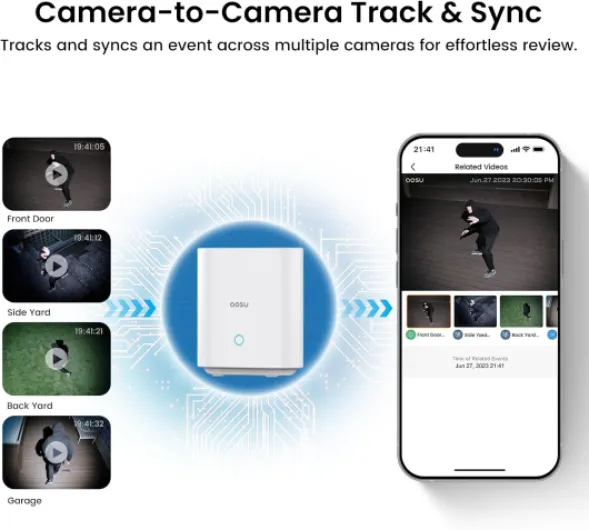
The auto motion tracking is handy but not perfect. When a car pulls into the driveway or someone walks past, the camera does follow them, but it can over‑pan a bit and then slowly correct itself. It’s fine for general monitoring, but if you want perfectly framed clips every time, you’ll be slightly annoyed. The cross‑camera tracking feature (tying events from both cams together) is genuinely useful when checking if someone walked from front door to side gate; you tap, and the app lines up both perspectives.
Notifications are fairly quick. On my phone (Android), I usually get an alert 2–4 seconds after motion starts. Live view loads reasonably fast on Wi‑Fi; on 4G, it’s a bit slower but still okay. There’s a slight delay in audio and video, but nothing shocking for a wireless system. Connection stability has been good so far: no random disconnects, no missing events that I’ve noticed. The main performance downside is that if your Wi‑Fi is weak where the cameras are, you will see some lag and occasional pixelation, so plan your base and router placement properly.
What you actually get in the box and how it all fits together
Out of the box, you get: 2 dome‑style PTZ cameras, the aosuBase (the hub/recorder), 2 short charging cables (USB‑A to USB‑C), 2 wall mounts, screws, positioning stickers, and a small manual. No separate power bricks for the cameras since they’re meant to live off solar and their internal batteries. The base station does need power and Ethernet. The 32 GB storage is built into the base, not a removable SD card.
The idea is simple: the cameras connect wirelessly to the aosuBase, the base connects to your router (I used Ethernet), and you manage everything via the aosu app. The base handles recording and notifications. aosu claims up to 4 months of loop recording on 32 GB; in practice that will depend on how often motion is triggered and what quality settings you use. With my front and driveway cams on standard sensitivity and normal clip length, after about 2 weeks I had plenty of space left and the system was already looping older events without me having to touch anything.
Setup is fairly straightforward. You plug in the base, scan a QR code in the app, and then add each camera one by one. The app walks you through pairing, and each cam confirmed pairing via a voice prompt. It’s not totally idiot‑proof, but if you’ve ever set up a smart plug or a Wi‑Fi camera before, you’ll manage. It took me roughly 30–40 minutes from opening the box to having both cameras mounted and streaming, including drilling holes.
The whole system is clearly aimed at home users who don’t want to mess with NVRs, PoE, or running Ethernet cables. Everything is wireless on the camera side, and the base acts as a small NVR. If you’re used to pro‑grade CCTV with 4K PoE cams and huge hard drives, this will feel like a step down. But if you’re upgrading from basic battery cams or video doorbells, the aosu kit feels like a decent middle ground: more flexible than a single doorbell cam, but not overkill.
Does it actually make you feel more secure day to day?
In practice, effectiveness comes down to three things for me: do I get reliable alerts, can I see what happened clearly, and can I review it later without hassle. On those points, this aosu kit does a pretty good job. Motion alerts come through consistently. At first, I had way too many notifications because the driveway cam was picking up every passing car and even some larger birds. After reducing the detection area and adjusting sensitivity in the app, it calmed down to a more reasonable level and only pinged me for actual people or cars entering the property.
The combination of 2K resolution and colour night vision means I can usually identify people and see what they’re doing, even in the evening. When a courier dropped a parcel at 9 pm, I could see his company logo and the package clearly. When my neighbour walked across the shared path, I could tell it was him, not just a silhouette. That’s the kind of detail that makes a camera genuinely useful instead of just a gadget.
Reviewing events via the aosuBase is straightforward. Clips are sorted by time and camera, and the cross‑camera tracking feature is actually practical: if someone appears on the front cam then on the driveway cam, I can jump between those clips without scrolling through a timeline manually. It’s not perfect, but it does save time when you’re checking a longer sequence of events, like someone walking around the house.
Overall, I’d say the system does its job as a home security tool. It won’t replace a professional monitored alarm, but for keeping an eye on entrances, cars, and general outdoor activity, it works well enough. The main thing is to spend 20–30 minutes fine‑tuning zones and sensitivity at the start, otherwise you’ll drown in notifications and end up ignoring them, which defeats the whole purpose.
Pros
- No subscription needed: 32 GB local storage on the aosuBase included
- Integrated solar panels keep the batteries topped up in normal sunlight, reducing manual charging
- 360° PTZ with colour night vision and auto tracking covers large areas with fewer cameras
Cons
- Bulky dome design is very visible and not ideal if you want something discreet
- Fixed 32 GB storage on the base can feel limited if you add more cameras or want long history
- Auto tracking and app interface could be smoother and need some tweaking to avoid notification spam
Conclusion
Editor's rating
After living with the aosu 2K 2‑cam kit for a bit, my overall feeling is that it’s a solid, practical system for regular home users. The key strengths are pretty clear: no subscription needed, genuinely useful solar charging, and 360° PTZ coverage that cuts down on blind spots. Image quality is good enough to recognise faces and details in both day and night conditions, and the colour night vision with the LEDs is a real upgrade over the usual grainy black‑and‑white footage.
It’s not flawless. The cameras are bulky and not exactly pretty, the auto‑tracking can be a little twitchy, and the 32 GB fixed storage on the aosuBase feels a bit limited if you plan to expand beyond two cameras. The app works, but it’s not the most polished thing I’ve used; you’ll want to spend time tuning motion zones and sensitivity, otherwise you’ll get more alerts than you’d like. Still, once configured, the system runs quietly in the background without constant babysitting.
I’d say this kit is well suited for homeowners or renters who want to cover entrances, driveways, or gardens without messing with wiring or paying monthly fees. If you’re a power user chasing 4K, full wired reliability, and big storage arrays, this won’t satisfy you. If you just want a straightforward, mostly self‑powered setup that actually records locally and lets you see what’s going on around your place, it’s a good fit.