
Summary
Editor's rating
Value: strong features for the price, with some hidden costs
Design: compact, simple, and doesn’t scream ‘industrial CCTV’
Battery and power: good if you set it up right, bad if you don’t
Durability and weather resistance: holds up fine in real weather
Performance: sharp 4K image and decent AI, but Wi‑Fi is king
What you actually get with the Tapo C465
Pros
- Very clear 4K image with useful detail, both day and night
- No hub required and supports local microSD storage (no forced subscription)
- Easy setup and decent AI motion detection once configured properly
Cons
- Real-world battery life can be far shorter than the advertised 180 days in busy areas
- Strongly dependent on good Wi‑Fi signal for stable performance
- Included wall plugs and screws feel cheap and may need replacing with better hardware

Specifications
View full product page →| Brand | Tapo |
A straightforward 4K camera that mostly does what it says
I’ve been using the Tapo C465 4K security camera outside my house for a few weeks now, pointed at my driveway and front gate. I didn’t buy it to build a fancy smart home, I just wanted to clearly see who comes in and out, day and night, without paying a monthly fee if possible. I already had a couple of cheaper 1080p cameras, but they struggled with faces and licence plates once it got dark or if someone was a bit further away.
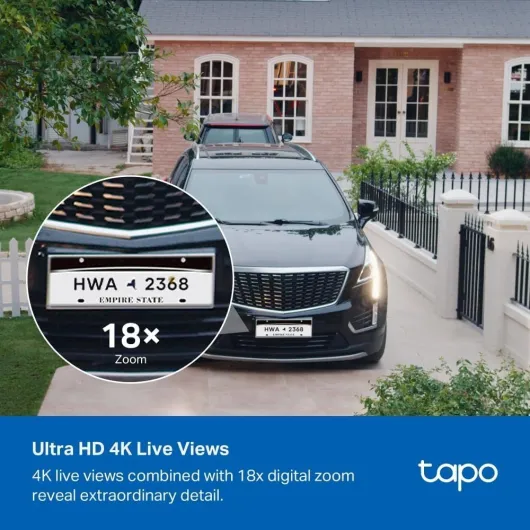
Right away, the thing that stands out with this camera is the image quality. 4K on a security cam isn’t just marketing; you actually see more detail when you zoom into the recordings. On my old 1080p cam, zooming in made everything look like a blurry mess. On this one, it’s still not cinema-level, but I can recognise faces at my gate and read plates at a reasonable distance if the angle is right. That’s basically why I bought it, and on that part, it delivers.
Setup was also fairly painless. I already use the Tapo app for other TP-Link cameras, so adding this one took maybe 10 minutes: plug it in to charge, follow the app, connect to Wi‑Fi, done. No hub, no extra box, it just talks directly to the router. If you’re used to smart devices, it’s pretty routine. If it’s your first time, you’ll probably still manage without needing a manual the size of a phone book.
It’s not perfect though. The battery and power side is where you need to think a bit before buying. Depending on how busy the area is and how you set motion detection, the battery life can vary a lot. Also, if your Wi‑Fi signal is weak where you want to place it, you’re going to have connection drops and missed clips. So overall, solid camera, but not a magic solution you just slap on the wall and forget forever.
Value: strong features for the price, with some hidden costs
In terms of value for money, the Tapo C465 sits in a good spot. You’re getting 4K resolution, colour night options, two-way audio, local microSD recording, and no mandatory subscription. Compared to a lot of big-name brands that push you into monthly cloud fees, this is refreshing. If you just add a microSD card, you can have a fully usable system without paying anything extra per month, which is what I wanted.
However, there are a few “hidden” costs to keep in mind. First, you pretty much need a microSD card if you want proper recordings. Without it (or cloud), the camera loses a lot of its point. So add that to the price. Second, if your Wi‑Fi doesn’t reach the camera well, you might end up needing a Wi‑Fi extender or mesh node, which is more money. Third, if you want the more advanced cloud features or easier remote access history, you might be tempted into the Tapo cloud subscription. It’s not mandatory, but it’s there, and a lot of people end up paying for it.
Compared to cheaper 1080p cameras, you’re paying a bit more here, but you actually see where the money goes: better image quality and more flexible smart features. For me, the difference between seeing a blurry shape and a recognisable face is worth paying a bit extra. If you already have other Tapo devices, the value is even better because everything sits in the same app and works the same way.
If you’re on a tight budget and don’t care about 4K or clear faces at distance, you can definitely find cheaper options that “get the job done” in a basic way. But if you want a sharper outdoor camera with no forced subscription, this one offers pretty good bang for the buck. Just be realistic about battery life and the cost of the extras (SD card, maybe better Wi‑Fi) when you do the maths.

Design: compact, simple, and doesn’t scream ‘industrial CCTV’
Design-wise, the Tapo C465 is pretty compact and low-key. Mine is the Snow White version, and from a distance it just looks like a small modern camera, not some big ugly industrial unit. If you care what the front of your house looks like, this is decent. It’s not tiny, but compared to older bullet cameras with big antennae and chunky bodies, this one is fairly discreet. I mounted it above my front door and it doesn’t draw much attention unless you’re actively looking for it.
The build is mostly plastic, but it doesn’t feel cheap or hollow. The joints and mount feel solid enough for normal home use. You can angle the camera up, down, and sideways during installation, but it doesn’t rotate or pan remotely. That’s important: once it’s fixed, that’s your angle. If you want to cover a wide area, you either have to mount it in the right spot from the start or buy more than one. For me, that’s fine, but if you’re used to motorised PTZ cameras, this will feel basic.
The USB‑C port for charging is on the camera body, and it’s covered with a rubber flap to keep water out. It’s not the most premium cover in the world, but it does the job. I like that it’s USB‑C and not some weird proprietary connector, so I can use the same cable I use for my phone or power bank. The microSD card slot is also tucked away and not something you’ll be constantly opening, which is good because you don’t want water getting in there.
In terms of looks, it’s fine: nothing fancy, nothing ugly. It’s the kind of design you forget about after a few days, which is honestly what I want from a security camera. The only real complaint I have is the included screws and wall plugs feel a bit flimsy. I’ve seen a few people mention that the plugs broke when screwing into brick, and I had the same feeling, so I just used my own better-quality rawl plugs. Once it’s up, though, it sits firmly and doesn’t wobble, even with wind and rain.
Battery and power: good if you set it up right, bad if you don’t
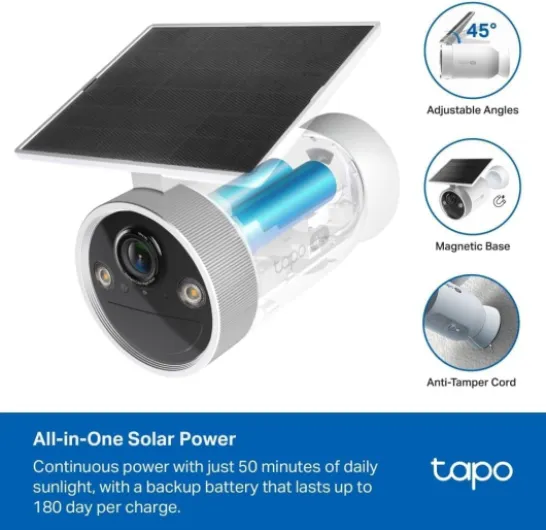
The battery situation is where opinions will differ a lot. The product page talks about up to 180 days on a full charge. In real life, you only get anywhere near that if the camera is in a quiet spot with very few motion events and if you’re not constantly checking the live view. On my driveway, which gets a mix of people, cars, and deliveries, the battery drains faster. I’m not hitting 6 months, more like several weeks to a couple of months depending on how aggressive the settings are.
The key is how you configure motion detection and recording. If you set it to record every little movement with long clips, the battery will obviously go down faster. I ended up limiting detection zones to just my driveway and front door, and I shortened the clip length. After that, the battery life became more acceptable. It’s still not something I forget about for half a year, but I’m not charging it every week either. It’s fine, but not magical. If your area is very busy (main road, lots of people passing), expect to charge it more often.
Charging itself is straightforward thanks to the USB‑C port. I usually just plug in a power bank and leave it charging in place, so I don’t have to remove the mount. Some people prefer to take the camera down and charge it indoors; the mount makes that fairly easy too. A full charge takes a few hours, which is acceptable for a device you charge every month or two. Personally, I’d rather deal with occasional charging than run a power cable along the wall, but that’s a personal choice.
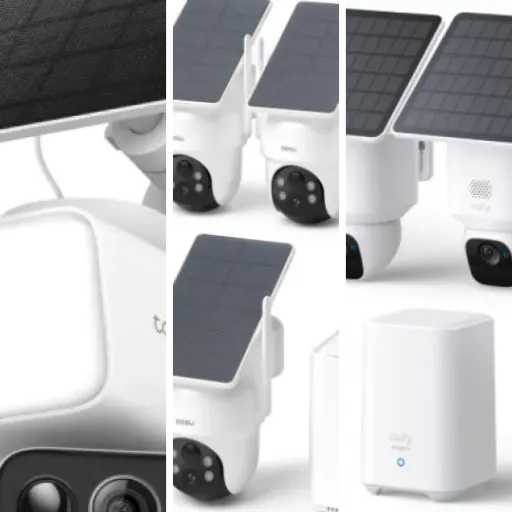
If you’re planning to use it in a very high-traffic area and you hate the idea of charging, you might want to look at a wired camera or one paired with a solar panel instead. This one is good for light to moderate traffic and people who don’t mind topping it up now and then. Just don’t take the 180-day claim as a guarantee; think of it as “best case if almost nothing happens in front of the camera.”
Durability and weather resistance: holds up fine in real weather
The Tapo C465 is rated IP65, which basically means it can handle dust and water jets from any direction. In normal language: it’s fine in the rain. I’ve had it outside through several heavy showers and some windy days, and it hasn’t shown any signs of water getting in. No fogging on the lens, no random disconnects during bad weather. It just keeps recording like normal. For a plastic-bodied camera, that’s all I really ask for.
The mount and joints have also held up okay so far. Once you tighten it properly, it doesn’t sag or move on its own, even with wind. I gave it a couple of good knocks with my hand to see if it would shift, and it stayed in place. Long term, plastic mounts can get brittle with constant sun exposure, but after a few weeks of use, I haven’t seen any fading or cracks. Given how many people have had these up for months according to reviews, I’m not too worried, but I’d still avoid over-tightening the screws to the point of stress.
One thing I did notice is that the rubber flap over the USB‑C port feels like the weakest point in the weatherproofing. It seals fine if you push it in properly, but I can see this being the part that wears out first if you open and close it every couple of weeks. My workaround is to charge it fully and not poke at that flap more than necessary. If you’re someone who loves to tinker daily, just be aware that constant opening might shorten its life.
Overall, in terms of durability, I’d call it pretty solid for home use. It’s not a heavy-duty industrial camera you’d mount in a warehouse loading dock, but for a typical house exterior, it handles rain, cold, and sun just fine. If you live somewhere with very harsh winters or intense sun, I’d just check on it every few months to make sure the plastic and seals still look okay. So far, no real complaints on this front.
Performance: sharp 4K image and decent AI, but Wi‑Fi is king
On the performance side, the 4K image quality is the main selling point, and it actually delivers. During the day, the picture is very clear, colours look natural, and you can zoom in on the Tapo app without everything turning into blocks. I’ve compared it directly to an older 1080p camera on the same spot: with the Tapo C465, I can read a licence plate at the end of my driveway and clearly see faces across the street, while the 1080p one just gives me a rough idea that someone is there.
At night, you’ve got two options: standard IR night vision (black and white) or starlight colour night with the help of the built-in spotlight. In practice, the colour night mode is useful if there’s at least a bit of ambient light, like a street lamp or porch light. With the spotlight on, the area in front of the camera is bright enough to see colours and details. It’s not like daytime, but it’s definitely more useful than the classic fuzzy black-and-white view. I’ve had one incident where a car pulled up at night and I could clearly see the colour of the car and the person’s jacket, which is exactly what I wanted from 4K + colour night.
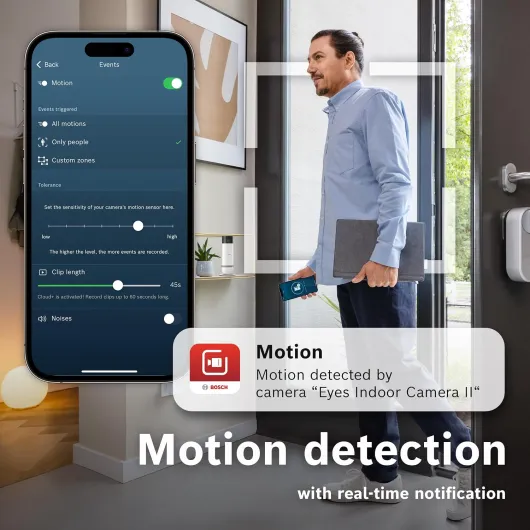
The motion detection and AI are pretty solid once you tweak them. Out of the box, I was getting too many notifications from cars on the main road. After adjusting the activity zones and lowering sensitivity, it calmed down and mostly only pings me when someone actually walks into my driveway or up to the door. It can distinguish between people and general motion, and that helps. It’s not perfect; sometimes heavy rain or big moving shadows still trigger it, but it’s manageable. You do need to spend 10–15 minutes in the app tuning it, though.
Where performance can fall apart is with weak Wi‑Fi. If the camera is too far from the router or the signal has to go through a couple of thick walls, you’ll see laggy live view and sometimes gaps in recordings. That’s not really the camera’s fault, but it’s something to be aware of. In my case, I moved my router slightly and things stabilised. When the Wi‑Fi is decent, the live feed loads in a few seconds, and scrubbing through the timeline on the app is fairly smooth, especially if you’re using a microSD card for local storage.
What you actually get with the Tapo C465
The Tapo C465 is basically a 4K outdoor Wi‑Fi camera with a built-in battery, spotlight, microphone, and speaker. You mount it on a wall, connect it to your home Wi‑Fi, and then watch the live feed or recordings from your phone using the Tapo app. It supports up to 4K (8MP) recording, uses MPEG‑4, and is rated IP65, which means it can handle rain and dust without drama. It’s meant for outdoors, but nothing stops you from using it indoors if you want.
In the box, you get the camera, a wall mount, screws and plugs, and a USB‑C port on the camera for charging. There’s no power brick included in most packs I’ve seen, so you’ll need your own USB charger or a power bank to top it up. You also don’t get a microSD card, which is important: without a card or cloud subscription, you basically only have live view and notifications, no real history to go back to. So factor in the cost of at least a 32 or 64 GB microSD if you don’t want to pay monthly for cloud.
The camera talks to your phone via the Tapo app, and also works with Alexa and Google Home. In practice, this means you can ask your Echo Show or Nest Hub to show the camera feed. It’s a nice extra if you already have those screens; if you don’t, you won’t miss much. There’s also AI detection for people, vehicles, etc., which helps cut down on useless alerts from leaves and shadows, as long as you spend a bit of time fine-tuning the sensitivity.
One thing to be clear on: this model doesn’t need a separate hub, but it still relies heavily on your Wi‑Fi quality. If the camera is too far from the router or there are thick walls, you’ll see lag, pixelation, or failed recordings. So the product itself is decent, but your home network will decide a big part of your experience. Overall, it’s a pretty complete package on paper: 4K, colour night, spotlight, two-way audio, no hub, microSD or cloud. You just need to add good Wi‑Fi and storage on your side.
Pros
- Very clear 4K image with useful detail, both day and night
- No hub required and supports local microSD storage (no forced subscription)
- Easy setup and decent AI motion detection once configured properly
Cons
- Real-world battery life can be far shorter than the advertised 180 days in busy areas
- Strongly dependent on good Wi‑Fi signal for stable performance
- Included wall plugs and screws feel cheap and may need replacing with better hardware
Conclusion
Editor's rating
After using the Tapo C465 for a while, my feeling is simple: it’s a solid 4K outdoor camera that does most of what it promises without turning into a subscription trap. The daytime image is very clear, and the night performance with colour and the spotlight is genuinely useful, especially if you care about identifying faces and cars, not just seeing vague movement. Setup is easy, the app is straightforward, and the AI detection is good enough once you spend a bit of time tuning it.
It’s not perfect. The “up to 180 days” battery claim is optimistic unless your camera watches a very quiet area, and the included wall plugs are a bit cheap. Wi‑Fi quality makes or breaks the experience, so if your signal is weak where you want to mount it, expect some headaches or extra spend on a Wi‑Fi extender. Also, if you don’t buy a microSD card or sign up for the cloud, the camera loses a lot of its usefulness.
I’d say this camera is well suited for homeowners or renters who want clear footage, don’t mind charging every few weeks or months, and already have decent Wi‑Fi coverage outside. It’s also a good pick if you’re already in the Tapo ecosystem and want everything in one app. On the other hand, if you need 24/7 continuous recording, hate the idea of ever charging a battery, or have very poor Wi‑Fi, you should probably look at a wired PoE system or a different solution. Overall, it’s a good, practical choice with strong image quality and reasonable compromises for the price.