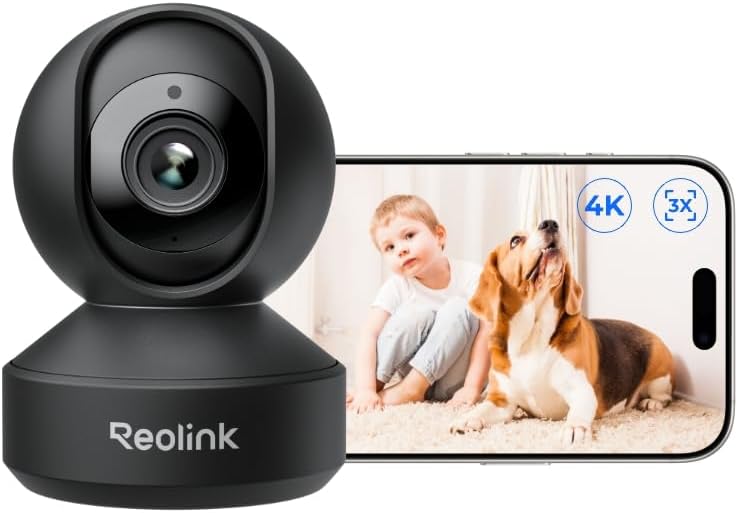



Understanding the benefits of 4k resolution in home security
Sharper Details for Better Security
When it comes to home security, the clarity of your video footage can make all the difference. A 4k PTZ camera delivers ultra-high-definition video, capturing every detail in your yard, driveway, or entryway. This means you can easily identify faces, license plates, and even small objects, which is a major advantage over standard HD cameras. The difference is especially noticeable during live streaming or when reviewing recorded footage from your app or microsd card.
Why 4k Outperforms Standard Cameras
- Full coverage: With four times the resolution of 1080p, a 4k camera provides a wider, clearer view. This is essential for outdoor camera setups where you want to cover large areas without losing detail.
- Zoom without losing clarity: Optical zoom on a 4k PTZ camera lets you zoom in on distant objects while maintaining sharpness. This is a big step up from digital zoom, which often results in blurry images.
- Enhanced night vision: Many 4k PTZ cameras offer color night vision, allowing you to see more than just silhouettes after dark. This can be crucial for identifying intruders or tracking motion at night.
Real-World Impact of High-Resolution Video
Imagine being able to track a person moving across your property at night, or reading a license plate from your driveway. With a 4k PTZ camera, these tasks become much easier. High-speed pan, tilt, and zoom features mean you can follow motion in real time, while the camera’s resolution ensures you don’t miss important details. For more on how roof-mounted cameras can maximize your home’s security coverage, read this guide on roof-mounted security cameras.
Making the Most of Your Investment
While the regular price of 4k PTZ cameras may be higher than standard models, the benefits in terms of security, control, and peace of mind are significant. With features like auto tracking, high-speed movement, and support for sdi hdmi output, these cameras offer professional-grade performance for homeowners in the United States and beyond. Whether you’re using a Wyze Cam Pan, a dedicated outdoor PTZ camera, or another model, investing in 4k means you’re getting the best possible video quality for your home security system.
How pan, tilt, and zoom features improve coverage
Expanding Your View: The Power of Pan, Tilt, and Zoom
When it comes to home security, seeing more means protecting more. PTZ (pan tilt zoom) cameras are designed to give you control over what you monitor, unlike fixed cameras that only capture a single angle. With a PTZ camera, you can move the lens horizontally (pan), vertically (tilt), and zoom in or out, all from your app or computer. This flexibility is a huge leap forward for anyone serious about home security.
- Pan: Move the camera left or right to cover wide areas, such as driveways or backyards. This means fewer blind spots compared to standard cameras.
- Tilt: Adjust the lens up or down to monitor multi-level spaces, like stairways or porches. This is especially useful for outdoor camera setups.
- Zoom: Optical zoom lets you focus in on details—like faces or license plates—without losing video quality. This is a big advantage over digital zoom, which can make images blurry.
Many PTZ cameras now offer high speed movement and auto tracking, so the camera can follow motion automatically. This is ideal for tracking people or vehicles at night, when quick response is critical. Features like color night vision and full HD or 4k video ensure you get clear footage, even in low light. Some models, like the Wyze Cam Pan, combine affordability with advanced features, making high-end security accessible to more households in the United States.
Remote control is another game changer. With live streaming through a mobile app, you can move your cam pan in real time, check on alerts, or review motion events. This level of control is a big step up from traditional cameras, which often require manual adjustment.
For those comparing price and features, PTZ cameras may have a higher regular price than basic models, but the added coverage and camera zoom capabilities can reduce the need for multiple cameras. Many support microSD card storage, SDI HDMI outputs, and integration with smart home systems, making them versatile for both indoor and outdoor use.
To learn more about the advantages of different camera designs, including domes that offer discreet protection and weather resistance, read this guide on security camera domes.
Key features to look for in a 4k pan tilt zoom camera
What Sets a Quality 4K PTZ Camera Apart?
When shopping for a 4K pan tilt zoom (PTZ) camera, it’s easy to get overwhelmed by the technical jargon. To make sure you’re investing in a camera that truly boosts your home security, focus on these essential features:
- True 4K Resolution: Not all cameras labeled as 4K deliver the same clarity. Look for a camera that offers full 4K video, ensuring you can zoom in on details like faces or license plates without losing image quality.
- High-Speed Pan, Tilt, and Zoom: The ability to move the camera quickly and smoothly is crucial. High-speed PTZ cameras can track motion across wide areas, reducing blind spots and letting you control the view in real time through an app or desktop interface.
- Optical Zoom vs. Digital Zoom: Optical zoom uses the camera’s lens to magnify the image, maintaining sharpness even at high zoom levels. Digital zoom, on the other hand, simply enlarges pixels, which can lead to blurry footage. For best results, prioritize cameras with a powerful optical zoom.
- Night Vision and Color Night Capabilities: Security threats don’t stop after dark. Advanced PTZ cameras offer infrared night vision, and some even provide color night vision for clearer identification in low light.
- Auto Tracking and Motion Detection: Features like auto tracking allow the camera to follow moving objects automatically. Combined with smart motion detection, this ensures you never miss important activity, whether it’s a visitor or a potential intruder.
- Reliable Storage Options: Consider cameras that support microSD cards for local storage, as well as cloud backup. This redundancy protects your footage in case of network or power issues.
- Weatherproof and Outdoor-Ready: If you’re installing your PTZ camera outdoors, make sure it’s rated for your climate. Look for weatherproofing, and check if the camera supports sdi hdmi output for flexible installation.
- App Control and Live Streaming: A user-friendly app lets you control pan, tilt, and zoom remotely, view live streaming, and receive instant alerts. Compatibility with popular platforms like Wyze Cam or other leading brands can be a plus.
- Power Options: Some cameras offer Power over Ethernet (PoE) for simple installation, while others may require separate power sources. Choose what fits your setup best.
When comparing PTZ cameras, don’t just look at the regular price. Consider the value of features like high-speed movement, advanced night vision, and robust motion tracking. For those in the United States, it’s also important to read up on outdoor surveillance camera laws to ensure compliance and protect your privacy.
Ultimately, the right 4K PTZ camera should offer a balance of performance, reliability, and ease of use. By focusing on these key features, you’ll be better equipped to choose a security camera that keeps your home safe, day and night.

- + 4K Resolution for clear video quality
- + AI Features for enhanced security
- + Color Night Vision for low light performance
- + 360° Pan/Tilt for comprehensive coverage
- + 8x Digital Zoom for detailed viewing

Installation tips for optimal performance
Positioning Your PTZ Camera for Maximum Coverage
To get the most out of your 4k pan tilt zoom (PTZ) camera, placement is crucial. These cameras offer high speed movement and a wide field of view, but their effectiveness depends on where and how you install them. Mount your outdoor camera at a height that covers entry points like doors, driveways, or backyards. This allows the camera to pan, tilt, and zoom efficiently, capturing full video coverage and taking advantage of features like auto tracking and motion detection.
Power and Connectivity Considerations
Reliable power is essential for continuous security. Many PTZ cameras can be powered via PoE (Power over Ethernet), which simplifies installation by combining power and data in a single cable. If your cam pan model uses a regular power adapter, ensure it is protected from the elements. For wireless cameras, check your Wi-Fi strength at the installation spot to avoid interruptions in live streaming or app control. Some models support SDI HDMI output for direct video feeds, which can be useful for advanced setups.
Optimizing Night Vision and Image Quality
Night vision is a key feature in modern security cameras. To maximize performance, avoid pointing the camera directly at bright lights or reflective surfaces, as this can reduce the effectiveness of color night vision. For outdoor PTZ cameras, ensure the lens and sensors are clean and unobstructed. Optical zoom capabilities allow you to focus on distant objects without losing clarity, especially important for identifying details at night.
Securing Storage and Data
Most PTZ cameras offer local storage options like a microsd card, as well as cloud storage. Insert the card properly and check compatibility with your camera model. Regularly back up important footage and set up alerts in your app for when the card is full. For added security, choose cameras with encrypted video transmission to protect your data from unauthorized access.
Integrating with Smart Home Systems
Many PTZ cameras, including popular models like Wyze Cam, offer integration with smart home apps for remote control and real-time notifications. Set up motion tracking and customize zones to reduce false alarms. Use the app to pan, tilt, and zoom the camera as needed, and enable live streaming to monitor your property from anywhere in the United States.
- Test your camera’s movement range (pan, tilt, zoom) after installation
- Check for firmware updates regularly to ensure optimal performance and security
- Label and organize power and data cables for easier maintenance
Addressing privacy and data security concerns
Protecting Your Privacy with Advanced Security Cameras
When installing a 4k PTZ camera, privacy and data security are just as important as image quality and coverage. With features like pan, tilt, and optical zoom, these cameras can capture a wide area, but they also raise questions about who can access the video and how your data is stored.- Secure App Access: Always use a camera app that supports two-factor authentication and strong password requirements. This helps prevent unauthorized access to your live streaming or recorded footage.
- Encrypted Video Transmission: Look for PTZ cameras that offer end-to-end encryption for both live video and stored files. This is especially important for outdoor cameras and those with high-speed pan tilt zoom functions, as they often cover sensitive areas around your home.
- Local Storage Options: Many users prefer storing video on a microsd card or similar local storage, rather than relying solely on cloud services. This gives you more control over your footage and can reduce the risk of data breaches.
- Firmware Updates: Regularly update your cam’s firmware to patch security vulnerabilities. Reputable brands release updates to address new threats and improve data protection.
- Network Security: Connect your PTZ camera to a secure, password-protected Wi-Fi network. If your camera supports sdi hdmi connections, consider using them for added security, especially in the United States where privacy laws can vary.
Balancing Surveillance and Personal Privacy
A 4k PTZ camera with features like auto tracking, night vision, and motion detection can be powerful tools for home security, but it’s important to respect the privacy of family members and neighbors. Position your camera to avoid capturing footage from public areas or neighboring properties. Use privacy zones or masking features if your camera app supports them, so the cam pan and tilt functions don’t record unintended spaces.Data Retention and Access Control
Decide how long you want to keep recorded video. Many PTZ cameras allow you to set automatic deletion schedules for footage stored on a microsd card or in the cloud. Limit access to your security camera system by only granting permissions to trusted users. This is especially important if your camera supports remote control or live streaming features. By prioritizing privacy and data security, you can enjoy the full benefits of your 4k PTZ camera—such as high-speed tracking, color night vision, and powerful zoom—while keeping your personal information and home safe.Maintaining your 4k pan tilt zoom camera for long-term reliability
Routine Care for Consistent Performance
Keeping your 4k PTZ camera in top condition is essential for reliable home security. Regular maintenance helps your camera deliver sharp video, smooth pan tilt zoom movement, and dependable night vision. Here’s what you should focus on:
- Clean the lens and housing – Dust, rain, and insects can blur your camera’s view. Gently wipe the lens with a microfiber cloth and check the housing for debris. This is especially important for outdoor cameras and PTZ models with high-speed movement.
- Check power and connections – Inspect power cables, SDI HDMI outputs, and network connections. Loose or damaged wires can cause outages or poor video quality, especially during live streaming or when using the app for remote control.
- Update firmware – Manufacturers often release updates that improve motion tracking, auto tracking, and security features. Regularly check for updates in your camera app or on the manufacturer’s website.
- Test pan, tilt, and zoom functions – Run the camera through its full range of motion. Make sure the pan tilt zoom controls respond quickly and the optical zoom remains clear at all levels. This is crucial for PTZ cameras with advanced tracking and color night vision.
- Review storage – If your cam uses a microSD card, check its health and available space. Replace cards that show errors or fill up quickly. For cloud storage, confirm your subscription and backup settings.
Preventing Common Issues
- Protect from weather – Outdoor PTZ cameras need proper sealing to prevent water or dust from entering. Use weatherproof covers if your camera isn’t fully rated for outdoor use.
- Secure mounting – Over time, vibrations or wind can loosen mounts. Inspect brackets and screws, especially for high-speed PTZ models or when the camera is mounted high up for wide coverage.
- Monitor night vision – Test the camera’s night and color night vision modes regularly. Clean any infrared sensors and make sure nearby lights don’t interfere with the camera’s ability to track motion in the dark.
When to Seek Professional Help
If your PTZ camera shows persistent issues—like blurry video, unresponsive controls, or frequent power loss—it may be time to contact the manufacturer or a certified technician. This is especially true for advanced features like auto tracking or high-speed pan tilt zoom that require precise calibration.
By following these steps, you’ll help your security camera deliver reliable performance, whether you’re monitoring your home at night, zooming in for details, or using live streaming through your app. Regular care also protects your investment, ensuring your camera continues to provide peace of mind at a reasonable price.