

Understanding the basics of smart PTZ cameras
What Sets PTZ Cameras Apart in Home Security?
When exploring home security options, you’ll often come across the term PTZ—short for Pan, Tilt, and Zoom. Unlike fixed security cameras, PTZ cameras offer dynamic movement, letting you remotely control the camera’s direction and zoom level. This flexibility means you can monitor wide areas, track motion, and focus on specific details, all from your phone or a dedicated camera app.
How PTZ Technology Works
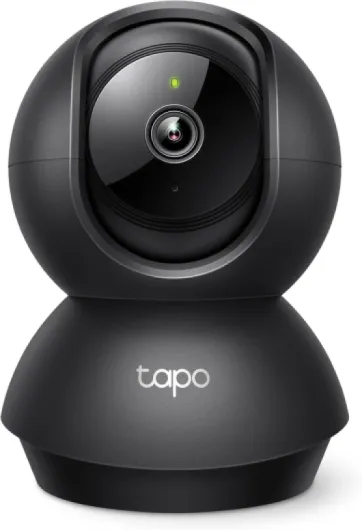
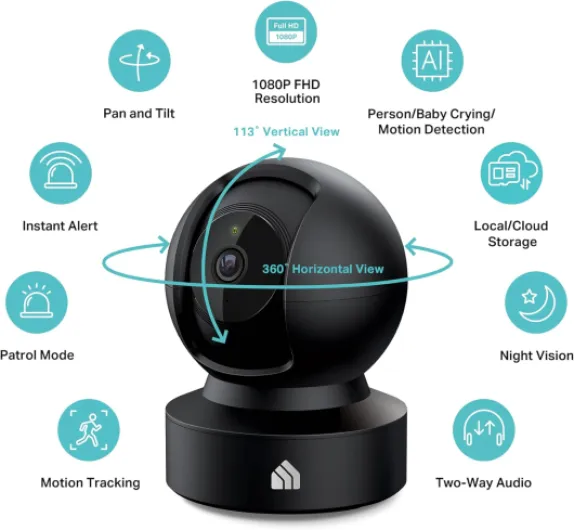
PTZ cameras use motors to move horizontally (pan), vertically (tilt), and to zoom in or out, often with optical zoom for clear, detailed video. Many smart PTZ cameras connect via wifi or wired networks, and some models are part of a larger camera series designed for both indoor and outdoor use. These cameras offer features like night vision, motion detection, and auto tracking, making them a versatile product for modern security systems.
- Pan: Sweeps the camera left and right to cover a broad area
- Tilt: Moves the lens up and down for vertical coverage
- Zoom: Optical zoom brings distant objects into focus without losing clarity
Smart Features and Connectivity
Today’s best PTZ security cameras are often smart—meaning they integrate with mobile apps, support cloud storage, and can be managed alongside other wireless security devices. Many cameras are certified for outdoor use, with weather-resistant designs and advanced motion detection. Some options even support auto tracking, following movement across your property for enhanced monitoring.
Choosing the Right PTZ Camera for Your Needs
With so many cameras on the market, it’s important to compare features like video quality, night vision, and compatibility with your existing security systems. Consider whether you need a wired PTZ or a wireless model, and look for cameras that offer reliable app control and flexible installation options. For a deeper dive into how turret cams compare to PTZ cameras, check out this guide on enhancing your home security with a turret cam.

Key features to look for in a smart PTZ camera
What Sets Smart PTZ Cameras Apart?
When evaluating a smart PTZ camera for your home security, understanding the essential features can make all the difference. PTZ stands for pan, tilt, and zoom, which means these cameras offer flexible control over what you monitor. The best PTZ security cameras combine these mechanical movements with smart technology, giving you more than just a static view.
- Optical Zoom: Unlike digital zoom, optical zoom uses the camera's lens to magnify the image, maintaining video clarity. This is crucial for identifying details at a distance, especially in outdoor security systems.
- Pan and Tilt Control: The ability to remotely pan and tilt the camera allows you to cover wide areas. Some cameras offer auto tracking, following motion across their field of view for continuous monitoring.
- Motion Detection and Smart Tracking: Advanced motion detection can trigger alerts and recording. Smart tracking features let the camera automatically follow movement, reducing blind spots and improving real-time monitoring.
- Night Vision: Look for cameras with infrared or color night vision to ensure your security system works around the clock, even in low-light conditions.
- Connectivity Options: PTZ cameras come in both wired and wireless security options. Wired PTZ cameras may offer more stable connections, while wireless models provide easier installation and flexibility.
- App Integration: A dedicated camera app lets you control pan, tilt, and zoom from your phone, receive alerts, and view live video. This is especially useful for managing multiple cameras in a series.
- Cloud Storage and Local Recording: Consider whether the camera supports cloud storage, SD cards, or network video recorders for storing footage securely.
- Weatherproof and Certified for Outdoor Use: If you need outdoor coverage, ensure the camera is certified for weather resistance to withstand rain, dust, and temperature changes.
For a deeper dive into how zoom, tilt, and pan features enhance your home security camera, check out this detailed guide on camera movement features.
Choosing the right PTZ camera product means balancing these features with your specific needs. Whether you prioritize optical zoom for distant monitoring, advanced motion detection, or seamless app control, modern PTZ cameras offer a wide range of options to fit your home security system.
How smart PTZ cameras improve real-time monitoring
Real-time Surveillance: What Makes PTZ Cameras Stand Out
Smart PTZ cameras have changed the way homeowners monitor their property. With pan, tilt, and zoom (PTZ) capabilities, these cameras offer a dynamic approach to security that fixed cameras simply can't match. The ability to remotely control the camera's direction and zoom in on specific areas means you can respond quickly to any suspicious activity, whether you're at home or away.- Pan, Tilt, and Zoom Control: PTZ cameras allow you to move the lens horizontally (pan), vertically (tilt), and zoom in or out. This flexibility means you can cover wide areas and focus on details, like license plates or faces, with optical zoom.
- Motion Detection and Auto Tracking: Many smart PTZ cameras feature advanced motion detection. When movement is detected, the camera can automatically track the subject, following them across the field of view. This auto tracking is especially useful for outdoor security and large properties.
- App-Based Monitoring: Most PTZ security cameras connect to your wifi and can be managed through a dedicated camera app. This lets you view live video, control the camera, and receive instant alerts on your phone, no matter where you are.
- Night Vision and Low-Light Performance: Modern PTZ cameras offer strong night vision capabilities, ensuring your property is monitored 24/7. Infrared LEDs or low-light sensors help maintain clear video even in darkness.
- Cloud Storage and Playback: Many cameras offer cloud storage options, so you can review footage from anywhere. This is crucial for evidence collection and peace of mind.
Comparing PTZ Cameras to Traditional Security Cameras
| Feature | PTZ Camera | Traditional Security Camera |
|---|---|---|
| Pan/Tilt/Zoom | Yes (remote control) | No (fixed view) |
| Auto Tracking | Available in smart models | Rarely available |
| Coverage Area | Wide, adjustable | Limited, static |
| Real-Time Control | Via app or security systems | Not available |
| Zoom Options | Optical and digital zoom | Usually digital only |
Enhancing Your Security System with Smart PTZ Cameras
Integrating PTZ cameras into your home security system can significantly improve your ability to monitor and respond to incidents in real time. Whether you choose wired PTZ or wireless security options, these cameras offer flexibility for both indoor and outdoor use. Certified products in a camera series often include features like motion detection, night vision, and robust app support, making them a strong addition to any security setup. For a deeper look at optimizing your home security camera setup with advanced PTZ options, check out this guide on enhancing your home security camera setup.Integrating smart PTZ cameras with your home automation system
Connecting PTZ Cameras to Your Smart Home
Integrating a smart PTZ camera into your home automation system can make your security setup much more effective and user-friendly. Many modern PTZ cameras offer compatibility with popular smart home platforms, allowing you to control your camera, receive alerts, and view live video feeds directly from your preferred app or smart device. Whether you choose a wired PTZ or a wireless security camera, look for models that are certified to work with your existing security systems and home automation hubs.
Seamless Control and Automation
With the right integration, you can use your smart home app to pan, tilt, and zoom your PTZ camera remotely. This means you can adjust the camera’s field of view, optical zoom, and tracking features from anywhere, whether you’re at home or away. Some camera series even support voice control through smart assistants, making it easier to check on specific areas or activate motion detection with simple commands.
- Motion detection: Automate alerts and recording when movement is detected.
- Auto tracking: Let your PTZ camera follow movement automatically for better coverage.
- Cloud storage: Save video footage securely and access it from your smart devices.
- Night vision: Integrate night vision features for 24/7 monitoring.
Customizing Security Options
Smart PTZ cameras offer flexible options for integration, whether you prefer a wired PTZ setup for reliability or a wifi-enabled product for easier installation. Many cameras offer advanced detection and tracking, which can be linked to other smart devices, such as lights or alarms, to create a comprehensive security system. For outdoor security, choose cameras certified for weather resistance and optimal night vision.
When selecting the best PTZ camera for your home, consider how well it fits with your current security cameras and smart home devices. A well-integrated PTZ security camera can enhance your overall security system, providing real-time control, reliable motion detection, and seamless video management through your chosen camera app.
Privacy concerns and best practices for home surveillance
Protecting Your Privacy with Smart PTZ Cameras
When adding a smart PTZ camera to your home security system, privacy should be a top priority. These cameras offer advanced features like pan, tilt, and optical zoom, which can cover wide areas and provide detailed video. However, their powerful capabilities also mean you need to be mindful of how and where you use them.
- Data Security: Choose security cameras that are certified for strong encryption standards. Look for products that support secure wifi connections and offer two-factor authentication in their camera app. This helps prevent unauthorized access to your video feeds.
- Cloud Storage Options: Many PTZ cameras offer cloud storage for video recordings. Make sure the service you select is reputable and complies with privacy regulations. Some camera series provide local storage options, which can be a safer alternative if you are concerned about your footage being stored offsite.
- Motion Detection and Auto Tracking: Features like motion detection and auto tracking are useful for security, but they can also capture footage of neighbors or public spaces. Adjust the detection zones and sensitivity in your app to focus only on your property and avoid unnecessary recording.
- Control and Access Management: Limit who can access your PTZ security cameras. Use strong, unique passwords for your camera app and regularly update them. If your system supports user roles, assign access based on necessity.
- Wired vs. Wireless Security: Wired PTZ cameras can be more secure than wireless options, as they are less vulnerable to wifi hacking. However, both types require regular firmware updates to patch security vulnerabilities.
Best Practices for Responsible Surveillance
To maintain trust with your family and neighbors, follow these best practices:
- Install cameras only in areas where privacy is expected, such as entrances, driveways, and outdoor spaces. Avoid placing cameras in private indoor areas.
- Inform household members about the presence of security cameras and how they work, especially if your system includes features like night vision or pan tilt zoom.
- Review your camera app settings regularly to ensure you are not recording or streaming video unnecessarily.
- Display clear signage if required by local laws, letting visitors know that your property is monitored by security systems.
By following these guidelines, you can enjoy the benefits of smart PTZ cameras—such as advanced tracking, optical zoom, and real-time motion detection—while respecting privacy and maintaining a secure home environment.
Tips for installation and optimal placement
Choosing the Right Spot for Maximum Coverage
Getting the most out of your smart PTZ camera starts with where you place it. PTZ cameras—thanks to their pan, tilt, and zoom capabilities—can cover wide areas, but strategic placement is key. For outdoor security, mount your camera high enough to avoid tampering, but low enough to capture clear video. Corners of your home or above entry points like doors and garages are popular options. Indoors, consider areas with high foot traffic or where valuables are stored. Remember, a wired PTZ camera may need access to power and network cables, while wireless security models offer more flexibility but still require a strong wifi signal.
Installation Tips for Reliable Performance
- Check your wifi strength before installing a wireless PTZ camera. Weak signals can cause video lag or lost footage.
- Use certified mounting hardware that matches your camera series and weight. This ensures your product stays secure in all weather conditions.
- Adjust the camera’s field of view using the pan tilt and optical zoom features. Test different angles with your camera app to find the best coverage.
- Enable motion detection and auto tracking in your app settings. This allows the camera to follow movement and send instant alerts.
- Consider cloud storage options for video backup. Many security cameras offer this as part of their security systems, providing extra peace of mind.
- For wired PTZ cameras, plan your cable runs carefully to avoid interference and ensure a neat installation.
Optimizing Night Vision and Detection
Night vision is a must for any security camera. Test your PTZ camera’s infrared or low-light performance after dark. Make sure there are no obstructions like tree branches or reflective surfaces that could interfere with detection. Adjust the sensitivity of motion detection to reduce false alarms from pets or passing cars. Some cameras ptz models allow you to set detection zones, focusing alerts only on specific areas.
Maintaining Your PTZ Security Camera
Regular maintenance keeps your security cameras working at their best. Clean the lens periodically to avoid blurry video. Check for software updates in your camera app to access the latest features and security patches. If your camera is part of a larger security system, test all components together to ensure seamless control and tracking. Following these steps helps you get the best ptz performance and long-term reliability from your investment.