
Summary
Editor's rating
Price, subscriptions, and how it stacks up against rivals
Looks, build quality, and how it actually sits on your door
Realistic battery life and what charging is like
Video quality, motion detection, and how fast it reacts
What you actually get and how it fits into a home setup
Does it actually make your front door easier to manage?
Pros
- No mandatory subscription: free AI detection and full use with just a microSD card
- Good 2K video quality with usable colour night vision and a wide 160° field of view
- Included wireless chime and generally easy installation and setup via the Tapo app
Cons
- MicroSD card not included, so there’s an extra purchase to get local storage
- Built-in battery is not swappable, and removing the unit to charge can be a bit fiddly
- App and build feel mid-range, not premium, compared to some higher-end brands

Specifications
View full product page →| Brand | Tapo |
A budget-friendly doorbell that doesn’t milk you with subscriptions
I’ve been using the Tapo TD21 battery video doorbell for a while now, and the short version is this: it’s a pretty solid option if you’re sick of paying monthly fees to see who’s at your door. It’s not perfect, but for the price and the fact you can run it with just a microSD card and no subscription, it does the job well enough for most people. I’ve used Blink and Arlo before, so I’m not coming from nothing here.
What pushed me to try this one was mainly the whole no mandatory subscription angle and the included chime. With some brands, you buy the doorbell, then realise half the features are locked unless you pay a monthly fee. With the TD21, the app, notifications, and basic recordings are usable out of the box. You just add an SD card if you want local storage and you’re done.
In day-to-day use, it’s been fine for deliveries, checking when the kids get home, and just keeping an eye on the front door. The 2K image is clearly better than the old 1080p stuff I had, especially when you zoom in on faces or number plates. The app is decent, not perfect, but fast enough to actually answer the door before the person has walked away, which is more than I can say for some older systems I used.
If you’re expecting a premium metal build and super polished software, this isn’t that. It feels like a mid-range plastic device that focuses on the essentials: clear video, workable audio, free AI detection, and no forced subscriptions. For a normal house where you just want to see who’s knocking and record a bit of footage, it gets the job done with less hassle and less ongoing cost than a lot of the big-name competitors.
Price, subscriptions, and how it stacks up against rivals
On value, this is where the Tapo TD21 makes the most sense. You’re getting a 2K doorbell with a chime included, free AI detection, and the option to use only local storage. That alone puts it ahead of a lot of rivals that force you into a subscription just to get proper event history or smart alerts. With this one, you buy a microSD card once and you’re basically set. No monthly drip-feeding.
Compared to Arlo and some Ring setups I’ve used, the cost difference adds up fast. One user mentioned they were paying around £16 per month for basic features on their old system; switching to Tapo with SD storage means that money stays in your pocket. Even Tapo’s own cloud option, Tapo Care, is cheaper than many others if you decide you want off-site backups, but the key point is: you don’t have to use it for the doorbell to be useful.
There are a few compromises that come with the lower price. The build is mostly plastic, there’s no swappable battery, and there’s no SD card in the box. The app is good but not as polished as some of the really big brands. If you’re super picky about interface design or want deep integration with a whole home security system, you might want to spend more on something higher-end.
But if you just compare what you pay versus what you get—2K video, colour night vision, free AI, included chime, and no mandatory subscription—it’s hard to call it anything other than good value for money. It’s especially appealing if you already have or plan to get other Tapo gear like cameras or bulbs, because everything lives in the same app and you don’t end up juggling different ecosystems. For a regular household that wants a solid, budget-conscious doorbell, the TD21 hits a pretty sweet spot.

Looks, build quality, and how it actually sits on your door
Design-wise, the Tapo TD21 is pretty straightforward. It’s a rectangular white plastic unit with the camera at the top and a round button at the bottom. In photos online it can look a bit cheap, but in real life it’s fine. It’s not premium, but it doesn’t scream budget either. If you’re expecting brushed metal and fancy finishes, you’ll be disappointed; if you just want something that looks tidy and doesn’t stand out too much, it’s okay.
The unit is fairly compact: around 15 x 5 x 3.8 cm and about 250 g. On a normal front door frame, it doesn’t look oversized. The plastic feels solid enough; it doesn’t flex or creak when you press the button. It’s not built like a tank, but for a device that just sits by your door, it feels durable enough. There’s an IP65 waterproof rating, so it should handle rain and general UK weather without drama, though I’d still avoid mounting it somewhere it gets direct hose blasts or constant sideways rain if you can help it.
Mounting is simple. You get a bracket that screws into the wall or frame, and the doorbell clips onto it. There’s also an adhesive pad in the box if you really don’t want to drill, though I’d only trust that on smooth surfaces and not over long periods. A small downside is that once it’s clipped in, removing it to charge the battery means pressing a release point and sliding it off, which is a bit fiddly the first few times. Not terrible, just something you notice when you start using it regularly.
In terms of visibility, the button ring lights up, so visitors can actually see where to press in the dark. It doesn’t look overly flashy; it’s more functional than stylish. If you’re trying to match a fancy front door aesthetic, this is more “simple tech box” than “designer accessory.” Personally, I’m fine with that. It blends in, and nobody is coming up to your door to admire the design of your doorbell anyway—they just want to press it and move on.
Realistic battery life and what charging is like
The TD21’s battery is a 6400 mAh built-in pack, and Tapo advertises up to six months of life. That “up to” is important. If you live in a quiet cul-de-sac, have motion sensitivity on low, and don’t hammer the live view all day, you might get close to that. In a more realistic, busy front-door scenario with a few dozen detections a day, you’re probably looking at something more like 3–4 months between charges. Still, that’s pretty solid for a battery doorbell.
Compared to my old Blink doorbell, which chewed through batteries every couple of weeks in a high-traffic area, this is a big step up. One user mentioned they’d only charged it once in a couple of months despite a busy area, and my experience is similar: I don’t feel like I’m constantly worrying about the battery. It just quietly runs in the background, and I remember it exists when the app pings me saying it’s getting low.
Charging itself is done via cable after you take the unit off the mount. That’s the slightly annoying part: you have to unclip it, bring it inside, and leave it charging for a few hours. There’s no hot-swappable battery pack like some higher-end systems. If you’re worried about downtime, the workaround is to charge it when you’re home and don’t care too much about coverage for a few hours, or grab a long enough cable to charge it in place if your layout allows it.
The app gives you a clear battery percentage, and you can stretch the battery life quite a bit by tweaking settings: lower motion sensitivity, shorter clip lengths, less frequent notifications, and limiting how often you check live view. If you’re smart about it, you won’t be charging this thing every month. Overall, I’d call the battery good for a mid-range battery doorbell: not magical, but reliable enough that it doesn’t turn into a chore.
Video quality, motion detection, and how fast it reacts
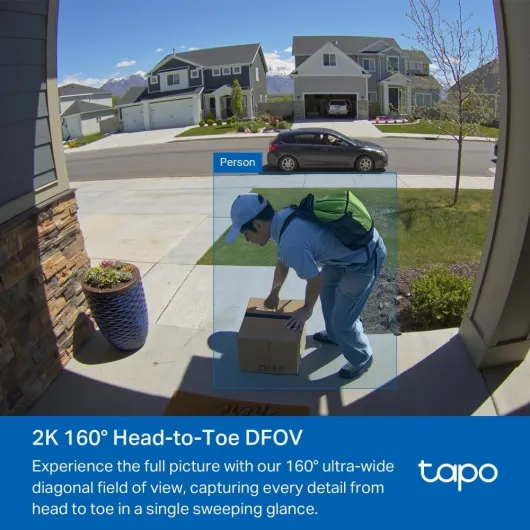
On the performance side, the 2K 3MP video is the main selling point, and it actually delivers. Daytime footage is sharp, colours are decent, and you can clearly see faces and details like parcels and number plates at normal door distances. Compared to my older 1080p doorbell, you really notice the extra resolution when you zoom in. It runs at around 15 fps, so it’s not super smooth like a 60 fps camera, but for a doorbell it’s completely fine and you don’t miss important moments.
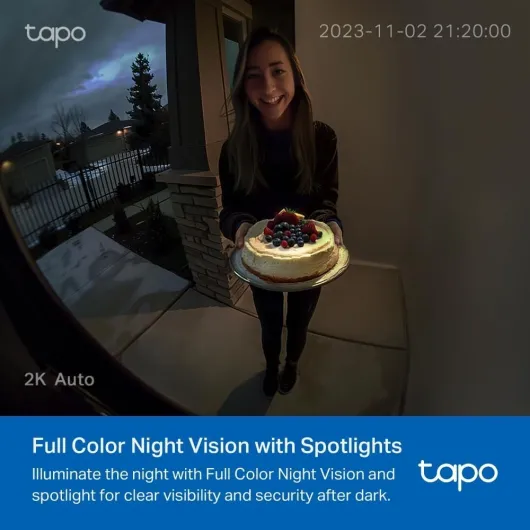
At night, you’ve got color night vision with a spotlight plus standard infrared. In practice, if there’s a bit of ambient light from the street or a porch light, you’ll get usable colour footage. If it’s very dark, it switches to black-and-white IR which is still clear enough to see faces. I found the night performance good for the price point—people walking up to the door are clearly visible, and you can tell who is who without guessing.
The motion detection and AI alerts are what make it workable day-to-day. You can set zones and sensitivity so it doesn’t trigger every time a car passes at the end of the street. The free AI can distinguish between people, vehicles, pets, and packages. It’s not perfect, but it’s good enough that you don’t get spammed constantly. I had the odd false alert from shadows or a cat, but far fewer than with older systems that only used basic motion detection.
Latency is a big one for doorbells, and this is where I was pleasantly surprised. When someone presses the button, the included chime rings almost instantly, and my phone gets a call-style notification one or two seconds later. That’s quick enough that I can usually answer before the person gives up and walks away. Live view loads reasonably fast over Wi‑Fi; it’s not instant, but it’s better than my previous Arlo setup, which often took so long to connect that the visitor was already gone. Overall, the performance is good and reliable, not mind-blowing, but more than enough for everyday home use.
What you actually get and how it fits into a home setup
Out of the box, the Tapo TD21 gives you the doorbell itself, the wireless chime, mounting bits, and that’s about it. No microSD card is included, which is a bit annoying because nearly everyone buying this will want one for local storage. So just factor in grabbing at least a 32 or 64 GB card if you don’t already have one lying around. On the plus side, the chime is included, which some brands still try to sell you as an extra.
The doorbell is battery-powered with a 6400 mAh battery and Tapo claims up to six months of life. In reality, it depends heavily on how busy your door is and how aggressive your motion settings are. With medium sensitivity and a fairly active street, you’re probably looking at around 3–4 months before needing a charge, based on my use and what other users report. Still, that’s miles better than my old Blink doorbell, where I felt like I was swapping batteries every couple of weeks.
Setup is done through the Tapo app. If you’ve used any Tapo gear before (cameras, bulbs, plugs), it all lives in the same place, which is handy. Pairing the doorbell and chime took me roughly 10–15 minutes including a bit of messing around with Wi‑Fi. The app walks you through it step-by-step: connect to Wi‑Fi, add the device, test the chime, set motion zones, etc. It’s not rocket science, and you don’t need to be super technical to get it going.
Once installed, you get the usual features: live view, event history, motion detection, person/vehicle/pet/package alerts, and two-way audio. The nice part is that Tapo’s AI detection is free, which is rare. Other brands stick that behind a paywall. You can still pay for Tapo Care cloud storage if you want off-site backups, but it’s optional and cheaper than many rivals. So as a whole package, the TD21 is positioned as a budget-friendly, all-in-one solution that ties nicely into the wider Tapo ecosystem without forcing you into monthly payments.
Does it actually make your front door easier to manage?
In terms of pure usefulness, the TD21 does what most people actually want from a video doorbell: it tells you when someone is there, records what happened, and lets you talk to them if needed. For deliveries, it’s been handy. I can see when parcels arrive, give instructions if I’m out, and double-check later where the driver left something. The footage is clear enough that if there ever was an issue with a missing parcel, I’d have something solid to show.
The two-way audio is decent. It’s not studio quality, but people can hear me and I can hear them without too much lag or distortion. With my old Arlo, half the time there were delays or cut-outs that made conversations awkward. Here it’s usable: I’ve told delivery drivers to leave boxes in the porch or with neighbours and they’ve understood me fine. Wind noise can be a bit of a problem on very blustery days, but that’s pretty normal for outdoor mics.
The free AI detection is what makes it workable long term. Getting a notification for every leaf that moves is annoying, and that’s not really happening here if you set it up properly. The person detection is the most reliable; vehicle and pet detection are helpful but not flawless. Still, it cuts down on random alerts enough that I don’t feel the need to mute notifications all the time. The fact that all of this is free, without locking it behind a paywall, is a big practical advantage over a lot of big-name doorbells.
Linked with Alexa or Google Assistant, it becomes a bit more flexible. You can have the live feed pop up on an Echo Show or Fire TV, which is handy if you’re already in that ecosystem. It’s not essential, but nice to have. Overall, the TD21 isn’t doing anything revolutionary, but it covers the basics well: clear video, reliable alerts, and simple communication with whoever is at your door. For everyday use, that’s really what matters.
Pros
- No mandatory subscription: free AI detection and full use with just a microSD card
- Good 2K video quality with usable colour night vision and a wide 160° field of view
- Included wireless chime and generally easy installation and setup via the Tapo app
Cons
- MicroSD card not included, so there’s an extra purchase to get local storage
- Built-in battery is not swappable, and removing the unit to charge can be a bit fiddly
- App and build feel mid-range, not premium, compared to some higher-end brands
Conclusion
Editor's rating
The Tapo TD21 is a practical, budget-friendly video doorbell that focuses on the essentials: clear 2K video, usable night vision, reliable motion detection, and no forced subscription. It’s not trying to be a luxury gadget; it’s just a straightforward way to see who’s at your door and keep a record of it without paying every month. The included chime, free AI detection, and support for big microSD cards make it easy to run this thing long-term with almost no ongoing cost.
It’s not perfect. The build is mostly plastic, the battery isn’t removable, and you’ll have to buy your own SD card. The app, while decent, isn’t as slick as some of the more expensive competitors. But in daily use, it gets the job done: visitors are clearly visible, notifications arrive fast enough to react, and two-way audio is good enough for quick chats with delivery drivers. If you’re coming from something like Arlo or Ring with hefty subscription fees, this feels like a relief.
I’d say the TD21 is ideal for people who want solid front-door security without ongoing costs, especially if you already use or plan to use other Tapo products. If you’re super fussy about premium materials, ultra-smooth high frame rate video, or deep smart home integration across multiple brands, you might want to look higher up the price ladder. For most normal users though, this is a good value, no-nonsense doorbell that does exactly what you need and doesn’t keep charging you for it every month.