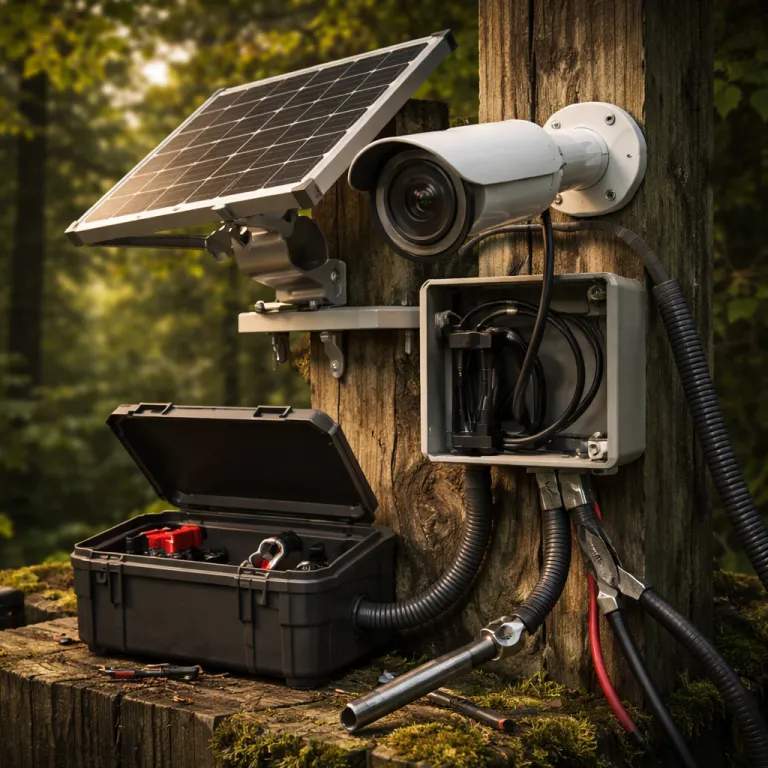
Why power accessories decide which battery security cameras actually work
A battery powered security camera is only as useful as the day its battery dies. When you choose the best battery security camera for your home, you are really choosing a power strategy that keeps that cam recording during storms, holidays, and long weekends away. A $200 wireless camera with a flat battery at night is just an expensive wall ornament.
Most first time buyers focus on resolution, smart features, and night vision, but the quiet failure points are battery life, Wi-Fi stability, and video storage. In real homes, security cameras stop protecting you not because the lens breaks, but because the battery powered system runs down, the dual band router drops the signal, or a storage subscription lapses and cloud storage quietly stops saving clips. When you evaluate any security camera, treat power accessories, mounts, and connectivity as core parts of the system, not optional extras, and look for clear specs such as battery capacity in mAh or Wh, solar panel wattage, and estimated runtimes at defined motion levels.
Look at how different brands handle this. Ring leans heavily on plug in and solar accessories, while Blink pushes long lasting AA battery designs and Eufy promotes local video storage with some solar options. Arlo, especially the Arlo Essential and higher end models, mixes wire free convenience with optional solar panels and extended packs, and Google Nest with the Nest Cam Battery sits somewhere in the middle, balancing smart home integration with practical outdoor security accessories.
For a first time homeowner, the best battery security camera is usually the one that needs the least babysitting. That means pairing the right camera with the right solar panel, extended battery, or even a PoE injector if you decide to mix in a wired cam later. Think of these accessories as insurance that your security camera is awake when something actually happens at 3 a.m., not as cosmetic add ons that you might buy later if the budget allows.
Solar panels for battery cameras: when they work and when they do not
Solar panels turn a good battery powered security camera into a nearly maintenance free system. To work reliably, most small solar panels in the 2 W to 5 W range need around four to six hours of direct sunlight per day, which means your mounting position matters more than the brand name printed on the panel. A north facing wall in a shaded yard will starve even the best solar accessory, no matter how efficient it claims to be.
On a south facing wall or roof edge, a compact solar panel can keep a wireless cam like a Ring Stick Up Cam Battery or Arlo Essential Spotlight topped up indefinitely in moderate climates. During cloudy weeks, the battery will slowly drain, but a healthy pack plus a few bright days usually recovers without you dragging out a ladder. If you live somewhere with long, dark winters, plan for a mix of solar and manual charging, especially if your security cameras record a lot of motion video around a busy driveway.
Some models integrate solar directly into the camera body, such as the Eufy SoloCam S220, which reduces cable clutter but locks you into one form factor. Others, like many Arlo and Ring cameras, use separate solar accessories that you can angle independently for better light capture, which is helpful when the ideal field of vision does not match the ideal sun exposure. Reolink’s affordable solar panels, often around the cost of a restaurant meal and typically rated between 3 W and 6 W at about 5 V, can provide continuous power to compatible outdoor security cameras when mounted correctly.
Third party brands such as Wasserstein and iTODOS sell universal solar panels and mounts for Ring, Blink, and Arlo, and these can be a smart way to stretch your budget. Always check that the voltage and connector match your specific cam, and remember that a weatherproof junction and drip loop are just as important as the panel itself. If you are curious about how a fully solar powered outdoor security setup behaves in practice, look at a detailed test of a 4G solar powered security camera with colour night vision and wire free installation, which shows how panel placement, panel wattage, and night vision usage affect real world battery life.
Extended batteries, weatherproof skins, and mounts that survive real weather
Extended battery packs are the unsung heroes of the best battery security camera setups. Some Ring and Arlo models accept clip on battery packs that effectively double battery life, which can turn a one month recharge cycle into a two or three month window in busy locations. For a camera watching a high traffic front path, that extra capacity often matters more than another bump in video resolution, especially when a standard pack might be around 5,000 to 6,000 mAh and an extended pack pushes closer to 10,000 mAh.
Blink Outdoor cameras, such as the Blink Outdoor 4, take a different route by using AA lithium batteries that can last up to two years in ideal conditions, but heavy motion, cold weather, and long video clips will cut that figure sharply. Eufy and Google Nest often rely on proprietary rechargeable packs, which are easy to swap if you buy a spare and keep it charged indoors. When you compare pros and cons, think about whether you prefer cheap, widely available batteries or a dedicated pack that supports faster charging, clearer Wh ratings, and better battery health monitoring.
Weatherproof cases and silicone skins add another layer of protection for outdoor security cameras. Even if a cam carries a decent IP rating, constant UV exposure, sideways rain, and wind driven dust can degrade seals and plastics over time, especially on cheaper security camera housings. A snug silicone skin can reduce glare in color night video, protect the lens surround, and slightly insulate the battery compartment during cold snaps.
Mounts matter just as much as cases. A flimsy plastic mount that vibrates in the wind will ruin night vision clarity and make motion detection unreliable, because the camera thinks the whole world is moving. If you are weighing different mount and power combinations, a guide to choosing the right surveillance cameras without Wi-Fi for your home can still be useful, because many of the same placement, cable routing, and weatherproofing principles apply to wireless, battery powered models.
Wi-Fi, storage, and smart platforms: the invisible power drains
Power is not just about batteries and solar panels, because your network and storage choices quietly affect how long a battery powered security camera lasts. A weak Wi-Fi signal forces the cam to boost its radio power, which drains the battery faster and increases the odds of dropped video clips. Placing a mesh node or Wi-Fi extender near your outdoor security cameras is often the single most effective accessory upgrade you can make.
Dual band routers that support both 2.4 GHz and 5 GHz can help, but many security cameras still prefer 2.4 GHz for range, so check your settings. If your Nest Cam Battery or a similar Google Nest device keeps dropping offline, try locking it to the 2.4 GHz band and see whether battery life stabilizes. Arlo, Eufy, Ring, Blink, and Tapo all have slightly different Wi-Fi behaviours, and some models handle roaming between access points better than others, especially when you use mesh systems or multiple access points with the same SSID.
Video storage also shapes battery life. Cameras that constantly upload to cloud storage use more power than those that write local video to a microSD card or a home NVR, especially if your upload bandwidth is marginal. A storage subscription can unlock useful features such as longer clip history and smart detection, but it also encourages you to keep more cameras recording more often, which means more charging unless you pair them with solar or extended packs.
Smart home integrations with Alexa, Google Assistant, or similar platforms add convenience but can introduce extra background traffic. Every live view request, every smart routine trigger, and every pan tilt command on a motorised cam is another small power draw. If you plan a mixed system with both battery powered and PoE cameras, consider a central NVR with 4K display, night vision, and smartphone integration so that your battery devices can focus on motion events instead of constant live streaming.
Choosing the right ecosystem and planning for year round uptime
When you choose the best battery security camera for your home, you are really choosing an ecosystem of cameras, power accessories, and storage options. Ring offers tight integration with its video doorbell range and branded solar panels, while Blink focuses on ultra low power cams that sip from AA batteries and lean on cloud storage. Arlo and Eufy sit in the middle, with Arlo Essential models emphasising flexible mounts and solar options, and Eufy highlighting local video storage and some solar integrated designs.
Google Nest, with the Nest Cam Battery and wired Nest Cam variants, leans on the Google Home app and deep smart home ties, which can be a pro or a con depending on how much you already use that ecosystem. Tapo offers budget friendly wireless cameras that can still benefit from third party solar panels and weatherproof skins, especially in smaller yards or balconies. If you mix brands, pay attention to how each app handles notifications, night vision settings, and video storage, because juggling three different interfaces can be more tiring than climbing a ladder twice a year.
For most first time homeowners, a simple plan works best. Start with one or two key positions, usually a video doorbell and a main outdoor security camera covering the driveway or back garden, then add more cams only after you understand your real blind spots. As you expand, consider whether a PoE switch and a wired NVR might handle fixed positions such as eaves and corners, while your battery powered, wire free cameras handle flexible spots and temporary placements.
Accessories such as pan tilt mounts, Tapo style Wi-Fi extenders, and even basic cable clips can make maintenance easier and safer. A well planned system means you can swap a battery pack or clean a lens in minutes, without dismantling half your guttering. In the end, the best battery security camera setup is not the one with the longest spec sheet, but the one that still records clear color night video after a week of storms, a month of travel, and a year of real life.
FAQ
How many hours of sun does a solar panel camera really need ?
Most small solar panels for battery powered security cameras need roughly four to six hours of direct sunlight per day to maintain charge. If your panel only receives dappled or indirect light, the camera will still work, but the battery will slowly drain during busy periods. In heavily shaded locations, plan for occasional manual charging or consider a wired or PoE powered cam instead.
Are extended battery packs worth paying extra for ?
Extended battery packs are usually worth the cost if your camera watches a high traffic area such as a front door, driveway, or shared path. Doubling the capacity can turn a frustrating monthly recharge into a more manageable schedule of every two or three months. They also provide more buffer during cold weather, when lithium batteries naturally lose capacity.
Do solar panels work in winter for outdoor security cameras ?
Solar panels still work in winter, but shorter days and lower sun angles reduce their output. If your camera records a lot of motion video, the battery may slowly drain during long cloudy stretches, even with a panel attached. Mounting the panel at a steeper angle and keeping it clear of snow and debris helps maximise winter performance.
Is local video storage better than cloud storage for battery life ?
Local video storage on a microSD card or NVR usually uses less power than constant uploads to cloud storage, because the camera does not need to push every clip over Wi-Fi. However, cloud storage can be safer if the camera is stolen, since the footage is already off site. Many homeowners combine both, using local storage for continuous recording and cloud backups for critical motion events.
What is the most common reason battery cameras stop recording ?
The most common reason battery powered security cameras stop recording is not a hardware failure but a flat battery combined with poor placement or neglected accessories. Weak Wi-Fi, outdated firmware, and lapsed storage subscriptions also cause silent failures where events are not saved. Regularly checking battery levels, signal strength, and storage status in the app prevents most of these issues.