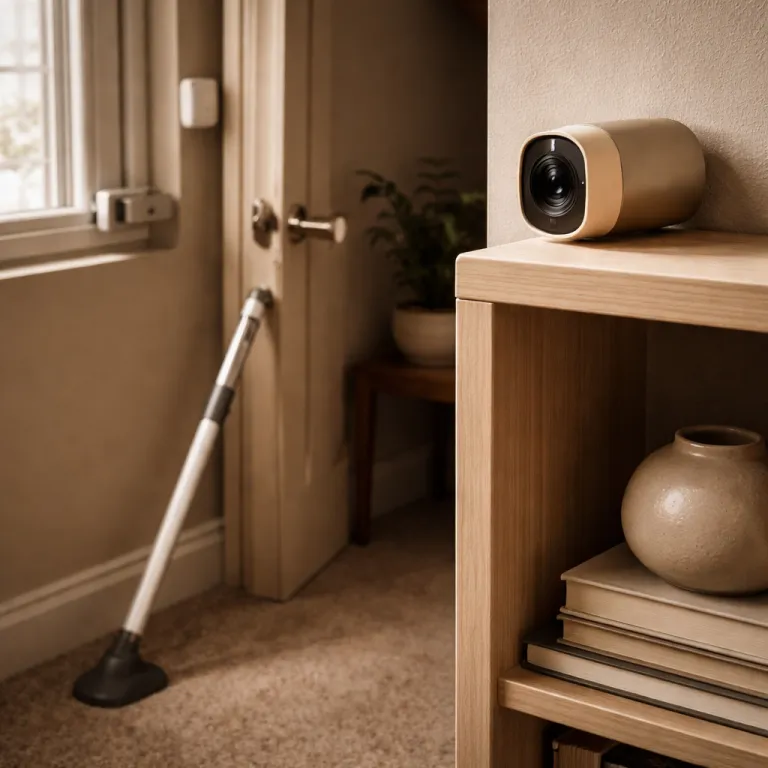
Renter realities when you want to install security cameras
Most guides on how to install security camera systems quietly assume you own the walls. As a renter, you face a different security equation where you must protect your space without leaving a single drill hole behind. Your goal is simple but demanding, because you need a camera installation that is reversible, discreet, and still genuinely effective.
Start with a renter constraint checklist before installing security cameras anywhere in your apartment. You usually cannot drill into a wall, cannot run new power cables, and cannot attach permanent brackets that your landlord will treat as damage. You also need every security camera, mount, and cable to be portable, so the whole camera system can move with you in one afternoon when the lease ends.
That checklist shapes every step of your installation plan. You will favor wireless cameras, adhesive mounts, and small plug in models that sit on shelves rather than cameras installed with anchors and screws. When you read product pages, look for phrases like wire free, peel and stick, or magnetic mount, because they signal renter friendly installation instead of a construction project.
For most tenants, the best security strategy uses several compact indoor cameras instead of a single large outdoor security unit. A mix of one front door view, one hallway view, and one living room view usually gives better recording coverage than a bulky outdoor camera that you are not allowed to bolt to the building. Think in terms of number cameras needed to cover movement paths, not just the square metres of your floor plan.
Power and connectivity are your next constraints, because every camera will need a reliable power source and stable Wi Fi that do not involve rewiring. Plug in cameras like the Blink Mini 2 or Ring Indoor Cam are ideal for renters, since you can install security cameras by simply placing them near an outlet and routing the cable neatly along furniture edges. Battery powered wireless security cameras add flexibility, but you must plan time for recharging and make sure the charging cable can reach without creating a trip hazard or blocking doors.
Finally, decide early whether you want a cloud based security system or a local recording setup. Cloud focused brands such as Ring and Nest make it easy to connect cameras to Wi Fi and your phone, but many features like extended recording history sit behind subscription paywalls. Local storage options such as some Eufy or Blink camera models reduce ongoing costs, yet you must remember where the microSD card or base station is when moving apartments and check that storage is not full.
Choosing the right type of camera for a no drill apartment setup
Once you accept that you cannot drill, the type camera you choose matters more than any marketing slogan. For renters, the best security cameras are compact indoor models that can sit on a shelf, clamp to furniture, or attach with removable adhesive instead of screws. You want a camera installation that feels like placing a speaker, not like installing a ceiling fan.
Plug in cameras are the simplest option for most apartments, because they solve the power problem elegantly. The Blink Mini 2, for example, costs roughly 30–40 dollars in many markets and plugs into any standard outlet, so you can install wireless style coverage without touching the building wiring. Ring Indoor Cam works the same way and can either sit on a table or attach with a 3M adhesive plate, which avoids permanent fixtures while still keeping the camera stable.
Pan and tilt models give you more coverage from a single camera install. The Eufy Indoor Cam S350 can rotate to follow motion across a room, offers up to 4K resolution, and has a wide field of view that can monitor both your front door area and the main living space if you place it carefully. This reduces the number cameras you need to buy, which is useful when you are balancing security with a tight rental budget.
For renters who want true wire free flexibility, battery powered wireless cameras like the Arlo Pro 5S or Nest Cam Battery are strong options. These wireless cameras can sit on bookshelves, cling to magnetic mounts on metal door frames, or rest on window sills to watch the corridor outside your apartment. Typical battery life ranges from a few weeks to a couple of months depending on motion activity and settings, so you still need a plan for the power source, but recharging periodically is usually easier than negotiating with a landlord about drilling holes for cables.
Think carefully about night vision performance, because many cheaper cameras promise clarity but deliver washed out grey blobs at 3 am. Models like the Arlo Pro 5S and Blink Outdoor 4 handle infrared night vision better than many budget cameras, especially when you keep them indoors facing a lit corridor or car park. If you rely on indoor cameras to monitor outdoor security through a window, remember that infrared reflections on glass can ruin recording quality, so you may need to disable IR and use ambient light instead.
Whatever you choose, treat the first week as a live test of your new security system. Check whether the cameras installed actually capture faces at your front door, whether the wireless security connection stays stable, and whether the recording clips start quickly enough when someone walks past. Use a maintenance checklist from a guide on how to keep your home security camera system in top shape to adjust motion zones, update firmware, and make sure your install security plan still works after software updates.
Strategic camera placement in small apartments and shared spaces
Good security is less about buying more cameras and more about where you place them. In a rental, every camera install should serve a clear purpose, such as watching the front door, monitoring the main hallway, or covering the balcony door. Randomly installing security devices in corners just creates blind spots and wastes both money and bandwidth.
Start with the front door, because that is where most risks and deliveries converge. Instead of mounting a bulky outdoor security camera in the corridor, position a small indoor security camera on a shelf or console table facing the door from inside your flat. This way you protect your entry, keep the camera installation entirely within your rented space, and avoid arguments with neighbours about visible recording devices in shared hallways.
If you have a peephole, a Ring Peephole Cam is one of the cleanest no drill solutions. It replaces the existing peephole hardware without touching the wall structure, so you can install security features at eye level and still remove everything when you move out. For many renters, this single type camera at the door plus one indoor unit in the living room is enough to build a practical camera system.
Next, think about the hallway that connects bedrooms, bathrooms, and the living area. A single wireless camera placed high on a bookshelf can see who moves between rooms without intruding on private spaces. This placement respects roommate privacy while still giving you a clear recording of anyone who enters from the front door and walks deeper into the apartment.
Ground floor renters should consider window focused placements, especially for windows facing car parks, alleys, or bike storage areas. Suction cup or adhesive mounts let you install wireless cameras on the glass without touching the frame, and you can angle the lens slightly downward to reduce reflections and improve night vision. Combine this with smart delivery notifications and a vacation camera checklist such as a summer vacation camera checklist with zero blind spots, so your security system keeps working even when you are away for two weeks.
Shared living rooms and kitchens require extra care, because you must balance security with trust. Always tell roommates where security cameras are, what they record, and when recording is active, and never place a camera where someone reasonably expects privacy. A transparent placement plan will protect your relationships as effectively as it protects your electronics and front door packages.
No drill mounting methods that actually work for renters
Once you know where each camera should go, the next step is figuring out how to mount it without a drill. For renters, the best camera installation methods rely on friction, magnets, and removable adhesives rather than screws and anchors. Done properly, these mounts hold steady during daily life but come off cleanly when your lease ends.
Start with the simplest option, which is placing cameras on stable furniture. A Ring Indoor Cam or Blink Mini 2 sitting on a bookshelf can cover the front door, while an Eufy Indoor Cam S350 on a TV stand can pan across the living room. Use non slip pads or museum putty under each camera to keep it from sliding when someone bumps the furniture or when you adjust cables.
Magnetic mounts are a powerful tool for renters who have metal door frames, radiators, or shelving. Third party mounts from brands like Wasserstein clip onto a camera body and then attach magnetically to any steel surface, which means you can install wireless cameras at eye level without touching the wall. This approach is especially useful for temporary outdoor security views through a window, because you can move the camera seasonally without leaving marks.
Adhesive mounts come next, and they require more care but no drill. Many wireless cameras ship with 3M style adhesive plates that stick to painted walls or tiles, allowing you to mount a camera system high in a corner for a better angle. Always read the adhesive instructions, press firmly for the recommended time, and make sure the surface is clean and dry before you commit to the placement.
For windows, suction cup mounts let you attach cameras directly to glass, which is ideal when you want to monitor outdoor security areas like car parks or bike racks from inside. Remember that infrared night vision can bounce off glass, so either disable IR and rely on street lighting or place the camera slightly away from the pane to reduce reflections. If you need to connect cameras to a monitor without running new cables, you can use a guide on how to connect a security camera to a TV monitor screen without HDMI to keep everything renter friendly.
Whatever mounting method you choose, test each camera install by gently tugging and twisting the mount before trusting it long term. You will avoid the classic failure where a camera falls overnight, points at the floor, and records nothing useful during the one incident that actually matters. A few minutes of stress testing now will protect your deposit, your equipment, and your peace of mind.
Power, Wi Fi, and recording settings that renters often overlook
Many renters focus on where to place cameras and forget how they will stay powered and connected. A security camera that loses power or Wi Fi several times a day becomes a decorative gadget instead of a protective tool. Treat power and connectivity as part of the installation, not an afterthought.
Map your outlets before you start installing security devices, especially in older apartments with limited sockets. Plug in cameras like Blink Mini 2, Ring Indoor Cam, and Eufy Indoor Cam S350 need a stable power source within about two metres, so plan cable routes that follow furniture edges instead of stretching across walkways. Use low profile extension leads or cable covers where necessary, and always make sure your setup respects fire safety and building rules.
Battery powered wireless security cameras solve the outlet problem but introduce maintenance. You will need to recharge or swap batteries every few weeks, depending on motion activity and recording settings, so choose locations where you can easily reach the camera without climbing precariously. Some models like Eufy SoloCam S340 pair a battery with a small solar panel, which can be placed on a balcony or window ledge to extend the time between manual charges.
Wi Fi stability is the other silent failure point in many rental security systems. Cameras installed at the far end of a long corridor or behind thick concrete walls may struggle to connect, leading to delayed alerts and missing clips. If your router sits in a corner, consider a Wi Fi extender or mesh system so every camera install has a strong signal and can upload recording data reliably.
Once power and connectivity are solid, fine tune your recording settings. Set motion zones so the camera system ignores busy corridors outside your door but reacts quickly when someone actually approaches your flat, and adjust sensitivity to avoid constant alerts from pets or curtains. Use scheduled recording or privacy modes in shared spaces, so roommates know when cameras are active and when they are off.
Finally, decide where your footage lives and how long you keep it. Cloud based security systems from Ring, Arlo, or Nest make it easy to read and share clips, but subscription costs add up over time and some basic features sit behind paywalls. Local storage options reduce ongoing costs but require you to remember where the base station is packed when you move, and to check that microSD cards are not full at the worst possible moment.
Moving out, privacy, and keeping your rental security setup future proof
A good rental security setup is not just easy to install, it is easy to uninstall. When moving day comes, you should be able to remove every camera, mount, and cable in under an hour without leaving marks on the wall. Think of your system as a kit that travels with you, not as a fixture that belongs to the building.
Before you move, schedule time to back up important recording clips and reset each security camera to factory settings. This protects your privacy and ensures the next place starts with a clean configuration, rather than old Wi Fi passwords and motion zones from a different floor plan. Keep a small box labelled camera system with all power adapters, screws, adhesive pads, and manuals, so you can reinstall quickly in the new flat.
Privacy with roommates and neighbours should guide how you use cameras as much as where you place them. Always avoid pointing cameras directly into other apartments, shared bathrooms, or bedrooms, and be clear about what your security cameras record in common areas like living rooms. Written house rules about camera usage can prevent arguments later, especially when new roommates join or when someone works from home in the shared space.
As you upgrade, be wary of feature creep and subscription traps. Some brands gradually move essential functions like basic recording or person detection behind paid tiers, turning what felt like a one time install into a permanent monthly bill. When comparing models such as Ring Stick Up Cam, Arlo Pro 5S, Nest Cam Battery, Eufy SoloCam S340, and Blink Outdoor 4, look beyond the headline resolution and ask what still works if you cancel the subscription.
Future proofing also means choosing open, well supported ecosystems. Cameras that can connect to multiple platforms such as Amazon Alexa, Google Home, or Apple HomeKit give you more flexibility if you change phones or smart speakers over time. Avoid obscure brands with poor update histories, because unpatched security systems can become vulnerabilities rather than protections.
In the end, the best rental friendly security setup is the one you actually maintain. Check mounts twice a year, test night vision after you change bulbs or curtains, and review whether the number cameras you use still matches your lifestyle. Your goal is not just to watch your home, but to make sure that when something happens at 3 am, your cameras capture what matters instead of a blurry shadow and a dead battery.
Key statistics on rental and apartment security cameras
- According to the United States Census Bureau’s 2022 housing data, roughly 44 million households live in rented accommodation, which means a large share of potential security camera users face no drill and no wiring constraints.
- Consumer testing from organisations such as Which? and Wirecutter has reported that many plug in indoor cameras under 50 dollars, like the Blink Mini 2, can match or exceed the daytime image quality of more expensive outdoor models when placed correctly, especially at typical indoor viewing distances.
- Studies on burglary patterns from national crime surveys, including the U.S. National Crime Victimization Survey and similar reports in the UK, consistently show that front doors and ground floor windows remain the most common entry points, with many reports attributing well over half of residential break ins to these locations, which supports prioritising camera placement at the main door and key windows in small apartments.
- Wi Fi interference and weak signal strength account for a significant portion of user complaints about wireless security cameras in multi unit buildings, particularly in dense urban areas where dozens of overlapping networks compete for the same channels.
- Industry reports from major brands such as Ring, Arlo, and Google Nest indicate that a growing share of new camera models now offer local storage options alongside cloud recording, reflecting consumer concerns about subscription fatigue, data retention, and long term cost control.
FAQ about installing security cameras in rentals
Can I install security cameras in my apartment without my landlord’s permission ?
In most places you are allowed to install security cameras inside your rented unit as long as you do not damage the property or record shared hallways without consent. Always check your lease and local laws, and avoid drilling or permanent fixtures if the contract forbids alterations. When in doubt, choose plug in or adhesive mounted cameras that you can remove cleanly.
Where should I place cameras in a small apartment for the best coverage ?
Prioritise the front door, the main hallway, and any ground floor windows or balcony doors. A single camera facing the entry from inside plus one covering the central living area usually gives better coverage than several randomly placed devices. Make sure each camera has a clear view of faces at typical walking height, not just the top of heads.
Are wireless security cameras reliable in buildings with many Wi Fi networks ?
Wireless cameras can work well in apartments, but they depend heavily on signal strength and interference. Place your router centrally, use the 5 GHz band when possible, and consider a mesh system if cameras sit far from the router. Always test live view and recording at each planned location before committing to mounts.
How many cameras do I really need in a one bedroom rental ?
Most one bedroom flats work well with two or three cameras. One should watch the front door from inside, another should cover the main living or hallway area, and a third optional unit can monitor a high risk window or balcony. Pan and tilt models can sometimes replace two fixed cameras if placed thoughtfully.
What is the best way to power cameras if I cannot add new outlets ?
Use existing outlets strategically by placing plug in cameras on nearby shelves or furniture and routing cables along edges with clips or covers. For locations without convenient sockets, choose battery powered or solar assisted wireless cameras and schedule regular recharging. Avoid overloading extension leads and always follow electrical safety guidelines in your building.