
Summary
Editor's rating
Is the Vantrue N5S worth the money?
Design and installation: not tiny, not huge, but you’ll feel the cables
Power, parking mode and what 24/7 really means
Video quality, night vision and how it behaves day to day
What you actually get with the N5S
How well it actually protects you in real situations
Pros
- True 4-channel coverage (front, front cabin, rear cabin, rear) with clear footage day and night
- Strong night vision with STARVIS 2 sensors and IR, good plate readability at city speeds
- Parking mode with 10-second buffered recording and impact detection, useful for street parking
Cons
- Very storage-hungry with all 4 channels; really needs a large, fast microSD card
- G-sensor and motion detection are overly sensitive by default and require tweaking
- Installation and cable routing are more involved than with a simple 1–2 channel dash cam

Specifications
View full product page →| Brand | VANTRUE |
A 360° dash cam that finally feels like full coverage
I’ve been running various dash cams for years – usually the classic front-only or front+rear setups. I picked up the Vantrue N5S because I wanted proper 360° coverage, not just a slightly wider front angle and some marketing buzzwords. I’ve had it in the car for a few weeks now, wired up with all four channels running: front, front cabin, rear cabin, and rear window. So this isn’t an unboxing impression; it’s based on daily driving, dark winter mornings, and a few nasty potholes.
In short, the N5S is a feature-packed, 4-channel dash cam that actually works well in real life, but it comes with trade-offs: cable mess if you’re not patient, a very sensitive G-sensor if you don’t tweak it, and heavy storage usage if you insist on all four cameras at max quality. If you’re used to a simple front cam, this is a different level of setup and maintenance.
The first thing that stood out to me was the image quality at night. Most dash cams look fine at noon and fall apart under streetlights. Here, the STARVIS 2 sensors and IR really help; plates and faces are still readable in tough lighting, especially at city speeds. On the other hand, the more channels you turn on, the more you feel the limitations of your SD card size and your patience when managing files.
If you’re thinking about this cam, go in knowing it’s not a plug-and-forget toy. It’s closer to a small surveillance system for your car. That can be great if you care about evidence and security, but you’ll need to spend time on installation, settings, and a decent microSD card. I’ll break down where it shines and where it’s a bit annoying in daily use.
Is the Vantrue N5S worth the money?
Price-wise, the N5S sits on the higher end of the dash cam market, especially once you add the cost of a proper microSD card (I’d say 256 GB minimum, 512 GB or 1 TB if you really want to use all four channels heavily) and maybe the hardwire kit. So this isn’t a cheap impulse buy. You’re paying for multiple STARVIS 2 sensors, 4-channel recording, WiFi, GPS, and a pretty complete parking mode. The question is whether you’ll actually use those features or just want a simple camera.
If you only care about recording what’s ahead of you, this is overkill. You can get a good 1 or 2-channel cam for a lot less. Where the N5S starts to make sense is if you want proper full coverage and long-term reliability. The supercapacitor, 1 TB support, and the general build quality make it feel like it’s built for people who drive a lot: daily commuters, rideshare drivers, delivery drivers, or anyone who parks on the street and worries about vandalism or hit-and-runs.
There are some hidden costs to keep in mind. The camera eats storage, so cheap small cards are not a good idea. You also need to format the card regularly, keep the firmware updated, and spend time fine-tuning the G-sensor and parking mode so it doesn’t spam you with useless clips. If you’re not willing to do a bit of “maintenance”, you’re paying for features you won’t fully benefit from. In that case, a simpler model from Vantrue or another brand might be better value.
Overall, I’d rate the value as pretty solid if you genuinely want 4-channel coverage and parking surveillance. For that use case, the price is justified. If you’re just curious about dash cams and don’t really need all the angles, this is probably more money and effort than you need to spend. So it’s good value for the right user, and a bit overkill for the casual one.
Design and installation: not tiny, not huge, but you’ll feel the cables
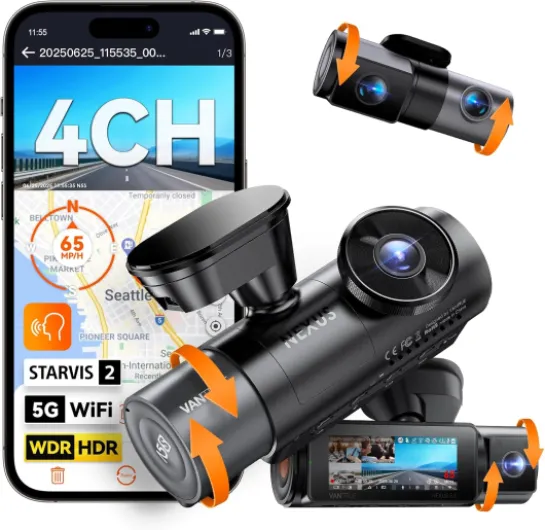
The main unit of the N5S is fairly compact for something that handles four channels, but it’s still a noticeable block on the windshield. It’s not ugly, just functional: matte black plastic, small screen, physical buttons on the side. Think “tool” rather than “cool gadget”. The two cabin cameras are built into the front unit, and you can tilt them to aim at the cabin and rear cabin properly. That adjustability is useful if you sit high or low or if your windshield is steep, like on some SUVs and Jeeps.
Installation is where you feel the difference between a simple dash cam and this 4-channel setup. The adhesive mount with the electrostatic sticker holds well and doesn’t feel like it will fall off in heat, which is good. But you really want to use those electrostatic films if you care about removing it later without destroying your windshield tint or scraping glue. I skipped that step on an older cam and had to go at it with a razor blade, so I didn’t repeat the mistake here.
The rear camera install is the most time-consuming part. The included 20 ft cable is fine for a regular car or small SUV, but if you’ve got a large truck or van, you’ll probably want the longer optional cable Vantrue sells. Running the cable under trim and around the headliner takes some patience. If you rush it, you’ll end up with a visible cable hanging or rattling, which gets annoying quickly. Once it’s tucked away properly, you can forget about it, but plan at least an hour if you care about a clean install.
One design detail I appreciated: the ball-joint style front mount makes it easy to adjust the angle without feeling like you’ll break it. Also, the auto LCD shutoff is handy; the screen goes off after a bit, so you’re not driving around with a glowing rectangle in your face. Overall, the design isn’t pretty, but it’s practical. Just know that with four channels, the car ends up with more wiring than a basic cam, and you need to accept that or take your time to hide everything well.
Power, parking mode and what 24/7 really means
The N5S doesn’t use a traditional battery; it has a supercapacitor. In practice, that means it’s more resistant to heat and cold and less likely to swell or die after a couple of summers, but it also means it can’t run on its own for long. It’s meant to shut down safely and keep files from getting corrupted, not to record on internal power for minutes. For normal driving, that’s fine – it powers from the included car charger and starts and stops with the ignition without issues.
Where things get more interesting is parking mode. If you want true 24/7 monitoring, you need the hardwire kit (sold separately). Once that’s installed, the camera can stay in a low-power mode and wake up when it detects motion or impact. The buffered mode is actually useful: it records about 10 seconds before the trigger, so you don’t just see the moment of impact; you see the lead-up. I had it trigger when someone walked close to the car and jostled it, and the footage started well before the bump.
The flip side is that parking mode is only as good as your settings and your car’s battery. If you set the motion sensitivity too high and park on a busy street, the cam will wake up constantly and hammer your SD card and your vehicle battery. The hardwire kit usually has voltage protection, but still, it’s something to think about. I ended up turning down the sensitivity and using collision detection more than motion in very busy areas to avoid endless clips of random people walking by.
Overall, in terms of “battery life”, you’re really talking about how smart the power management is, and I’d say it’s decent once configured. The supercapacitor gives some peace of mind for hot climates, and the always-on parking mode is useful if you’re willing to invest in the hardwire kit and spend time dialing in the sensitivity. If you just plug it into the cigarette lighter and never hardwire it, you still get basic protection while driving, but you’re leaving a big feature on the table.
Video quality, night vision and how it behaves day to day
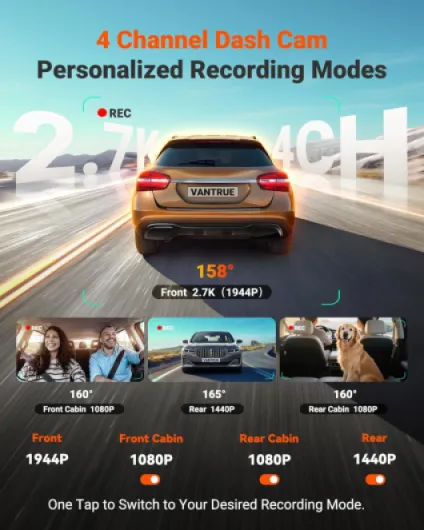
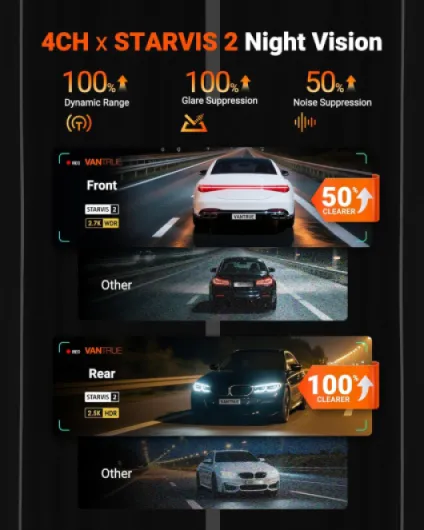
In daily use, the video quality is the main strong point of this thing. The front camera at 2.7K looks sharp enough to read plates at normal city speeds, and you can still pick up details like lane markings and small road signs. The rear 1440p camera is also very clear, much better than the 1080p rear cams I’ve used before. Where it really stands out is at night: the STARVIS 2 sensors with HDR/WDR actually help with blown-out headlights and dark streets. I was able to read plates at around 20–30 mph under streetlights, which is about as good as I’ve seen in a consumer dash cam.
Inside the car, the IR night vision on the cabin cameras is very handy if you drive ride-share or just want a record of what’s happening inside. In total darkness, the interior footage is still usable – you can clearly see faces and movements. It’s not pretty, it has that classic IR look, but for evidence it’s good. During the day, the cabin cams don’t blow out the image too much, even with bright light from the side windows, which is something cheaper cams struggle with.
On the downside, running all four channels at full res eats storage quickly. My 128 GB card filled a lot faster than I expected. Yes, loop recording overwrites older files, but if you want to keep a specific clip from days ago, you can’t be lazy about it. With 4 channels, I’d honestly say a 256 GB card is a bare minimum, and 512 GB or 1 TB is ideal if you don’t want to constantly manage files. Also, you really want to format the card regularly, as Vantrue suggests, or you’ll eventually run into weird file issues.
In terms of behavior, the G-sensor and loop recording do their job, but the sensor is very sensitive out of the box. Potholes, speed bumps, even slamming a door can trigger an “event” file. That clutters the protected folder quickly. You can reduce the sensitivity in the settings, and you should. Once tuned, it’s more reasonable, but don’t expect it to be perfectly smart. Overall, for pure recording quality and coverage, it’s pretty solid, but you have to manage storage and settings to get the best out of it.
What you actually get with the N5S
Out of the box, the Vantrue N5S feels like a complete kit rather than a barebones camera. You get the main front unit with a small 3.19-inch screen, the rear camera, a 20 ft cable for the rear, a GPS mount, an adhesive base, car charger, USB cable, cable clips, electrostatic stickers, and the usual paperwork. No SD card in the box, so you absolutely need to buy a U3/A2 microSD separately. If you think your old Class 10 card will do the job for 4 channels, forget it.
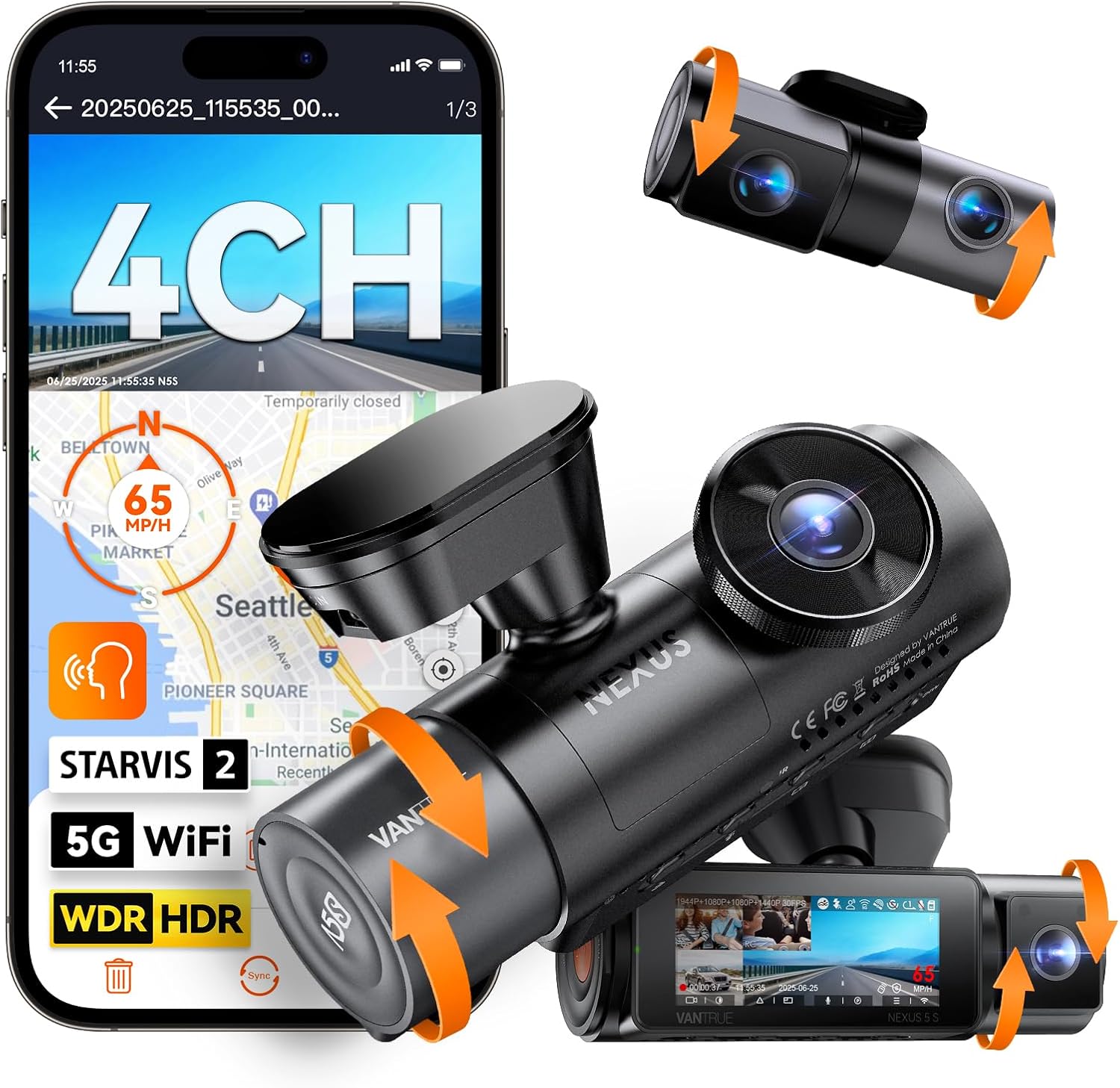
The core pitch of this camera is 4-channel 360° coverage: front 2.7K, front cabin 1080p, rear cabin 1080p, and rear window 1440p. In practice, that means it records everything: road ahead, inside the car, trunk/back seat, and what’s happening behind you on the road. Compared to my old 2-channel cam, the difference in angles is obvious the first time you review footage. You can clearly see side windows and who’s next to the car at traffic lights or during a lane change.
It’s also loaded with features: 5 GHz WiFi, GPS, voice control, buffered parking mode, loop recording, G-sensor, OTA firmware updates, and support for up to a 1 TB card. On paper, it looks like overkill, but once you start using it, some of it is genuinely useful. For example, the 10-second buffered parking mode actually captured someone walking way too close to my car and leaning on it before the impact event – something my old cam completely missed because it only started recording after motion.
One thing to be aware of: the N5S expects you to keep up with firmware updates. The app pushes OTA updates, and Vantrue seems to tweak stuff fairly often. If you’re the kind of person who hates updating anything, you might miss bug fixes or improvements. I had one minor WiFi hiccup that vanished after an update, so I’d say it’s worth doing, even if it’s a bit of a chore.
How well it actually protects you in real situations
From a pure “will this help me if something happens?” angle, the N5S does the job well. Having front, rear, and interior coverage means you’re covered for rear-end collisions, side swipes, road rage at your window, and anything happening inside the car. Compared to my old front+rear cam, the extra cabin views really fill in the gaps. For example, you can see if someone approached from the side during a parking lot incident, not just the direction the car was facing.
The G-sensor and event locking work, but as I mentioned earlier, they are very sensitive on default. First few days, every big pothole turned into a “protected” clip. That’s annoying when you’re trying to review only real incidents. After lowering the sensitivity, it became more reasonable and only flagged stronger jolts. I’d recommend everyone go into the menu on day one and tweak that, otherwise you’ll think the camera is overreacting all the time.
The voice control is a nice touch in practice. Being able to say a command to save a video or take a photo without reaching for buttons is actually useful. It’s not perfect – now and then it doesn’t catch the command, especially with loud music – but overall it’s usable. Just don’t expect sci-fi level voice recognition. Also, if you use a VPN on your phone, note that the app connection over WiFi can be finicky until you disable the VPN. Once connected, though, browsing and saving clips from the app is straightforward.
For incidents and insurance, the GPS data is handy. It logs route and speed, which can support your version of events if there’s a dispute. If you’re paranoid about privacy, you can turn it off, but for most people it’s a plus. In real terms, if someone hits you from behind or cuts you off, the footage is clear enough and complete enough to be useful. That’s the main point of a dash cam, and on that front the N5S is solid. It’s not perfect, but it definitely gives you much better coverage than a basic single lens camera.
Pros
- True 4-channel coverage (front, front cabin, rear cabin, rear) with clear footage day and night
- Strong night vision with STARVIS 2 sensors and IR, good plate readability at city speeds
- Parking mode with 10-second buffered recording and impact detection, useful for street parking
Cons
- Very storage-hungry with all 4 channels; really needs a large, fast microSD card
- G-sensor and motion detection are overly sensitive by default and require tweaking
- Installation and cable routing are more involved than with a simple 1–2 channel dash cam
Conclusion
Editor's rating
After using the Vantrue N5S for a while, my take is simple: it’s a serious dash cam for people who actually care about full coverage and parking protection. The 4-channel setup, STARVIS 2 sensors, and IR night vision give you clear footage in most conditions, day or night. The rear 2.5K camera and the two cabin cameras really do cover blind spots that normal front+rear kits miss. For evidence in accidents, vandalism, or ride-share situations, it’s a solid tool.
It’s not perfect, though. Installation is more involved than a basic cam, the G-sensor is too sensitive until you tune it, and the storage demands are high if you use all four channels. You’ll also likely end up buying a bigger microSD card and maybe a hardwire kit, which pushes the total cost up. The app and WiFi work, but you may need to disable VPNs, and you should stay on top of firmware updates.
I’d recommend the N5S to: rideshare drivers, people who park on the street, owners of larger vehicles, and anyone who has already used simpler dash cams and wants more coverage. If you just want a cheap camera to record the road ahead in case of a basic fender bender, this is probably more money and complexity than you need. For those who actually want a 360° style setup and are willing to spend a bit of time on installation and settings, it gets the job done well and feels like a dependable long-term option.