
Summary
Editor's rating
Value for money: worth it if you’re serious about recording
Boxy, basic, and a bit noisy – but practical
Built to run 24/7 – with a few things to watch
Real-world performance: recording, playback, and remote access
What this NVR actually does (and what it doesn’t)
Does it actually make your camera setup more useful?
Pros
- Reliable 24/7 recording with straightforward timeline and motion-based playback
- 8 built-in POE ports so you can power and connect up to eight IP cameras directly
- Good compatibility with ONVIF cameras, not just Amcrest-branded ones
Cons
- Fan is noticeably loud in a quiet room, better suited to a closet or equipment area
- User interface feels dated and can be confusing until you learn your way around

Specifications
View full product page →| Brand | Amcrest |
A straight-up NVR for people who just want their cameras to record
I’ve been running this Amcrest NV4108E-A2 8‑channel POE NVR with a mix of 4MP and 4K IP cameras, after previously messing around with SD cards, FTP, and a half-baked NAS setup. In short: if you already have IP cameras and you’re tired of unreliable recording and clunky playback, this box is a big step up. It’s not flashy, the interface feels a bit old-school, but it gets the basics right: it records, it stays up, and it’s not picky about cameras as long as they speak ONVIF properly.
What pushed me to try it was exactly what a lot of other users mention: microSD cards dying in days or weeks, FTP being a pain, and NAS recording being awkward to search through. With this NVR, everything is in one place with a timeline, motion markers, and simple backup to USB. It’s the boring piece of the system that you actually need if you’re serious about having footage when something happens.
Setup is not totally plug-and-play if you’ve never touched networking before, but if you can plug in an HDMI cable and follow a basic wizard, you’ll be fine for local use. Remote access can be done via their P2P feature, which saves you from doing port forwarding manually, though you still want to understand what you’re opening up if you go that route. Once it’s up, it mostly just runs in the background.
It’s not perfect: the fan noise is noticeable in a quiet room, the interface is dated and sometimes clunky, and there’s no fancy AI on the box itself. But in daily use, the thing that matters most—reliable recording and easy playback—is there. If you’re expecting a polished Apple‑like product, you’ll be disappointed. If you just want a solid recorder that doesn’t freak out every week, this is much closer to that.
Value for money: worth it if you’re serious about recording
On the value side, this NVR sits in a reasonable price bracket for an 8‑channel POE recorder with 4K support. It’s not the cheapest barebones NVR on the market, but you’re paying for a few things that actually matter: decent ONVIF support, stable firmware, US-based support, and a one-year warranty. Considering it can handle up to 10TB and eight 4K cameras (with the right settings), that’s not bad at all for a home or small business setup.
You do have to factor in the cost of a hard drive, which isn’t included. A good 4–10TB surveillance drive will add a noticeable chunk to the total. But if you compare it to constantly replacing microSD cards, or the time wasted trying to get some free FTP/NAS hack working reliably, the extra upfront cost is justified. This is one of those cases where spending a bit more at the start saves you hours of frustration later.
Compared to some cheaper no-name NVRs, the advantage here is that it actually behaves like an ONVIF device should and works with a wide range of cameras. People coming from "fake ONVIF" recorders (like some GW units) see a clear difference. The interface still looks generic, but things like motion recording, multi-channel playback, and backups just work more consistently. You’re also not locked into one brand of camera, which helps if you want to mix and match later.
If you just want to monitor one or two cheap cameras casually, this is probably overkill. But if you’ve already invested in several IP cameras, especially 4MP/4K ones, and you care about having a usable archive of footage, the price-to-utility ratio is pretty solid. I’d call it good value for someone who’s past the "toy phase" and wants a more serious setup without jumping into super expensive enterprise gear.
Boxy, basic, and a bit noisy – but practical
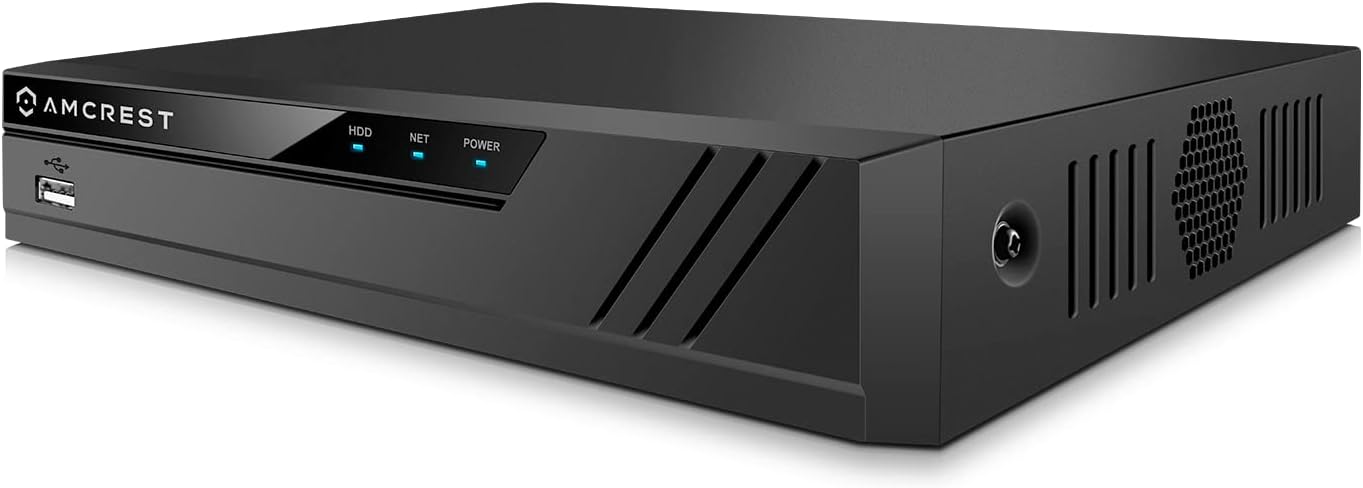
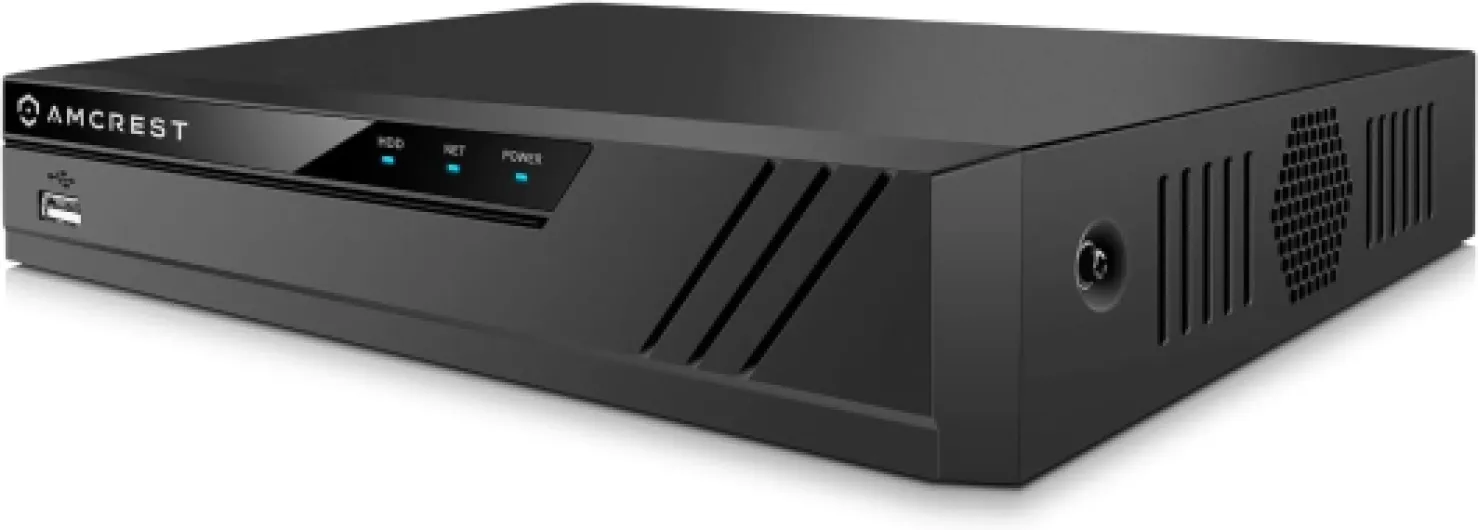
Design-wise, this thing is pretty plain. It’s a compact metal box, roughly 8.9 x 10.2 x 1.9 inches and about 4.5 pounds. Think of a small DVD player or basic network switch with a bit more depth. It’s meant to sit in a rack shelf, closet, or under a TV, not be a centerpiece in your living room. The front has a few status LEDs and USB, the back has all the ports. Nothing fancy, but it’s functional.
One thing you notice quickly is the fan noise. It’s not insanely loud, but in a quiet bedroom or office you’ll hear it as a constant hum. After a few hours, I just accepted it, but I wouldn’t put this on a desk right next to where you work all day if you’re sensitive to noise. Some folks mention swapping the fan for a quieter one; that’s probably doable if you’re handy, but obviously that’s on you. Personally, I just put it in a network closet and closed the door.
The layout on the back is straightforward: eight POE ports grouped together, then the LAN port, HDMI/VGA, audio, and power. There’s enough space around the ports that you’re not fighting with cables. With eight cameras plugged in, plus a network cable and HDMI, it does become a bit of a cable octopus, so plan where you’re going to place it before you start wiring. Having the USB port on the front is handy for quick backups; you don’t have to dig behind the unit.
Overall, the design is utilitarian. It feels more like a piece of networking gear than a consumer gadget, which is fine for what it is. My only real gripe is the fan noise and that the status LED inside stays on all the time, which might annoy you if it’s in a dark room and visible. If you tuck it away somewhere, those issues basically disappear and it just becomes "that box where all the camera cables go."
Built to run 24/7 – with a few things to watch
In terms of durability, this NVR is more like a piece of network gear than a consumer gadget. The metal chassis feels solid, and it’s clearly intended to sit in a corner and run 24/7. There are plenty of user reports of units running for several years straight without failing, including people who’ve had it going for 5–6 years. That lines up with what I’ve seen so far: once it’s set up with a decent hard drive, it just quietly does its thing.
The main wear points are realistically the hard drive and the fan. The drive isn’t included, so that’s your choice; if you cheap out and use a random desktop drive, expect it to fail sooner under constant writing. Use a surveillance-rated drive if you care about long-term reliability. The fan runs all the time and is what you hear the most. If it ever starts making weird noises or gets louder, it’s probably a standard size you can replace, but that’s a bit of DIY work. I haven’t had to do that, but it’s something to keep in mind a few years down the line.
Heat-wise, with a single 10TB drive and six cameras powered over POE, the unit got warm but not worryingly hot. I wouldn’t stack it under other hot gear or stuff it in a tiny unventilated space, but in a normal closet or on a shelf it’s fine. The internal red LED being always on doesn’t affect durability; it’s just a minor visual quirk if you can see inside the vent holes.
On the software side, it’s fairly stable. I didn’t get random reboots or crashes, and there are firmware updates available if you want to stay current. Just don’t expect constant new features; it’s more about stability than adding fancy stuff. Overall, as long as you pair it with a proper drive and give it some airflow, I’d trust this to run for years without constant babysitting. For a home or small business install, that’s exactly what you want.
Real-world performance: recording, playback, and remote access
Performance is where this NVR earns its keep. With a mix of four 4MP cameras and two 4K cameras, running mostly 24/7 recording, it handled everything without stuttering. Live view on a TV over HDMI is smooth, and even with all eight channels up on a grid, the streams stayed stable. Local playback is also solid: you pick a date and time, and you get a timeline with colored sections for motion events if you’ve set it up that way. It’s not the prettiest interface, but it’s functional and reasonably quick.
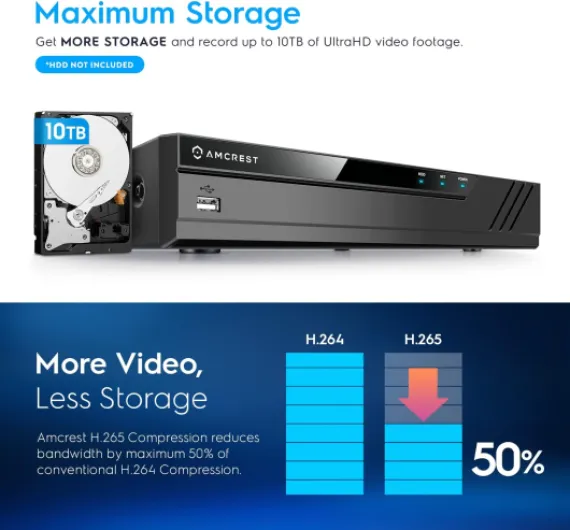
Bandwidth-wise, the 80 Mbps limit is something to keep in mind if you want all eight channels at 4K. To make that work, you need to switch your cameras to H.265 and lower the bitrate as Amcrest suggests. After doing that, I didn’t see any obvious quality drop that bothered me, and storage usage went down a lot. If you leave everything at high bitrates and H.264, you’ll chew through space and might push the NVR harder than it likes. Once tuned, it just runs and records without drama.
Remote access using the Amcrest app and P2P was surprisingly straightforward. I scanned the QR code from the NVR, and the cameras showed up in the app within a few minutes. Over LTE/5G, there’s a short delay when you start playback or switch cameras, but nothing crazy. If you’re old‑school and prefer port forwarding and direct IP access, you can do that too, but the P2P option is easier for most people and avoids digging through router menus. I didn’t have random disconnects or the NVR dropping off the network, which was a big improvement over my previous DIY setup.
Where it falls a bit short is user interface polish. The mouse-driven menus feel like a generic OEM NVR: lots of right-clicking, nested menus, and slightly confusing options until you’ve used it for a few days. Once you learn where things are—recording schedule, motion zones, encoding settings—it’s fine, but the learning curve is real if you’re new to this kind of gear. Still, in day-to-day use, I care more that it records reliably and lets me scrub through footage quickly, and on those points, it performs well.
What this NVR actually does (and what it doesn’t)
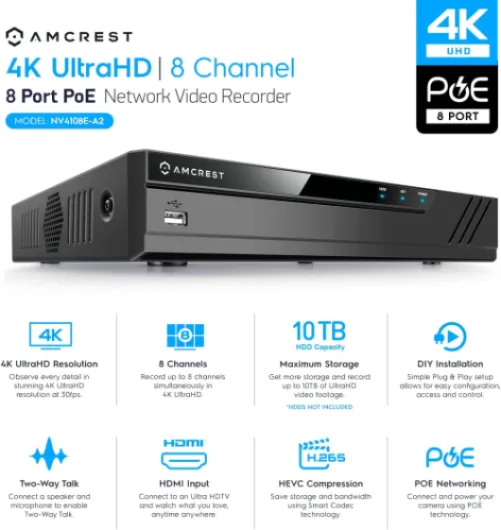
On paper, the Amcrest NV4108E-A2 is an 8‑channel 4K POE NVR that supports up to 8 IP cameras up to 8MP, with a max incoming bandwidth of 80 Mbps. In normal terms, that means you can run eight 4K cameras if you tweak the compression settings to H.265 and keep the bitrate reasonable (around 1792 Kbps per camera as Amcrest suggests). Out of the box, it’s set for H.264, which works, but eats more storage. There’s no hard drive included, so you’ll need to add your own 3.5" SATA drive up to 10TB. I used a surveillance‑rated drive (think Seagate SkyHawk or WD Purple) and that’s what I’d recommend.
The back of the unit has eight POE ports, one LAN port for your network, HDMI and VGA video outputs, and a couple of USB ports (for the mouse and for backups). The POE ports are the big convenience here: you plug each camera straight into the NVR, and it powers them and handles the video. No separate POE switch needed for up to eight cameras, which simplifies things a lot for a home or small office setup.
Feature-wise, it supports live view and recording up to 4K, motion detection recording, basic event search, USB backup, and works with Amcrest’s mobile and desktop apps. It also supports AI features from AI‑capable cameras, but only up to 2 channels at 4K/30fps, and the AI is in the camera, not the NVR. So don’t buy this thinking you’re getting fancy face recognition or smart detection on the box itself—you’re basically getting pass-through support if your cameras already do that.
In practice, I’d describe this NVR as a workhorse recorder. It’s not trying to be a smart home hub, it’s not packed with random extra features, and the software looks like something from a few years ago. But it’s stable, it’s ONVIF‑friendly (a lot of people have it working with non‑Amcrest cameras like Brillcam, Hikvision‑style clones, etc.), and it focuses on the basics: record, play back, and export. That’s the realistic expectation you should have going in.
Does it actually make your camera setup more useful?
Before this NVR, I tried relying on microSD cards in the cameras, FTP backups, and a NAS share. All of that technically "worked" but in practice it was a headache. SD cards died fast, FTP was flaky and annoying to browse, and the NAS solution meant digging through folders with timestamps. The biggest difference with this Amcrest box is how much easier it is to actually find and use footage when something happens. That’s the real measure of effectiveness for me.
With this NVR, you get a central timeline per camera, or all cameras at once, and you can quickly jump to a specific day and time. Motion detection events are marked, so if you know "something happened around 3 AM," you can jump right there instead of clicking through random files. Exporting a clip to USB is a few clicks, and you end up with a standard video file you can send to someone or save elsewhere. That’s a massive quality-of-life upgrade compared to messing around with SD cards or raw files on a NAS.
Another useful point is that it plays nicely with non‑Amcrest cameras as long as they are truly ONVIF‑compliant. I tested it with some generic ONVIF cams and it pulled in the streams without drama. Other users report success with Brillcam and random Hikvision‑style brands. That means if you already have a mix of cameras, you’re not forced to replace everything just to get them recording in one place. That’s effective in terms of both money and time.
It’s not perfect, though. There are no built‑in AI functions on the NVR itself; any smart detection like human/vehicle detection depends entirely on the camera, and the NVR just records whatever events the camera sends. Also, some advanced camera settings are easier to tweak directly via the camera’s web interface rather than through the NVR menus, so you might end up jumping back and forth. But if the goal is simply: "I want reliable 24/7 or motion-based recording that I can actually review without losing my mind," this NVR does that job well.
Pros
- Reliable 24/7 recording with straightforward timeline and motion-based playback
- 8 built-in POE ports so you can power and connect up to eight IP cameras directly
- Good compatibility with ONVIF cameras, not just Amcrest-branded ones
Cons
- Fan is noticeably loud in a quiet room, better suited to a closet or equipment area
- User interface feels dated and can be confusing until you learn your way around
Conclusion
Editor's rating
The Amcrest NV4108E-A2 is a solid choice if you already have—or plan to have—a small fleet of IP cameras and you’re done messing around with SD cards and half-baked recording setups. It’s not stylish, the interface feels dated, and the fan is definitely audible, but it does the core job reliably: record multiple 1080p–4K cameras 24/7 or on motion, let you review footage quickly, and export clips without a headache. It also plays fairly nicely with third-party ONVIF cameras, which is a big plus if your system is a mix of brands.
This NVR makes the most sense for homeowners and small business owners who want a central, always-on recorder in a closet or equipment room. If you’re the kind of person who has four to eight cameras watching your property and you actually care about having usable evidence if something happens, this box is a good fit. On the other hand, if you just have one or two cameras for casual monitoring, or you’re extremely sensitive to fan noise and old-school menus, you might be happier with a simpler cloud-based camera or a quieter, more polished (and usually pricier) system.
Overall, I’d rate it as a practical, no-frills workhorse. It’s not trying to impress you with design or buzzword features; it just records and keeps going. If you accept its rough edges—fan noise, clunky UI, no built-in AI—it’s a dependable backbone for a small CCTV setup at a fair price.